Skip to content
Testing Times
 Why Board Visibility Matters
Over the last few weeks, we've explored:
Why JTAG was created
What JTAG actually enables
Why it has become so important to today's semiconductor industry
A common theme runs through all three:
Access.
JTAG exists because engineers need a reliable way to access increasingly complex electronic systems. But access alone isn't the end goal, the real objective is something else:
Visibility.
The Challenge of Modern Electronics
Today's electronic systems are extraordinary.
A single PCB may contain:
FPGAs
Processors
SoCs
Memories
Power management devices
High-speed interfaces
Mixed-signal circuitry
Many of these devices are housed in dense BGA packages and connected through multilayer PCBs containing thousands of nets. While this enables incredible functionality, it creates a challenge: Understanding what is actually happening on the board becomes increasingly difficult.
When Things Work, Visibility Is Invisible
One of the interesting things about board visibility is that nobody talks about it when everything is working. If a board powers up correctly, programs successfully, and behaves exactly as expected, visibility doesn't feel important.
The challenge appears when something doesn't work.
Suddenly, engineers start asking questions such as:
Is the device responding?
Is the board assembled correctly?
Is the signal reaching its destination?
Is the fault in the hardware or the software?
Has this part of the design actually been proven?
These questions all have something in common.
They require visibility.
Why Guessing Is Expensive
When visibility is limited, engineering teams often compensate by making assumptions.
They:
Rebuild software
Recompile firmware
Swap boards
Replace components
Repeat tests
Sometimes these actions solve the problem.
Often they simply consume time. The longer it takes to establish what is actually happening on the board, the longer it takes to identify the true cause.
Visibility Creates Confidence
The fastest engineering teams are not always the teams that solve problems fastest. Often they are the teams that establish confidence earliest.
They know:
Which devices are accessible
Which interfaces are functioning
Which connections have been verified
Which assumptions have already been proven
That confidence allows investigations to become more focused and efficient.
Instead of asking:
"What's wrong?"
They can begin asking:
"What remains unproven?"
Why Visibility Matters Throughout the Lifecycle
Board visibility is often associated with bring-up and debugging. In reality, it matters throughout the entire product lifecycle.
During Development
Engineers need to establish confidence in prototypes and first revisions.
During Manufacturing
Teams need to verify assembly quality and identify defects quickly.
During Repair
Technicians need efficient ways to isolate faults and confirm repairs.
During Field Support
Engineers need mechanisms for understanding issues without extensive physical access. At every stage, visibility reduces uncertainty.
Visibility and Complexity
As semiconductor devices continue to evolve, complexity is increasing faster than accessibility.
Modern systems contain:
More devices
More interfaces
More software
More functionality
Yet engineers are expected to bring them up faster than ever. This makes visibility increasingly valuable. Not because systems are becoming less reliable. But because understanding complex systems requires better tools and better access to information.
Why This Matters
Many engineering delays are not caused by faults. They are caused by uncertainty.
The time between:
observing a problem
and
understanding a problem
can often be the most expensive part of development.
Visibility shortens that gap.
Closing Thought
Engineers don't need more complexity. They need more certainty and certainty comes from understanding what is actually happening on the hardware.
That is why board visibility matters.
Not because it makes systems simpler.
But because it makes complex systems easier to understand.
JTAG Tip of the Week
Design with future visibility in mind.
During development it is tempting to optimise for today's requirements, but future bring-up, manufacturing, service and support activities often benefit from additional access and observability.
Consider:
JTAG accessibility
Test point placement
Connector access
Signal visibility
The easiest time to add visibility is during design.
The hardest time is after the PCB has been manufactured.
Explore your board design with the Free XJTAG Layout Viewer
To get started find out how the Free XJTAG Layout Viewer can help you see your board connections:
Download your Free XJTAG Layout Viewer today
Why JTAG is Critical to Semiconductors
Over the last two weeks, we've explored:
Why JTAG was created
What JTAG actually enables
This naturally leads to another question:
Why do so many semiconductor devices include JTAG?
After all, if JTAG was originally developed to solve a manufacturing challenge, why is it now found in everything from microcontrollers and processors to FPGAs and complex SoCs?
The answer lies in a simple reality:
Modern semiconductor devices have become incredibly difficult to access without it.
The Visibility Challenge
Today's semiconductor devices contain extraordinary levels of integration.
A single device may contain:
High-Speed interfaces
Internal memories
Security functions
Programmable logic
Mixed-signal circuitry
At the same time, package technology has evolved dramatically.
Devices now routinely use:
BGAs
Fine-pitch packages
High pin counts
Dense PCB routing
While these advances enable incredible performance, they also make traditional methods of accessing and testing hardware increasingly difficult.
Development Teams Need Access
Before software can run, engineers need to answer some basic questions:
Is the device alive?
Is it powered correctly?
Is it responding?
Can it be programmed?
Are key interfaces functioning?
JTAG provides a standardised way to establish this confidence.
Without requiring physical access to every signal.
This is one reason why JTAG became deeply integrated into development workflows.
Manufacturing Teams Need Confidence
The same challenge exists in manufacturing. Once devices are soldered onto a PCB, many of their connections become inaccessible.
Yet manufacturers still need to verify:
Assembly quality
Connectivity
Programming
Device presence
Hardware integrity
JTAG provides an efficient way to perform many of these checks, even on highly complex boards.
Service Teams Need Diagnostics
The need for visibility does not stop once a product ships. During repair and field support, engineers often need to determine:
Is the device responding?
Has the hardware failed?
Is the issue related to configuration?
Is communication still possible?
JTAG provides an access mechanism that can remain valuable throughout the product lifecycle.
Why FPGA Vendors Rely on JTAG
FPGAs are perhaps one of the most visible examples of JTAG usage.
Engineers commonly use JTAG for:
Device identification
FPGA programming
Configuration verification
Bring-up activities
Board-level testing
Debug support
Without JTAG, many FPGA development workflows would become significantly more difficult.
Why Processor and SoC Vendors Rely on JTAG
The same principle applies to processors and SoCs. As devices become more capable, the need for reliable access increases.
JTAG is commonly used to:
Access debug resources
Program flash memories
Support software development
Enable manufacturing test
Assist with hardware validation
For many processor-based systems, JTAG becomes one of the first interfaces engineers use during bring-up.
A Technology That Solves Multiple Problems
One of the reasons JTAG has endured for so long is that it solves multiple challenges simultaneously.
It supports:
Development
Bring-up
Programming
Manufacturing
Debug
Repair
Field support
Few technologies provide value across such a broad range of activities.
Why JTAG Is More Essential Than Ever
As semiconductor devices continue to increase in complexity, the need for access and visibility continues to grow. Not because engineers are doing anything wrong. But because devices are becoming increasingly difficult to understand from the outside alone.
JTAG provides a standardised mechanism for gaining insight into devices that would otherwise be largely inaccessible.
That is why it remains such a fundamental part of the semiconductor ecosystem.
Closing Thought
JTAG is often viewed as a programming interface.
Or a debugging interface.
Or a test interface.
In reality, it is all of these things. More importantly, it provides something that modern semiconductor devices increasingly depend upon:
Access.
And as devices continue to grow in complexity, access becomes more valuable than ever.
JTAG Tip of the Week
Where possible, ensure JTAG access remains available beyond the prototype stage.
It can be tempting to remove or minimise access once a design is proven, but JTAG often provides significant value later in the product lifecycle.
Why it matters:
Manufacturing may need programming access
Service teams may require diagnostic access
Future design revisions may benefit from additional visibility
Designing for long-term access today can save significant effort tomorrow.
Explore your board design with the Free XJTAG Layout Viewer
To get started find out how the Free XJTAG Layout Viewer can help you see your board connections:
Download your Free XJTAG Layout Viewer today
What JTAG Actually Enables
Last week, we explored why JTAG was created.
As electronic systems became more complex, traditional methods of accessing and testing hardware became increasingly difficult. Semiconductor manufacturers needed a standardised way to interact with devices once they were mounted on densely populated PCBs.
That solution became JTAG.
But understanding why JTAG exists only tells part of the story.
The more interesting question is: What does JTAG actually enable?
More Than a Connector
For many engineers, JTAG is associated with a connector on a PCB.
Others know it primarily as a method of programming devices.
While both are true, they only scratch the surface.
At its core, JTAG provides something much more valuable:
Access.
The ability to communicate with devices that would otherwise be difficult or sometimes impossible to reach.
Access to the Device
One of the most common uses of JTAG is device access.
Through a small number of pins, engineers can:
Identify devices
Read device information
Verify communication
Check device status
Interact with internal registers
This capability alone can significantly simplify bring-up and debug activities.
Before any software, firmware or application functionality is considered, engineers can establish whether the device itself is alive and responding.
Programming Devices
JTAG is widely used to program devices after assembly.
This includes:
FPGAs
CPLDs
Configuration memories
Flash devices
Microcontrollers
Processors
Rather than removing devices for programming or relying on specialised production fixtures, engineers can program devices directly on the assembled PCB. This simplifies both development and manufacturing.
Testing Connections
Perhaps one of the most powerful capabilities enabled by JTAG is boundary scan testing.
Boundary scan allows signals to be driven and observed through the boundary scan logic embedded within semiconductor devices. This makes it possible to verify PCB connectivity even when signals are physically inaccessible.
Engineers can use this capability to:
Detect open circuits
Detect shorts
Verify assembly quality
Validate connectivity
This is particularly valuable for BGAs and densely routed designs where traditional probing methods are limited.
More Than Testing JTAG Devices
One common misconception is that JTAG testing is limited to connections between JTAG devices.
In reality, JTAG-enabled devices can often provide access to much larger portions of the board.
Once signals can be driven and observed through the boundary scan infrastructure, engineers can use those signals to interact with many non-JTAG devices connected to the circuit.
Depending on the design, this may include:
Memories
I²C devices
SPI peripherals
Clocking circuits
Analogue interfaces
Power management devices
This ability to extend visibility beyond the JTAG chain itself is one of the reasons boundary scan has become such a valuable technology for board bring-up, debug, and production test.
Debugging Hardware
When a board does not behave as expected, one of the first questions engineers ask is:
"Is the hardware correct?"
JTAG provides a structured way to answer that question.
Engineers can:
Verify device access
Check signal states
Investigate connectivity
Confirm configuration paths
Rather than relying entirely on functional behaviour, they can establish confidence in the hardware itself.
Supporting Manufacturing
As systems move from development into production, JTAG often takes on an additional role.
It can be used to:
Program devices
Test assemblies
Verify manufacturing quality
Support fault diagnosis
Improve production coverage
Importantly, many of these activities can be automated and repeated consistently across large numbers of boards.
A Technology That Quietly Sits Everywhere
One of the reasons JTAG is so widely adopted is that it supports the entire product lifecycle.
The same interface may be used for:
Development
Bring-up
Debug
Production test
Repair
Field support
Few technologies remain useful across so many stages of a product's life.
Yet most engineers interact with JTAG every day without necessarily thinking about how much capability it provides.
Why It Matters
As electronic systems continue to increase in complexity, visibility becomes increasingly important.
The ability to:
Access devices
Understand hardware behaviour
Verify connectivity
Program systems
Diagnose faults
all starts with having a reliable mechanism for interacting with the hardware.
That is what JTAG enables.
Not just programming.
Not just testing.
But access, visibility, and confidence in increasingly complex electronic systems.
Closing Thought
JTAG was originally developed to solve a manufacturing challenge.
Over time, it evolved into something much broader.
Today it provides one of the most important foundations for bringing up, testing, programming, debugging and supporting electronic systems.
And in many cases, engineers rely on it long before they realise how much it is doing behind the scenes.
JTAG Tip of the Week
Think about the entire product lifecycle when designing your JTAG interface.
The same JTAG connection may be used by:
Development engineers
Test engineers
Manufacturing operators
Service technicians
Designing for easy access, clear documentation, and long-term usability can deliver benefits far beyond initial bring-up.
Good JTAG design isn't just about development.
It's about supporting the board throughout its entire life.
Explore your board design with the free XJTAG Layout Viewer
To get started find out how the free XJTAG Layout Viewer can help you see your board connections:
Download your Free XJTAG Layout Viewer today
Why JTAG Exists
Electronic systems are extraordinary.
Today’s boards can contain:
FPGAs
processors
memories
high-speed interfaces
mixed-signal devices
complex power and communication architectures
All integrated onto increasingly dense multilayer PCBs.
But as semiconductor devices became more capable, a quiet engineering problem began to emerge: engineers could no longer physically access many of the signals they needed to test.
The Problem Before JTAG
Years ago, testing electronic boards was relatively straightforward.
Devices used larger packages, signals were accessible and engineers could probe pins directly with oscilloscopes and test equipment.
As semiconductor technology evolved, however:
pin counts increased
packages became smaller
BGAs replaced accessible leads
routing moved inside multilayer boards
Suddenly, many critical signals became physically inaccessible.
Ironically, as systems became more advanced, they also became harder to test and debug.
The Visibility Problem
This created a major challenge across the electronics industry.
How could engineers:
test connectivity?
verify assembly quality?
program devices?
diagnose faults?
debug boards?
…when they could no longer physically reach many of the connections?
Traditional probing methods were no longer enough.
A different approach was needed.
The Industry’s Answer
That answer became:
JTAG
Originally standardised as IEEE 1149.1, JTAG was developed to solve a very practical problem:
provide a standardised way to access and test increasingly complex electronic systems, without requiring physical access to every signal.
What Made JTAG So Important
Instead of probing pins externally, JTAG allowed devices to help test the board from within.
Semiconductor devices could:
observe signals
drive signals
shift data internally
communicate test information serially
This fundamentally changed what engineers could do.
Suddenly, it became possible to:
test interconnections beneath BGAs
verify board assembly
program devices
debug systems
and gain visibility into hardware behaviour
all through a small standardised interface.
Why It Became Widely Adopted
One reason JTAG became so successful is that it solved problems affecting almost every part of electronics development and manufacturing.
JTAG is commonly used for:
board bring-up
manufacturing test
FPGA configuration
processor debug
in-system programming
fault diagnosis
hardware validation
And because many semiconductor devices support it directly, JTAG quietly became one of the most widely adopted technologies in todays electronics. Even though many engineers interact with it every day without necessarily thinking about it explicitly.
More Than Just Programming
One of the common misconceptions about JTAG is that it only exists for programming devices.
In reality, programming is just one part of a much larger capability.
At its core, JTAG is really about:
visibility and access
The ability to:
interact with devices
understand board behaviour
and establish confidence in hardware systems
Especially when physical access is limited.
Why This Matters Today
As boards continue becoming:
denser
faster
more integrated
and more difficult to probe physically
…the original reasons JTAG was created are becoming even more relevant.
Not less.
The need for:
visibility
structural understanding
and reliable hardware access
continues to grow across:
telecommunications
aerospace
defence
automotive
industrial electronics
and AI hardware platforms
Closing Thought
JTAG was never really about the connector.
It was about solving a fundamental engineering problem:
how to understand, test, and trust increasingly complex electronic hardware.
And as modern systems continue to evolve, that problem remains just as important today as when JTAG was first introduced.
JTAG Tip of the Week
Always include accessible and clearly labelled JTAG headers or test access points in early prototypes.
Why it matters:
Missing or difficult-to-access JTAG connections can severely limit debug and bring-up options
Early hardware issues are much easier to diagnose when reliable access already exists
Small layout decisions early can save significant engineering time later
What to watch out for:
Insufficient ground connections
Inaccessible headers once the board is assembled into the system
Shared signals that may interfere with JTAG operation
Good hardware visibility starts with reliable access.
Explore your board design with the free XJTAG Layout Viewer
To get started find out how the free XJTAG Layout Viewer can help you see your board connections:
Download your Free XJTAG Layout Viewer today
Faster FPGA Bring-Up Isn’t Just About Speed
When engineers talk about accelerating FPGA development, the conversation often focuses on:
faster tools
faster programming
faster debug
But in practice, the real gain often comes from something else entirely:
reducing uncertainty earlier
Two engineering examples highlighted this in very different ways.
Complex Boards Create a Different Kind of Problem
As FPGA-based systems become more sophisticated, so do the boards around them.
Modern designs increasingly include:
BGAs
high-speed interfaces
mixed-signal devices
serial buses
tightly integrated subsystems
And while these systems deliver incredible capability, they also make testing and debugging significantly harder.
Not because engineers lack expertise but because understanding what’s happening on the board takes time.
One Team Focused on Coverage
In one example, an engineering team working with highly complex RF-related systems wanted to improve confidence in production testing.
Their boards contained:
FPGA devices
PCIe interfaces
RS485
RIO interfaces
complex interconnected subsystems
By integrating boundary scan alongside existing functional testing, they achieved a considerable increase in overall test coverage
But interestingly, the biggest benefit wasn’t just coverage.
It was the ability to:
create tests quickly
reuse existing test structures
debug failed boards more efficiently
and investigate faults directly at pin level
The team also highlighted how intuitive tools and clear visibility into the JTAG chain simplified troubleshooting significantly
Another Team Focused on Test Time
A second engineering team faced a different challenge.
Testing their complex FPGA-based boards manually could take several hours per board.
Their systems included:
FPGA devices
memories
DACs and ADCs
LAN interfaces
RS485
I²C-connected devices
After changing approach, they reduced testing of critical sections to around 30 seconds.
But again, the real impact went beyond speed.
The engineers highlighted:
easier fault detection
better manufacturing quality control
simpler debugging
and the ability to detect faults that functional testing could easily miss
Importantly, they also recognised that testing could now move earlier into the manufacturing process before boards progressed into later calibration and system-level stages.
A Pattern Is Emerging
Across both examples, the same theme appears repeatedly:
The fastest engineering teams are often not the ones solving problems faster.
They are the ones:
proving more of the hardware earlier
Once engineers can:
verify connectivity
establish access
confirm interfaces
and isolate faults structurally
…the entire development and production flow changes.
The Importance of Visibility
One thing we’ve consistently observed over the years is this:
When engineers can clearly see:
how devices connect
where signals travel
what has already been proven
…debugging becomes dramatically more efficient.
Because uncertainty reduces.
And when uncertainty reduces:
investigation becomes more focused
testing becomes more repeatable
and confidence in the hardware increases much earlier.
Closing Thought
In complex FPGA systems, the biggest delays are not always caused by the faults themselves.
Often, they come from the time required to understand:
what the hardware is actually doing
The sooner that visibility is established, the sooner engineers can move from:
investigation
to understanding
to confidence.
Full Case Studies
For more detail on the engineering examples discussed:
PE Fiberoptics
Elettronica
Explore your board design with the free XJTAG Layout Viewer
To get started find out how the free XJTAG Layout Viewer can help you see your board connections:
Download your Free XJTAG Layout Viewer today
Why Understanding the Board Matters More Than Ever
Today's electronics are incredibly powerful. As boards become denser and more complex, one challenge continues to grow quietly in the background:
simply understanding what is connected to what
During bring-up, debug, and test, engineers are constantly asking questions like:
Where does this signal actually go?
Which devices are connected to this net?
Is this behaviour expected?
What part of the board has already been proven?
The answers already exist inside the design data.
The problem is often visibility.
The Growing Visibility Problem
As electronic systems evolve, so does board complexity:
more layers
more BGAs
more high-speed interfaces
more hidden connectivity
And while schematics remain essential, tracing signals manually across dense layouts can quickly become time-consuming and frustrating.
Particularly when:
debugging hardware issues
investigating manufacturing faults
validating connectivity
or simply trying to understand an unfamiliar design
Seeing the Board Changes the Process
One thing we’ve seen repeatedly over the years is this:
The faster engineers can visualise the board, the faster they can:
understand problems
isolate faults
verify assumptions
and move development forward
Because often, the bottleneck isn’t solving the issue itself.
It’s understanding the hardware clearly enough to know where to focus.
Introducing the Free XJTAG Layout Viewer
To help make this easier, we created the XJTAG Layout Viewer, a free standalone tool for exploring PCB layouts using ODB++ design data.
It allows engineers to:
Search and highlight nets, pins, and devices
Visualise signal connectivity clearly
Navigate dense layouts quickly
Trace connections across the PCB
Understand board structure more intuitively
The goal is simple:
Reduce the time spent trying to understand the board
Particularly Useful For
The Layout Viewer is especially valuable when working with:
BGA-based systems
complex multilayer boards
manufacturing debug
board bring-up
fault investigation
unfamiliar hardware designs
Whether you’re validating a new prototype, investigating a failure, or simply trying to understand how a system is connected, being able to visualise the board directly can dramatically improve workflow efficiency.
More Than Just Viewing Layouts
One of the interesting things we’ve observed is that once engineers can clearly see the hardware, many other processes become easier:
debugging becomes more focused
communication improves between teams
manufacturing issues are easier to isolate
confidence in the hardware increases
In many cases, simply improving visibility removes a surprising amount of friction from development.
Closing Thought
In complex electronic systems, uncertainty often comes from not being able to clearly see what’s happening on the board.
The faster that visibility is established, the faster engineers can move from:
confusion
to understanding
to confidence
And sometimes, that starts with something very simple:
being able to see the connections clearly.
<p">If you’d like to explore your own PCB layouts and board connections more clearly:
<p">Download your free XJTAG Layout Viewer
Why Board Visibility Matters
Over the last few weeks, we've explored:
Why JTAG was created
What JTAG actually enables
Why it has become so important to today's semiconductor industry
A common theme runs through all three:
Access.
JTAG exists because engineers need a reliable way to access increasingly complex electronic systems. But access alone isn't the end goal, the real objective is something else:
Visibility.
The Challenge of Modern Electronics
Today's electronic systems are extraordinary.
A single PCB may contain:
FPGAs
Processors
SoCs
Memories
Power management devices
High-speed interfaces
Mixed-signal circuitry
Many of these devices are housed in dense BGA packages and connected through multilayer PCBs containing thousands of nets. While this enables incredible functionality, it creates a challenge: Understanding what is actually happening on the board becomes increasingly difficult.
When Things Work, Visibility Is Invisible
One of the interesting things about board visibility is that nobody talks about it when everything is working. If a board powers up correctly, programs successfully, and behaves exactly as expected, visibility doesn't feel important.
The challenge appears when something doesn't work.
Suddenly, engineers start asking questions such as:
Is the device responding?
Is the board assembled correctly?
Is the signal reaching its destination?
Is the fault in the hardware or the software?
Has this part of the design actually been proven?
These questions all have something in common.
They require visibility.
Why Guessing Is Expensive
When visibility is limited, engineering teams often compensate by making assumptions.
They:
Rebuild software
Recompile firmware
Swap boards
Replace components
Repeat tests
Sometimes these actions solve the problem.
Often they simply consume time. The longer it takes to establish what is actually happening on the board, the longer it takes to identify the true cause.
Visibility Creates Confidence
The fastest engineering teams are not always the teams that solve problems fastest. Often they are the teams that establish confidence earliest.
They know:
Which devices are accessible
Which interfaces are functioning
Which connections have been verified
Which assumptions have already been proven
That confidence allows investigations to become more focused and efficient.
Instead of asking:
"What's wrong?"
They can begin asking:
"What remains unproven?"
Why Visibility Matters Throughout the Lifecycle
Board visibility is often associated with bring-up and debugging. In reality, it matters throughout the entire product lifecycle.
During Development
Engineers need to establish confidence in prototypes and first revisions.
During Manufacturing
Teams need to verify assembly quality and identify defects quickly.
During Repair
Technicians need efficient ways to isolate faults and confirm repairs.
During Field Support
Engineers need mechanisms for understanding issues without extensive physical access. At every stage, visibility reduces uncertainty.
Visibility and Complexity
As semiconductor devices continue to evolve, complexity is increasing faster than accessibility.
Modern systems contain:
More devices
More interfaces
More software
More functionality
Yet engineers are expected to bring them up faster than ever. This makes visibility increasingly valuable. Not because systems are becoming less reliable. But because understanding complex systems requires better tools and better access to information.
Why This Matters
Many engineering delays are not caused by faults. They are caused by uncertainty.
The time between:
observing a problem
and
understanding a problem
can often be the most expensive part of development.
Visibility shortens that gap.
Closing Thought
Engineers don't need more complexity. They need more certainty and certainty comes from understanding what is actually happening on the hardware.
That is why board visibility matters.
Not because it makes systems simpler.
But because it makes complex systems easier to understand.
JTAG Tip of the Week
Design with future visibility in mind.
During development it is tempting to optimise for today's requirements, but future bring-up, manufacturing, service and support activities often benefit from additional access and observability.
Consider:
JTAG accessibility
Test point placement
Connector access
Signal visibility
The easiest time to add visibility is during design.
The hardest time is after the PCB has been manufactured.
Explore your board design with the Free XJTAG Layout Viewer
To get started find out how the Free XJTAG Layout Viewer can help you see your board connections:
Download your Free XJTAG Layout Viewer today
Why JTAG is Critical to Semiconductors
Over the last two weeks, we've explored:
Why JTAG was created
What JTAG actually enables
This naturally leads to another question:
Why do so many semiconductor devices include JTAG?
After all, if JTAG was originally developed to solve a manufacturing challenge, why is it now found in everything from microcontrollers and processors to FPGAs and complex SoCs?
The answer lies in a simple reality:
Modern semiconductor devices have become incredibly difficult to access without it.
The Visibility Challenge
Today's semiconductor devices contain extraordinary levels of integration.
A single device may contain:
High-Speed interfaces
Internal memories
Security functions
Programmable logic
Mixed-signal circuitry
At the same time, package technology has evolved dramatically.
Devices now routinely use:
BGAs
Fine-pitch packages
High pin counts
Dense PCB routing
While these advances enable incredible performance, they also make traditional methods of accessing and testing hardware increasingly difficult.
Development Teams Need Access
Before software can run, engineers need to answer some basic questions:
Is the device alive?
Is it powered correctly?
Is it responding?
Can it be programmed?
Are key interfaces functioning?
JTAG provides a standardised way to establish this confidence.
Without requiring physical access to every signal.
This is one reason why JTAG became deeply integrated into development workflows.
Manufacturing Teams Need Confidence
The same challenge exists in manufacturing. Once devices are soldered onto a PCB, many of their connections become inaccessible.
Yet manufacturers still need to verify:
Assembly quality
Connectivity
Programming
Device presence
Hardware integrity
JTAG provides an efficient way to perform many of these checks, even on highly complex boards.
Service Teams Need Diagnostics
The need for visibility does not stop once a product ships. During repair and field support, engineers often need to determine:
Is the device responding?
Has the hardware failed?
Is the issue related to configuration?
Is communication still possible?
JTAG provides an access mechanism that can remain valuable throughout the product lifecycle.
Why FPGA Vendors Rely on JTAG
FPGAs are perhaps one of the most visible examples of JTAG usage.
Engineers commonly use JTAG for:
Device identification
FPGA programming
Configuration verification
Bring-up activities
Board-level testing
Debug support
Without JTAG, many FPGA development workflows would become significantly more difficult.
Why Processor and SoC Vendors Rely on JTAG
The same principle applies to processors and SoCs. As devices become more capable, the need for reliable access increases.
JTAG is commonly used to:
Access debug resources
Program flash memories
Support software development
Enable manufacturing test
Assist with hardware validation
For many processor-based systems, JTAG becomes one of the first interfaces engineers use during bring-up.
A Technology That Solves Multiple Problems
One of the reasons JTAG has endured for so long is that it solves multiple challenges simultaneously.
It supports:
Development
Bring-up
Programming
Manufacturing
Debug
Repair
Field support
Few technologies provide value across such a broad range of activities.
Why JTAG Is More Essential Than Ever
As semiconductor devices continue to increase in complexity, the need for access and visibility continues to grow. Not because engineers are doing anything wrong. But because devices are becoming increasingly difficult to understand from the outside alone.
JTAG provides a standardised mechanism for gaining insight into devices that would otherwise be largely inaccessible.
That is why it remains such a fundamental part of the semiconductor ecosystem.
Closing Thought
JTAG is often viewed as a programming interface.
Or a debugging interface.
Or a test interface.
In reality, it is all of these things. More importantly, it provides something that modern semiconductor devices increasingly depend upon:
Access.
And as devices continue to grow in complexity, access becomes more valuable than ever.
JTAG Tip of the Week
Where possible, ensure JTAG access remains available beyond the prototype stage.
It can be tempting to remove or minimise access once a design is proven, but JTAG often provides significant value later in the product lifecycle.
Why it matters:
Manufacturing may need programming access
Service teams may require diagnostic access
Future design revisions may benefit from additional visibility
Designing for long-term access today can save significant effort tomorrow.
Explore your board design with the Free XJTAG Layout Viewer
To get started find out how the Free XJTAG Layout Viewer can help you see your board connections:
Download your Free XJTAG Layout Viewer today
What JTAG Actually Enables
Last week, we explored why JTAG was created.
As electronic systems became more complex, traditional methods of accessing and testing hardware became increasingly difficult. Semiconductor manufacturers needed a standardised way to interact with devices once they were mounted on densely populated PCBs.
That solution became JTAG.
But understanding why JTAG exists only tells part of the story.
The more interesting question is: What does JTAG actually enable?
More Than a Connector
For many engineers, JTAG is associated with a connector on a PCB.
Others know it primarily as a method of programming devices.
While both are true, they only scratch the surface.
At its core, JTAG provides something much more valuable:
Access.
The ability to communicate with devices that would otherwise be difficult or sometimes impossible to reach.
Access to the Device
One of the most common uses of JTAG is device access.
Through a small number of pins, engineers can:
Identify devices
Read device information
Verify communication
Check device status
Interact with internal registers
This capability alone can significantly simplify bring-up and debug activities.
Before any software, firmware or application functionality is considered, engineers can establish whether the device itself is alive and responding.
Programming Devices
JTAG is widely used to program devices after assembly.
This includes:
FPGAs
CPLDs
Configuration memories
Flash devices
Microcontrollers
Processors
Rather than removing devices for programming or relying on specialised production fixtures, engineers can program devices directly on the assembled PCB. This simplifies both development and manufacturing.
Testing Connections
Perhaps one of the most powerful capabilities enabled by JTAG is boundary scan testing.
Boundary scan allows signals to be driven and observed through the boundary scan logic embedded within semiconductor devices. This makes it possible to verify PCB connectivity even when signals are physically inaccessible.
Engineers can use this capability to:
Detect open circuits
Detect shorts
Verify assembly quality
Validate connectivity
This is particularly valuable for BGAs and densely routed designs where traditional probing methods are limited.
More Than Testing JTAG Devices
One common misconception is that JTAG testing is limited to connections between JTAG devices.
In reality, JTAG-enabled devices can often provide access to much larger portions of the board.
Once signals can be driven and observed through the boundary scan infrastructure, engineers can use those signals to interact with many non-JTAG devices connected to the circuit.
Depending on the design, this may include:
Memories
I²C devices
SPI peripherals
Clocking circuits
Analogue interfaces
Power management devices
This ability to extend visibility beyond the JTAG chain itself is one of the reasons boundary scan has become such a valuable technology for board bring-up, debug, and production test.
Debugging Hardware
When a board does not behave as expected, one of the first questions engineers ask is:
"Is the hardware correct?"
JTAG provides a structured way to answer that question.
Engineers can:
Verify device access
Check signal states
Investigate connectivity
Confirm configuration paths
Rather than relying entirely on functional behaviour, they can establish confidence in the hardware itself.
Supporting Manufacturing
As systems move from development into production, JTAG often takes on an additional role.
It can be used to:
Program devices
Test assemblies
Verify manufacturing quality
Support fault diagnosis
Improve production coverage
Importantly, many of these activities can be automated and repeated consistently across large numbers of boards.
A Technology That Quietly Sits Everywhere
One of the reasons JTAG is so widely adopted is that it supports the entire product lifecycle.
The same interface may be used for:
Development
Bring-up
Debug
Production test
Repair
Field support
Few technologies remain useful across so many stages of a product's life.
Yet most engineers interact with JTAG every day without necessarily thinking about how much capability it provides.
Why It Matters
As electronic systems continue to increase in complexity, visibility becomes increasingly important.
The ability to:
Access devices
Understand hardware behaviour
Verify connectivity
Program systems
Diagnose faults
all starts with having a reliable mechanism for interacting with the hardware.
That is what JTAG enables.
Not just programming.
Not just testing.
But access, visibility, and confidence in increasingly complex electronic systems.
Closing Thought
JTAG was originally developed to solve a manufacturing challenge.
Over time, it evolved into something much broader.
Today it provides one of the most important foundations for bringing up, testing, programming, debugging and supporting electronic systems.
And in many cases, engineers rely on it long before they realise how much it is doing behind the scenes.
JTAG Tip of the Week
Think about the entire product lifecycle when designing your JTAG interface.
The same JTAG connection may be used by:
Development engineers
Test engineers
Manufacturing operators
Service technicians
Designing for easy access, clear documentation, and long-term usability can deliver benefits far beyond initial bring-up.
Good JTAG design isn't just about development.
It's about supporting the board throughout its entire life.
Explore your board design with the free XJTAG Layout Viewer
To get started find out how the free XJTAG Layout Viewer can help you see your board connections:
Download your Free XJTAG Layout Viewer today
Why JTAG Exists
Electronic systems are extraordinary.
Today’s boards can contain:
FPGAs
processors
memories
high-speed interfaces
mixed-signal devices
complex power and communication architectures
All integrated onto increasingly dense multilayer PCBs.
But as semiconductor devices became more capable, a quiet engineering problem began to emerge: engineers could no longer physically access many of the signals they needed to test.
The Problem Before JTAG
Years ago, testing electronic boards was relatively straightforward.
Devices used larger packages, signals were accessible and engineers could probe pins directly with oscilloscopes and test equipment.
As semiconductor technology evolved, however:
pin counts increased
packages became smaller
BGAs replaced accessible leads
routing moved inside multilayer boards
Suddenly, many critical signals became physically inaccessible.
Ironically, as systems became more advanced, they also became harder to test and debug.
The Visibility Problem
This created a major challenge across the electronics industry.
How could engineers:
test connectivity?
verify assembly quality?
program devices?
diagnose faults?
debug boards?
…when they could no longer physically reach many of the connections?
Traditional probing methods were no longer enough.
A different approach was needed.
The Industry’s Answer
That answer became:
JTAG
Originally standardised as IEEE 1149.1, JTAG was developed to solve a very practical problem:
provide a standardised way to access and test increasingly complex electronic systems, without requiring physical access to every signal.
What Made JTAG So Important
Instead of probing pins externally, JTAG allowed devices to help test the board from within.
Semiconductor devices could:
observe signals
drive signals
shift data internally
communicate test information serially
This fundamentally changed what engineers could do.
Suddenly, it became possible to:
test interconnections beneath BGAs
verify board assembly
program devices
debug systems
and gain visibility into hardware behaviour
all through a small standardised interface.
Why It Became Widely Adopted
One reason JTAG became so successful is that it solved problems affecting almost every part of electronics development and manufacturing.
JTAG is commonly used for:
board bring-up
manufacturing test
FPGA configuration
processor debug
in-system programming
fault diagnosis
hardware validation
And because many semiconductor devices support it directly, JTAG quietly became one of the most widely adopted technologies in todays electronics. Even though many engineers interact with it every day without necessarily thinking about it explicitly.
More Than Just Programming
One of the common misconceptions about JTAG is that it only exists for programming devices.
In reality, programming is just one part of a much larger capability.
At its core, JTAG is really about:
visibility and access
The ability to:
interact with devices
understand board behaviour
and establish confidence in hardware systems
Especially when physical access is limited.
Why This Matters Today
As boards continue becoming:
denser
faster
more integrated
and more difficult to probe physically
…the original reasons JTAG was created are becoming even more relevant.
Not less.
The need for:
visibility
structural understanding
and reliable hardware access
continues to grow across:
telecommunications
aerospace
defence
automotive
industrial electronics
and AI hardware platforms
Closing Thought
JTAG was never really about the connector.
It was about solving a fundamental engineering problem:
how to understand, test, and trust increasingly complex electronic hardware.
And as modern systems continue to evolve, that problem remains just as important today as when JTAG was first introduced.
JTAG Tip of the Week
Always include accessible and clearly labelled JTAG headers or test access points in early prototypes.
Why it matters:
Missing or difficult-to-access JTAG connections can severely limit debug and bring-up options
Early hardware issues are much easier to diagnose when reliable access already exists
Small layout decisions early can save significant engineering time later
What to watch out for:
Insufficient ground connections
Inaccessible headers once the board is assembled into the system
Shared signals that may interfere with JTAG operation
Good hardware visibility starts with reliable access.
Explore your board design with the free XJTAG Layout Viewer
To get started find out how the free XJTAG Layout Viewer can help you see your board connections:
Download your Free XJTAG Layout Viewer today
Faster FPGA Bring-Up Isn’t Just About Speed
When engineers talk about accelerating FPGA development, the conversation often focuses on:
faster tools
faster programming
faster debug
But in practice, the real gain often comes from something else entirely:
reducing uncertainty earlier
Two engineering examples highlighted this in very different ways.
Complex Boards Create a Different Kind of Problem
As FPGA-based systems become more sophisticated, so do the boards around them.
Modern designs increasingly include:
BGAs
high-speed interfaces
mixed-signal devices
serial buses
tightly integrated subsystems
And while these systems deliver incredible capability, they also make testing and debugging significantly harder.
Not because engineers lack expertise but because understanding what’s happening on the board takes time.
One Team Focused on Coverage
In one example, an engineering team working with highly complex RF-related systems wanted to improve confidence in production testing.
Their boards contained:
FPGA devices
PCIe interfaces
RS485
RIO interfaces
complex interconnected subsystems
By integrating boundary scan alongside existing functional testing, they achieved a considerable increase in overall test coverage
But interestingly, the biggest benefit wasn’t just coverage.
It was the ability to:
create tests quickly
reuse existing test structures
debug failed boards more efficiently
and investigate faults directly at pin level
The team also highlighted how intuitive tools and clear visibility into the JTAG chain simplified troubleshooting significantly
Another Team Focused on Test Time
A second engineering team faced a different challenge.
Testing their complex FPGA-based boards manually could take several hours per board.
Their systems included:
FPGA devices
memories
DACs and ADCs
LAN interfaces
RS485
I²C-connected devices
After changing approach, they reduced testing of critical sections to around 30 seconds.
But again, the real impact went beyond speed.
The engineers highlighted:
easier fault detection
better manufacturing quality control
simpler debugging
and the ability to detect faults that functional testing could easily miss
Importantly, they also recognised that testing could now move earlier into the manufacturing process before boards progressed into later calibration and system-level stages.
A Pattern Is Emerging
Across both examples, the same theme appears repeatedly:
The fastest engineering teams are often not the ones solving problems faster.
They are the ones:
proving more of the hardware earlier
Once engineers can:
verify connectivity
establish access
confirm interfaces
and isolate faults structurally
…the entire development and production flow changes.
The Importance of Visibility
One thing we’ve consistently observed over the years is this:
When engineers can clearly see:
how devices connect
where signals travel
what has already been proven
…debugging becomes dramatically more efficient.
Because uncertainty reduces.
And when uncertainty reduces:
investigation becomes more focused
testing becomes more repeatable
and confidence in the hardware increases much earlier.
Closing Thought
In complex FPGA systems, the biggest delays are not always caused by the faults themselves.
Often, they come from the time required to understand:
what the hardware is actually doing
The sooner that visibility is established, the sooner engineers can move from:
investigation
to understanding
to confidence.
Full Case Studies
For more detail on the engineering examples discussed:
PE Fiberoptics
Elettronica
Explore your board design with the free XJTAG Layout Viewer
To get started find out how the free XJTAG Layout Viewer can help you see your board connections:
Download your Free XJTAG Layout Viewer today
Why Understanding the Board Matters More Than Ever
Today's electronics are incredibly powerful. As boards become denser and more complex, one challenge continues to grow quietly in the background:
simply understanding what is connected to what
During bring-up, debug, and test, engineers are constantly asking questions like:
Where does this signal actually go?
Which devices are connected to this net?
Is this behaviour expected?
What part of the board has already been proven?
The answers already exist inside the design data.
The problem is often visibility.
The Growing Visibility Problem
As electronic systems evolve, so does board complexity:
more layers
more BGAs
more high-speed interfaces
more hidden connectivity
And while schematics remain essential, tracing signals manually across dense layouts can quickly become time-consuming and frustrating.
Particularly when:
debugging hardware issues
investigating manufacturing faults
validating connectivity
or simply trying to understand an unfamiliar design
Seeing the Board Changes the Process
One thing we’ve seen repeatedly over the years is this:
The faster engineers can visualise the board, the faster they can:
understand problems
isolate faults
verify assumptions
and move development forward
Because often, the bottleneck isn’t solving the issue itself.
It’s understanding the hardware clearly enough to know where to focus.
Introducing the Free XJTAG Layout Viewer
To help make this easier, we created the XJTAG Layout Viewer, a free standalone tool for exploring PCB layouts using ODB++ design data.
It allows engineers to:
Search and highlight nets, pins, and devices
Visualise signal connectivity clearly
Navigate dense layouts quickly
Trace connections across the PCB
Understand board structure more intuitively
The goal is simple:
Reduce the time spent trying to understand the board
Particularly Useful For
The Layout Viewer is especially valuable when working with:
BGA-based systems
complex multilayer boards
manufacturing debug
board bring-up
fault investigation
unfamiliar hardware designs
Whether you’re validating a new prototype, investigating a failure, or simply trying to understand how a system is connected, being able to visualise the board directly can dramatically improve workflow efficiency.
More Than Just Viewing Layouts
One of the interesting things we’ve observed is that once engineers can clearly see the hardware, many other processes become easier:
debugging becomes more focused
communication improves between teams
manufacturing issues are easier to isolate
confidence in the hardware increases
In many cases, simply improving visibility removes a surprising amount of friction from development.
Closing Thought
In complex electronic systems, uncertainty often comes from not being able to clearly see what’s happening on the board.
The faster that visibility is established, the faster engineers can move from:
confusion
to understanding
to confidence
And sometimes, that starts with something very simple:
being able to see the connections clearly.
<p">If you’d like to explore your own PCB layouts and board connections more clearly:
<p">Download your free XJTAG Layout Viewer
 Why Some FPGA Systems Move Faster Than Others
Over the past few weeks, we’ve been exploring how reducing uncertainty early can transform FPGA bring-up and production.
Two recent examples highlight another important factor about how quickly teams can understand what’s actually happening on the board.
The Challenge: Time Lost Before Testing Even Begins
In one case, a test engineering team was evaluating different boundary scan solutions.
One of their key concerns wasn’t just test performance, it was how long it took to get started.
With some systems, creating a working test project could take several days.
With a different approach, they were able to get a project up and running in half a day.
That difference alone had a direct impact on both internal efficiency and customer delivery timelines.
The Hidden Cost of Limited Visibility
In another example, a team working with high-density FPGA-based boards faced a different issue.
Their existing testing approach:
provided limited coverage
struggled to access signals under BGAs
relied heavily on manual intervention
This created two problems:
Longer test times
Higher risk of human error
By changing their approach, they were able to:
increase test coverage significantly
access previously hidden signals
reduce testing time by around 30%
Just as importantly, they were able to remove much of the variability from the process.
What Changed
Across both examples, the improvements weren’t just about speed.
They came from:
faster setup and deployment
greater visibility into board behaviour
the ability to access and verify connections more directly
reducing reliance on manual interpretation
In one case, combining different test methods even allowed up to 25% more of a board to be tested than before.
A Pattern We’re Seeing More Often
These examples reinforce something we’ve been building throughout this series.
The bottleneck in FPGA systems is rarely just the design.
It’s often the time it takes to understand what’s happening.
Where is the signal going?
What is actually connected?
Which part of the system is behaving correctly?
When those questions are hard to answer, progress slows.
Seeing the Board Changes the Process
One of the simplest ways to remove that bottleneck is making the board easier to understand.
Being able to clearly visualise:
connections between devices
signal paths
relationships between components
can significantly reduce the time spent:
tracing schematics
interpreting documentation
trying to locate faults
Introducing the XJTAG Layout Viewer (Free)
To support this, XJTAG provides a free Layout Viewer designed to give engineers immediate visibility into board connections.
With it, you can:
explore how nets are connected across your design
quickly identify where issues may exist
understand complex layouts without manual tracing
This is especially valuable in:
FPGA-based systems
high-density designs
boards with limited physical access
Closing Thought
In FPGA systems, speed doesn’t just come from solving problems faster.
It comes from understanding the system sooner.
And often, that starts with something very simple:
being able to clearly see the board.
Try the Free Layout Viewer
If you’d like to explore your own board connections and start removing uncertainty from your designs:
Go to XJTAG Layout Viewer
Full Case Studies
For more detail on the examples discussed:
Flying Test Systems Case Study
Civitanavi Systems Case Study
Why Some FPGA Systems Move Faster Than Others
Over the past few weeks, we’ve been exploring how reducing uncertainty early can transform FPGA bring-up and production.
Two recent examples highlight another important factor about how quickly teams can understand what’s actually happening on the board.
The Challenge: Time Lost Before Testing Even Begins
In one case, a test engineering team was evaluating different boundary scan solutions.
One of their key concerns wasn’t just test performance, it was how long it took to get started.
With some systems, creating a working test project could take several days.
With a different approach, they were able to get a project up and running in half a day.
That difference alone had a direct impact on both internal efficiency and customer delivery timelines.
The Hidden Cost of Limited Visibility
In another example, a team working with high-density FPGA-based boards faced a different issue.
Their existing testing approach:
provided limited coverage
struggled to access signals under BGAs
relied heavily on manual intervention
This created two problems:
Longer test times
Higher risk of human error
By changing their approach, they were able to:
increase test coverage significantly
access previously hidden signals
reduce testing time by around 30%
Just as importantly, they were able to remove much of the variability from the process.
What Changed
Across both examples, the improvements weren’t just about speed.
They came from:
faster setup and deployment
greater visibility into board behaviour
the ability to access and verify connections more directly
reducing reliance on manual interpretation
In one case, combining different test methods even allowed up to 25% more of a board to be tested than before.
A Pattern We’re Seeing More Often
These examples reinforce something we’ve been building throughout this series.
The bottleneck in FPGA systems is rarely just the design.
It’s often the time it takes to understand what’s happening.
Where is the signal going?
What is actually connected?
Which part of the system is behaving correctly?
When those questions are hard to answer, progress slows.
Seeing the Board Changes the Process
One of the simplest ways to remove that bottleneck is making the board easier to understand.
Being able to clearly visualise:
connections between devices
signal paths
relationships between components
can significantly reduce the time spent:
tracing schematics
interpreting documentation
trying to locate faults
Introducing the XJTAG Layout Viewer (Free)
To support this, XJTAG provides a free Layout Viewer designed to give engineers immediate visibility into board connections.
With it, you can:
explore how nets are connected across your design
quickly identify where issues may exist
understand complex layouts without manual tracing
This is especially valuable in:
FPGA-based systems
high-density designs
boards with limited physical access
Closing Thought
In FPGA systems, speed doesn’t just come from solving problems faster.
It comes from understanding the system sooner.
And often, that starts with something very simple:
being able to clearly see the board.
Try the Free Layout Viewer
If you’d like to explore your own board connections and start removing uncertainty from your designs:
Go to XJTAG Layout Viewer
Full Case Studies
For more detail on the examples discussed:
Flying Test Systems Case Study
Civitanavi Systems Case Study
 Why Seeing the Board Changes Everything in FPGA Bring-Up and Test
Read to the end to access a free tool that lets you visualise your board connections and start uncovering what’s really happening beneath the surface.
Over the past few months, we’ve been exploring a consistent theme:
The faster you can prove what’s happening on the board, the faster everything else becomes.
Two recent examples highlight this clearly, particularly when it comes to fault isolation, test coverage, and understanding complex hardware.
The Common Problem
Both teams were working with complex, high-density electronic systems:
FPGA-based designs
Dense layouts with BGAs and multiple interfaces
Systems where access to signals is limited
And both faced a familiar challenge:
When something went wrong, it was difficult to quickly identify where and why.
When Testing Happens Too Late
In one case, testing was primarily performed after full assembly.
This meant that when a failure occurred:
the system could only indicate pass/fail
root cause was unclear
troubleshooting became time-consuming
In one instance, diagnosing a single issue required around 40 hours of effort across multiple engineers.
The problem wasn’t complexity, it was visibility.
Shifting Test Earlier and Deeper
By introducing board-level testing earlier in the process, both teams were able to fundamentally change how they worked.
Instead of waiting for failures at system level, they could:
test individual PCBs before final assembly
identify faults at component level
replace or rework boards before integration
This avoided:
unnecessary disassembly
repeated debugging cycles
extended engineering effort
And in many cases, faults could be identified in minutes rather than hours.
Expanding What Can Be Tested
Another important shift was increased test coverage.
Even in systems with:
BGAs
dense routing
limited physical access
It became possible to:
access internal device pins
communicate with non-JTAG components
validate a wide range of interfaces
In one example, improved test coverage even revealed previously undetected issues in legacy test fixtures, including a short circuit that had gone unnoticed.
What This Really Means
These examples reinforce something we’ve discussed throughout this series.
The biggest gains don’t come from solving problems faster.
They come from being able to see and prove what is actually happening on the board.
When that visibility is missing:
debugging becomes guesswork
effort increases
bottlenecks appear
When it’s present:
faults are isolated quickly
confidence is established early
development and production flow more smoothly
Seeing the Connections
One of the most powerful ways to improve this visibility is simply being able to see how everything is connected.
Understanding:
which pins connect to which devices
how signals are routed
where potential issues may exist
...can dramatically reduce the time needed to understand a problem.
Closing Thought
In FPGA systems, complexity is unavoidable.
But lack of visibility doesn’t have to be.
The more clearly you can see and prove what is happening on the board, the faster you can move from uncertainty to understanding.
Introducing the Free XJTAG Layout Viewer
To get you started, XJTAG now provides a free Layout Viewer that allows engineers to visualise board connections clearly and interactively.
With the Layout Viewer, you can:
explore connections between devices and signals
quickly locate components and investigate issues
This is particularly valuable when working with:
complex FPGA systems
dense layouts
boards with limited physical access
Explore the XJTAG Free Layout Viewer
To learn more about the XJTAG Layout Viewer and how it can help visualise your board connections:
Go to XJTAG Layout Viewer
Case Studies
If you’d like to explore the full examples:
IMSAR Case Study
Narda-MITEQ Case Study
What Happens When You Remove Guesswork from FPGA Bring-Up and Test
Over the past few months, we’ve been exploring a simple but important idea:
The more you can prove early in FPGA systems, the faster everything else becomes.
Today, we are looking at two different engineering teams working in very different application areas, yet facing very similar challenges.
The Common Challenge
Both teams were developing complex electronic systems:
High-density FPGA-based designs
Multiple interfaces and high-speed components
Increasing system complexity with each new generation
And both faced the same underlying problem:
Testing, programming, and debugging were taking too long.
Not because the teams lacked expertise, but because too much uncertainty remained during bring-up and production.
A Shift in Approach
Instead of treating testing as a late-stage activity, both teams moved it earlier and made it more central to their workflow.
They began:
testing boards as soon as they were assembled
integrating programming into the test process
reusing test procedures across development, production, and service
using structural validation to confirm hardware behaviour early
This wasn’t just about adding tools.
It was about changing when and how confidence in the system was established.
What Changed in Practice
Once this approach was in place, the impact was clear.
1. Faster Programming and Test
One team reduced FPGA programming time from several minutes to around 35 seconds by optimising programming within the test environment
Another achieved programming speeds up to 90% faster than traditional methods
2. Earlier and More Effective Fault Detection
Structural testing enabled faults to be identified:
immediately after assembly
before full system behaviour was introduced
with minimal manual effort
Automatic connection testing was able to detect most defects quickly, significantly reducing the effort required to locate issues.
3. Simpler and Faster Debug
With better visibility into the hardware:
engineers could isolate issues more quickly
unnecessary debugging of firmware and logic was reduced
test coverage increased without increasing complexity
In some cases, functional testing could even be simplified because much of the structural validation had already been completed.
4. Reuse Across the Lifecycle
Perhaps most importantly, the same test approach was used across:
R&D and prototype development
production test
servicing and fault diagnosis
Test procedures were not one-off efforts, they became reusable assets that improved efficiency over time.
What This Tells Us
These examples reinforce a pattern we’ve been discussing throughout this series.
The biggest improvements don’t come from solving problems faster.
They come from reducing uncertainty earlier.
By proving:
connectivity
device access
configuration infrastructure
…teams create a foundation where problems are easier to understand and resolve.
Closing Thought
In FPGA systems, complexity is inevitable.
But uncertainty doesn’t have to be.
When hardware is proven early and consistently, bring-up becomes more predictable, debug becomes more focused and production becomes more efficient.
Full Case Studies
If you’d like to explore these examples in more detail:
Active Silicon Case Study
beyerdynamic Case Study
Why Seeing the Board Changes Everything in FPGA Bring-Up and Test
Read to the end to access a free tool that lets you visualise your board connections and start uncovering what’s really happening beneath the surface.
Over the past few months, we’ve been exploring a consistent theme:
The faster you can prove what’s happening on the board, the faster everything else becomes.
Two recent examples highlight this clearly, particularly when it comes to fault isolation, test coverage, and understanding complex hardware.
The Common Problem
Both teams were working with complex, high-density electronic systems:
FPGA-based designs
Dense layouts with BGAs and multiple interfaces
Systems where access to signals is limited
And both faced a familiar challenge:
When something went wrong, it was difficult to quickly identify where and why.
When Testing Happens Too Late
In one case, testing was primarily performed after full assembly.
This meant that when a failure occurred:
the system could only indicate pass/fail
root cause was unclear
troubleshooting became time-consuming
In one instance, diagnosing a single issue required around 40 hours of effort across multiple engineers.
The problem wasn’t complexity, it was visibility.
Shifting Test Earlier and Deeper
By introducing board-level testing earlier in the process, both teams were able to fundamentally change how they worked.
Instead of waiting for failures at system level, they could:
test individual PCBs before final assembly
identify faults at component level
replace or rework boards before integration
This avoided:
unnecessary disassembly
repeated debugging cycles
extended engineering effort
And in many cases, faults could be identified in minutes rather than hours.
Expanding What Can Be Tested
Another important shift was increased test coverage.
Even in systems with:
BGAs
dense routing
limited physical access
It became possible to:
access internal device pins
communicate with non-JTAG components
validate a wide range of interfaces
In one example, improved test coverage even revealed previously undetected issues in legacy test fixtures, including a short circuit that had gone unnoticed.
What This Really Means
These examples reinforce something we’ve discussed throughout this series.
The biggest gains don’t come from solving problems faster.
They come from being able to see and prove what is actually happening on the board.
When that visibility is missing:
debugging becomes guesswork
effort increases
bottlenecks appear
When it’s present:
faults are isolated quickly
confidence is established early
development and production flow more smoothly
Seeing the Connections
One of the most powerful ways to improve this visibility is simply being able to see how everything is connected.
Understanding:
which pins connect to which devices
how signals are routed
where potential issues may exist
...can dramatically reduce the time needed to understand a problem.
Closing Thought
In FPGA systems, complexity is unavoidable.
But lack of visibility doesn’t have to be.
The more clearly you can see and prove what is happening on the board, the faster you can move from uncertainty to understanding.
Introducing the Free XJTAG Layout Viewer
To get you started, XJTAG now provides a free Layout Viewer that allows engineers to visualise board connections clearly and interactively.
With the Layout Viewer, you can:
explore connections between devices and signals
quickly locate components and investigate issues
This is particularly valuable when working with:
complex FPGA systems
dense layouts
boards with limited physical access
Explore the XJTAG Free Layout Viewer
To learn more about the XJTAG Layout Viewer and how it can help visualise your board connections:
Go to XJTAG Layout Viewer
Case Studies
If you’d like to explore the full examples:
IMSAR Case Study
Narda-MITEQ Case Study
What Happens When You Remove Guesswork from FPGA Bring-Up and Test
Over the past few months, we’ve been exploring a simple but important idea:
The more you can prove early in FPGA systems, the faster everything else becomes.
Today, we are looking at two different engineering teams working in very different application areas, yet facing very similar challenges.
The Common Challenge
Both teams were developing complex electronic systems:
High-density FPGA-based designs
Multiple interfaces and high-speed components
Increasing system complexity with each new generation
And both faced the same underlying problem:
Testing, programming, and debugging were taking too long.
Not because the teams lacked expertise, but because too much uncertainty remained during bring-up and production.
A Shift in Approach
Instead of treating testing as a late-stage activity, both teams moved it earlier and made it more central to their workflow.
They began:
testing boards as soon as they were assembled
integrating programming into the test process
reusing test procedures across development, production, and service
using structural validation to confirm hardware behaviour early
This wasn’t just about adding tools.
It was about changing when and how confidence in the system was established.
What Changed in Practice
Once this approach was in place, the impact was clear.
1. Faster Programming and Test
One team reduced FPGA programming time from several minutes to around 35 seconds by optimising programming within the test environment
Another achieved programming speeds up to 90% faster than traditional methods
2. Earlier and More Effective Fault Detection
Structural testing enabled faults to be identified:
immediately after assembly
before full system behaviour was introduced
with minimal manual effort
Automatic connection testing was able to detect most defects quickly, significantly reducing the effort required to locate issues.
3. Simpler and Faster Debug
With better visibility into the hardware:
engineers could isolate issues more quickly
unnecessary debugging of firmware and logic was reduced
test coverage increased without increasing complexity
In some cases, functional testing could even be simplified because much of the structural validation had already been completed.
4. Reuse Across the Lifecycle
Perhaps most importantly, the same test approach was used across:
R&D and prototype development
production test
servicing and fault diagnosis
Test procedures were not one-off efforts, they became reusable assets that improved efficiency over time.
What This Tells Us
These examples reinforce a pattern we’ve been discussing throughout this series.
The biggest improvements don’t come from solving problems faster.
They come from reducing uncertainty earlier.
By proving:
connectivity
device access
configuration infrastructure
…teams create a foundation where problems are easier to understand and resolve.
Closing Thought
In FPGA systems, complexity is inevitable.
But uncertainty doesn’t have to be.
When hardware is proven early and consistently, bring-up becomes more predictable, debug becomes more focused and production becomes more efficient.
Full Case Studies
If you’d like to explore these examples in more detail:
Active Silicon Case Study
beyerdynamic Case Study
 What Happens When You Start Testing Earlier
Over the past few months, we’ve been talking about the importance of proving hardware early during bring-up.
Not just debugging when something goes wrong, but establishing confidence in the system before problems have a chance to grow.
Recently, we saw a very clear example of what happens when that approach is applied consistently.
The Starting Point
An engineering team working on complex electronic assemblies wanted to improve their test process.
Their goals were straightforward:
Reduce test development time
Improve fault diagnosis
Maintain high coverage and reliability
Scale across multiple product lines
Nothing unusual there, these are challenges many teams face.
The Traditional Problem
In many environments, testing and debugging happen relatively late in the process.
Boards are assembled
Firmware is developed
Functional testing begins
And only then do issues fully surface. At that stage, diagnosing faults can be slow and expensive.
A Different Approach
Instead, this team shifted testing earlier in the lifecycle.
They introduced structural testing and programming:
during early prototypes
throughout development stages
and across production
This meant that boards could be validated:
as soon as they were assembled
before full system behaviour was introduced
and repeatedly as designs evolved
What Changed
The impact was significant.
Test development became much faster, with reusable libraries reducing creation time to around 40–60% of previous levels.
Fault diagnosis also improved dramatically.
Issues that previously took hours to identify could now be located in minutes and much earlier in the process, often immediately after assembly.
At the same time, integrating programming into the test process reduced overall production costs by 20–30% by removing the need for additional test fixtures.
What’s Really Happening Here
This isn’t just about faster tools or better automation, it’s about a change in approach.
Instead of waiting for problems to appear during functional testing, the team focused on proving the hardware earlier:
confirming connectivity
validating device access
ensuring configuration paths were working
By doing that, they reduced uncertainty. And once that uncertainty was removed, everything else became easier:
debugging became faster
development cycles shortened
production became more predictable
A Broader Pattern
This aligns closely with what we’ve been discussing over the past 12–13 weeks. The biggest gains in bring-up don’t always come from solving problems faster.
They often come from proving the right things earlier.
Closing Thought
In complex FPGA systems, problems are inevitable. But the point at which you discover them and how clearly you can isolate them makes all the difference.
Testing earlier, and across more stages of the lifecycle, doesn’t just improve quality, it fundamentally changes how quickly you can move forward.
Full Case Study
If you’d like to see the full details behind this example, you can read the case study here.
What Engineers Actually Do When FPGA Bring-Up Gets Stuck
Over the years, we’ve had many conversations with engineers working on FPGA systems at different stages of development.
Different industries, different devices and different applications.
But interestingly, when bring-up gets stuck, the behaviour is often very similar.
What Typically Happens
The system doesn’t behave as expected.
The FPGA won’t configure
Interfaces don’t respond
Something just doesn’t feel right
So the investigation begins.
A natural first step is to focus on the part of the system that appears to be failing:
looking at a specific interface
examining a particular signal path
trying to debug that area directly
That’s a completely reasonable approach, it’s how most engineers start solving problems.
The Role of Bring-Up
At its core, board bring-up is about proving that everything is working correctly and completely as expected.
And along the way, problems will inevitably appear.
When they do, the task becomes understanding why there is a mismatch between what is expected and what is actually happening.
A Slightly Different Approach
One pattern we’ve seen in experienced teams is a small but important shift in how they approach these situations.
Instead of immediately diving deeper into the failing area, they step back and ask:
“What do we know is working?”
From there, they begin to build a picture of the system based on what has already been proven:
Which devices are accessible?
Which paths are known to be correct?
Which parts of the board are behaving as expected?
This allows them to start ruling things out.
Why This Helps
Focusing only on the failing area can sometimes narrow the investigation too quickly.
By contrast, starting from what is known to work helps define the boundaries of the problem.
It becomes easier to see:
what the issue is likely related to
what it cannot be related to
and where to focus effort next
This doesn’t replace problem solving, it makes it more efficient.
Closing Thought
Bring-up is fundamentally about proving that a system behaves exactly as intended.
And when it doesn’t, systematically identifying where that expectation breaks down.
Often, the fastest way to do that is not to go straight into the problem itself, but to use what is already known to be working to guide the investigation.
FPGA Board-Level Tip of the Week
Design flexibility into JTAG and configuration circuitry from the start.
Why it matters:
Board bring-up and debugging often require configuration or signal adjustments that weren’t originally anticipated
Missing termination or fixed configuration options can limit your ability to diagnose issues
Small design decisions early can significantly affect flexibility later
What to do:
Include pads for all potentially required termination components on JTAG signals (pull-ups, parallel termination and series resistors)
Provide options to configure JTAG chain behaviour where devices may be optional or removed
Design configuration mode pins so they can be set to either state, even if only one mode is expected initially
What to watch out for:
Hard-wiring configuration modes without fallback options
Omitting termination options to save space or cost
Board revisions where flexibility has been reduced unintentionally
Building in these options upfront makes the board far more versatile and avoids situations where a small change is needed, but no longer possible once the hardware is built.
The Missing Layer in FPGA Systems
Over the past several weeks we’ve explored the realities of FPGA board bring-up.
Not the marketing version, the real one.
We’ve looked at:
Why simulation success doesn’t guarantee hardware success
The silent failures that occur between devices and the PCB
Why probing isn’t always the first answer
The difference between a dead FPGA and a disconnected one
Why reference designs don’t automatically transfer to custom hardware
How knowledge can disappear when the original engineer leaves
Why system lifecycles often outlast FPGA lifecycles
Across all of these discussions, a common theme keeps appearing.
There is a layer of FPGA systems that often receives less attention than it deserves.
The Layer Between Silicon and System
FPGA ecosystems are built around remarkable silicon and powerful development tools.
Engineers work with:
Sophisticated design environments
Reference platforms
Extensive documentation
These resources help teams design complex digital systems faster than ever before.
But once a design moves beyond the device and into a physical system, another layer becomes critically important.
The board itself.
This layer connects:
The FPGA
Power infrastructure
Configuration paths
Peripheral devices
High-speed interfaces
When something doesn’t behave as expected, it is often this layer that must be understood first.
Why This Layer Matters
Board-level behaviour determines whether a system can be:
Brought up reliably
Diagnosed efficiently
Manufactured consistently
Supported over time
When this layer is well understood, teams can quickly distinguish between:
Design issues
Connectivity problems
Configuration challenges
Hardware faults
When it isn’t, the debugging process often becomes guesswork.
A Shift in Perspective
Many FPGA projects understandably begin with a focus on functionality.
Does the logic work? Does the interface behave correctly? Does the software run?
Those questions are essential.
But experienced teams eventually add another one:
Can we prove the hardware is structurally what we believe it is?
That shift — from assuming behaviour to proving structure — often changes the pace of bring-up and long-term support.
Building Confidence That Lasts
The most resilient FPGA teams tend to build systems where structural validation becomes routine.
They design hardware and processes so that:
Connectivity can be verified
Critical devices remain accessible
Validation procedures can be reused across revisions
Hardware health can be proven years later
These practices don’t slow development.
In many cases, they accelerate it, because uncertainty disappears earlier.
Closing Thought
FPGA systems are often described in terms of logic and software.
But between the silicon and the system lies something equally important:
The physical structure that connects everything together.
Understanding that layer, and designing ways to validate it, is often what separates a working prototype from a system that remains understandable and supportable for years to come.
FPGA Board-Level Tip of the Week
Treat board-level validation as a permanent capability, not a temporary bring-up task.
Validation methods developed during early bring-up can provide lasting value throughout the product lifecycle.
Why it matters
Supports consistent validation across board revisions
Simplifies production and field diagnostics
Reduces dependency on original development teams
What to watch out for
Test infrastructure that disappears after initial bring-up
Debug methods that rely on undocumented procedures
Validation processes tied to a single prototype configuration
When board-level validation becomes part of the engineering infrastructure, systems remain easier to understand long after the first successful bring-up.
When the FPGA Changes, But the System Must Stay the Same
FPGA technology evolves quickly.
New architectures appear, performance improves, interfaces become faster and tools advance.
For engineers designing new systems, this pace of innovation is exciting.
But for organisations supporting long-lifecycle products, it introduces a quieter challenge.
Because the FPGA may change, while the system around it must remain stable.
The Inevitable Moment
At some point in many FPGA-based systems, a familiar conversation appears:
The original device becomes harder to source
A new revision of the board is required
A newer FPGA family is selected
The design is migrated
None of these events are unusual, they are simply part of the lifecycle of electronic systems.
But when the FPGA changes, an important question follows:
What else changes with it?
What Should Change, and What Should Not
Some elements must naturally evolve:
Logic implementation
Toolchain versions
Performance optimisation
But other elements should remain remarkably stable.
In particular:
The methods used to verify board connectivity
The processes used to validate hardware health
The procedures used to prove the system behaves as intended
These structural validation methods should ideally survive FPGA migrations.
The Risk of Device-Centric Thinking
When validation procedures are tightly coupled to a specific FPGA design, they tend to break whenever the device changes.
Scripts must be rewritten, debug methods recreated and confidence rebuilt.
This creates unnecessary friction during upgrades.
In contrast, when validation focuses on board-level structure and accessibility, the same methods often remain useful across multiple FPGA generations.
Thinking Beyond the First Device
Experienced teams often design their hardware validation strategies with a longer horizon in mind.
Instead of asking only:
“How do we bring up this FPGA?”
They also ask:
“How will we prove the board is healthy when the FPGA eventually changes?”
This shift in perspective helps ensure that validation infrastructure becomes an asset rather than a temporary workaround.
Systems Outlive Devices
In many industries, the system lifecycle far exceeds the lifecycle of the components within it.
Boards are repaired. Designs are refreshed. Devices are replaced.
When validation methods remain stable through these transitions, the system becomes easier to sustain.
When they do not, each device change becomes an organisational reset.
Closing Thought
FPGA devices will continue to evolve and that is a good thing.
But the systems built around them often need to remain understandable, maintainable, and diagnosable for much longer.
The teams that plan for that reality tend to find that device migrations become engineering exercises, not organisational crises
Where FPGA Vendor Responsibility Ends and System Designer Responsibility Begins
Modern FPGA ecosystems are remarkable.
Device vendors provide:
Highly capable silicon
Sophisticated development tools
Reference platforms
Extensive documentation
Taken together, these resources dramatically reduce the barrier to building complex digital systems.
But every ecosystem has a natural boundary.
The FPGA Vendor’s Perspective
FPGA vendors focus on what they can control directly.
They design and validate:
The FPGA architecture
The configuration infrastructure
The toolchain
Reference platforms that demonstrate best practice
Within that scope, they can deliver predictable behaviour and well-understood performance.
Once a design leaves the reference environment and enters a custom system, the situation changes.
Where Responsibility Naturally Shifts
Custom hardware introduces many variables that FPGA vendors cannot be expected to validate:
Board layout choices
Power distribution networks
Clock architectures
Component selection
System-level integration
Even when the FPGA device and design appear to be correct, any additional change can influence whether a system behaves as expected.
This is not a flaw in the ecosystem.
It’s simply the point where responsibility shifts from device vendor to system designer.
The Board Layer
Between the FPGA device and the surrounding components lies an important layer:
The board itself.
This layer connects:
Multiple devices
Power domains
Configuration paths
When something goes wrong during bring-up, it is often this layer that needs to be understood and proven first.
Why This Layer Matters More Over Time
As FPGA devices become more capable, the boards that host them also become more complex.
More interfaces. More devices. More configuration paths. More opportunities for subtle issues to appear.
That doesn’t make systems fragile — but it does mean that understanding board-level behaviour becomes increasingly important.
Teams that establish reliable ways to validate this layer tend to move through bring-up and support phases much more smoothly.
Closing Thought
A validated vendor FPGA design does not guarantee a custom working system.
Overall behaviour emerges from the interaction between the device, the board, and surrounding components.
Understanding this is key to predictable bring-up and reliable systems.
FPGA Board-Level Tip of the Week
Ensure every device in a JTAG chain has a defined behaviour when not populated.
During development, prototypes often include optional devices or connectors that may not appear in later revisions.
Why it matters
Missing devices can break scan chains unexpectedly
Test infrastructure that worked on prototypes may fail on production boards
Consistent chain behaviour simplifies validation across revisions
What to watch out for
Optional devices inserted directly in the scan path
Pull resistors that change chain behaviour when devices are removed
Board revisions that alter scan-chain order
Designing predictable chain behaviour early avoids surprises later.
What Happens When You Start Testing Earlier
Over the past few months, we’ve been talking about the importance of proving hardware early during bring-up.
Not just debugging when something goes wrong, but establishing confidence in the system before problems have a chance to grow.
Recently, we saw a very clear example of what happens when that approach is applied consistently.
The Starting Point
An engineering team working on complex electronic assemblies wanted to improve their test process.
Their goals were straightforward:
Reduce test development time
Improve fault diagnosis
Maintain high coverage and reliability
Scale across multiple product lines
Nothing unusual there, these are challenges many teams face.
The Traditional Problem
In many environments, testing and debugging happen relatively late in the process.
Boards are assembled
Firmware is developed
Functional testing begins
And only then do issues fully surface. At that stage, diagnosing faults can be slow and expensive.
A Different Approach
Instead, this team shifted testing earlier in the lifecycle.
They introduced structural testing and programming:
during early prototypes
throughout development stages
and across production
This meant that boards could be validated:
as soon as they were assembled
before full system behaviour was introduced
and repeatedly as designs evolved
What Changed
The impact was significant.
Test development became much faster, with reusable libraries reducing creation time to around 40–60% of previous levels.
Fault diagnosis also improved dramatically.
Issues that previously took hours to identify could now be located in minutes and much earlier in the process, often immediately after assembly.
At the same time, integrating programming into the test process reduced overall production costs by 20–30% by removing the need for additional test fixtures.
What’s Really Happening Here
This isn’t just about faster tools or better automation, it’s about a change in approach.
Instead of waiting for problems to appear during functional testing, the team focused on proving the hardware earlier:
confirming connectivity
validating device access
ensuring configuration paths were working
By doing that, they reduced uncertainty. And once that uncertainty was removed, everything else became easier:
debugging became faster
development cycles shortened
production became more predictable
A Broader Pattern
This aligns closely with what we’ve been discussing over the past 12–13 weeks. The biggest gains in bring-up don’t always come from solving problems faster.
They often come from proving the right things earlier.
Closing Thought
In complex FPGA systems, problems are inevitable. But the point at which you discover them and how clearly you can isolate them makes all the difference.
Testing earlier, and across more stages of the lifecycle, doesn’t just improve quality, it fundamentally changes how quickly you can move forward.
Full Case Study
If you’d like to see the full details behind this example, you can read the case study here.
What Engineers Actually Do When FPGA Bring-Up Gets Stuck
Over the years, we’ve had many conversations with engineers working on FPGA systems at different stages of development.
Different industries, different devices and different applications.
But interestingly, when bring-up gets stuck, the behaviour is often very similar.
What Typically Happens
The system doesn’t behave as expected.
The FPGA won’t configure
Interfaces don’t respond
Something just doesn’t feel right
So the investigation begins.
A natural first step is to focus on the part of the system that appears to be failing:
looking at a specific interface
examining a particular signal path
trying to debug that area directly
That’s a completely reasonable approach, it’s how most engineers start solving problems.
The Role of Bring-Up
At its core, board bring-up is about proving that everything is working correctly and completely as expected.
And along the way, problems will inevitably appear.
When they do, the task becomes understanding why there is a mismatch between what is expected and what is actually happening.
A Slightly Different Approach
One pattern we’ve seen in experienced teams is a small but important shift in how they approach these situations.
Instead of immediately diving deeper into the failing area, they step back and ask:
“What do we know is working?”
From there, they begin to build a picture of the system based on what has already been proven:
Which devices are accessible?
Which paths are known to be correct?
Which parts of the board are behaving as expected?
This allows them to start ruling things out.
Why This Helps
Focusing only on the failing area can sometimes narrow the investigation too quickly.
By contrast, starting from what is known to work helps define the boundaries of the problem.
It becomes easier to see:
what the issue is likely related to
what it cannot be related to
and where to focus effort next
This doesn’t replace problem solving, it makes it more efficient.
Closing Thought
Bring-up is fundamentally about proving that a system behaves exactly as intended.
And when it doesn’t, systematically identifying where that expectation breaks down.
Often, the fastest way to do that is not to go straight into the problem itself, but to use what is already known to be working to guide the investigation.
FPGA Board-Level Tip of the Week
Design flexibility into JTAG and configuration circuitry from the start.
Why it matters:
Board bring-up and debugging often require configuration or signal adjustments that weren’t originally anticipated
Missing termination or fixed configuration options can limit your ability to diagnose issues
Small design decisions early can significantly affect flexibility later
What to do:
Include pads for all potentially required termination components on JTAG signals (pull-ups, parallel termination and series resistors)
Provide options to configure JTAG chain behaviour where devices may be optional or removed
Design configuration mode pins so they can be set to either state, even if only one mode is expected initially
What to watch out for:
Hard-wiring configuration modes without fallback options
Omitting termination options to save space or cost
Board revisions where flexibility has been reduced unintentionally
Building in these options upfront makes the board far more versatile and avoids situations where a small change is needed, but no longer possible once the hardware is built.
The Missing Layer in FPGA Systems
Over the past several weeks we’ve explored the realities of FPGA board bring-up.
Not the marketing version, the real one.
We’ve looked at:
Why simulation success doesn’t guarantee hardware success
The silent failures that occur between devices and the PCB
Why probing isn’t always the first answer
The difference between a dead FPGA and a disconnected one
Why reference designs don’t automatically transfer to custom hardware
How knowledge can disappear when the original engineer leaves
Why system lifecycles often outlast FPGA lifecycles
Across all of these discussions, a common theme keeps appearing.
There is a layer of FPGA systems that often receives less attention than it deserves.
The Layer Between Silicon and System
FPGA ecosystems are built around remarkable silicon and powerful development tools.
Engineers work with:
Sophisticated design environments
Reference platforms
Extensive documentation
These resources help teams design complex digital systems faster than ever before.
But once a design moves beyond the device and into a physical system, another layer becomes critically important.
The board itself.
This layer connects:
The FPGA
Power infrastructure
Configuration paths
Peripheral devices
High-speed interfaces
When something doesn’t behave as expected, it is often this layer that must be understood first.
Why This Layer Matters
Board-level behaviour determines whether a system can be:
Brought up reliably
Diagnosed efficiently
Manufactured consistently
Supported over time
When this layer is well understood, teams can quickly distinguish between:
Design issues
Connectivity problems
Configuration challenges
Hardware faults
When it isn’t, the debugging process often becomes guesswork.
A Shift in Perspective
Many FPGA projects understandably begin with a focus on functionality.
Does the logic work? Does the interface behave correctly? Does the software run?
Those questions are essential.
But experienced teams eventually add another one:
Can we prove the hardware is structurally what we believe it is?
That shift — from assuming behaviour to proving structure — often changes the pace of bring-up and long-term support.
Building Confidence That Lasts
The most resilient FPGA teams tend to build systems where structural validation becomes routine.
They design hardware and processes so that:
Connectivity can be verified
Critical devices remain accessible
Validation procedures can be reused across revisions
Hardware health can be proven years later
These practices don’t slow development.
In many cases, they accelerate it, because uncertainty disappears earlier.
Closing Thought
FPGA systems are often described in terms of logic and software.
But between the silicon and the system lies something equally important:
The physical structure that connects everything together.
Understanding that layer, and designing ways to validate it, is often what separates a working prototype from a system that remains understandable and supportable for years to come.
FPGA Board-Level Tip of the Week
Treat board-level validation as a permanent capability, not a temporary bring-up task.
Validation methods developed during early bring-up can provide lasting value throughout the product lifecycle.
Why it matters
Supports consistent validation across board revisions
Simplifies production and field diagnostics
Reduces dependency on original development teams
What to watch out for
Test infrastructure that disappears after initial bring-up
Debug methods that rely on undocumented procedures
Validation processes tied to a single prototype configuration
When board-level validation becomes part of the engineering infrastructure, systems remain easier to understand long after the first successful bring-up.
When the FPGA Changes, But the System Must Stay the Same
FPGA technology evolves quickly.
New architectures appear, performance improves, interfaces become faster and tools advance.
For engineers designing new systems, this pace of innovation is exciting.
But for organisations supporting long-lifecycle products, it introduces a quieter challenge.
Because the FPGA may change, while the system around it must remain stable.
The Inevitable Moment
At some point in many FPGA-based systems, a familiar conversation appears:
The original device becomes harder to source
A new revision of the board is required
A newer FPGA family is selected
The design is migrated
None of these events are unusual, they are simply part of the lifecycle of electronic systems.
But when the FPGA changes, an important question follows:
What else changes with it?
What Should Change, and What Should Not
Some elements must naturally evolve:
Logic implementation
Toolchain versions
Performance optimisation
But other elements should remain remarkably stable.
In particular:
The methods used to verify board connectivity
The processes used to validate hardware health
The procedures used to prove the system behaves as intended
These structural validation methods should ideally survive FPGA migrations.
The Risk of Device-Centric Thinking
When validation procedures are tightly coupled to a specific FPGA design, they tend to break whenever the device changes.
Scripts must be rewritten, debug methods recreated and confidence rebuilt.
This creates unnecessary friction during upgrades.
In contrast, when validation focuses on board-level structure and accessibility, the same methods often remain useful across multiple FPGA generations.
Thinking Beyond the First Device
Experienced teams often design their hardware validation strategies with a longer horizon in mind.
Instead of asking only:
“How do we bring up this FPGA?”
They also ask:
“How will we prove the board is healthy when the FPGA eventually changes?”
This shift in perspective helps ensure that validation infrastructure becomes an asset rather than a temporary workaround.
Systems Outlive Devices
In many industries, the system lifecycle far exceeds the lifecycle of the components within it.
Boards are repaired. Designs are refreshed. Devices are replaced.
When validation methods remain stable through these transitions, the system becomes easier to sustain.
When they do not, each device change becomes an organisational reset.
Closing Thought
FPGA devices will continue to evolve and that is a good thing.
But the systems built around them often need to remain understandable, maintainable, and diagnosable for much longer.
The teams that plan for that reality tend to find that device migrations become engineering exercises, not organisational crises
Where FPGA Vendor Responsibility Ends and System Designer Responsibility Begins
Modern FPGA ecosystems are remarkable.
Device vendors provide:
Highly capable silicon
Sophisticated development tools
Reference platforms
Extensive documentation
Taken together, these resources dramatically reduce the barrier to building complex digital systems.
But every ecosystem has a natural boundary.
The FPGA Vendor’s Perspective
FPGA vendors focus on what they can control directly.
They design and validate:
The FPGA architecture
The configuration infrastructure
The toolchain
Reference platforms that demonstrate best practice
Within that scope, they can deliver predictable behaviour and well-understood performance.
Once a design leaves the reference environment and enters a custom system, the situation changes.
Where Responsibility Naturally Shifts
Custom hardware introduces many variables that FPGA vendors cannot be expected to validate:
Board layout choices
Power distribution networks
Clock architectures
Component selection
System-level integration
Even when the FPGA device and design appear to be correct, any additional change can influence whether a system behaves as expected.
This is not a flaw in the ecosystem.
It’s simply the point where responsibility shifts from device vendor to system designer.
The Board Layer
Between the FPGA device and the surrounding components lies an important layer:
The board itself.
This layer connects:
Multiple devices
Power domains
Configuration paths
When something goes wrong during bring-up, it is often this layer that needs to be understood and proven first.
Why This Layer Matters More Over Time
As FPGA devices become more capable, the boards that host them also become more complex.
More interfaces. More devices. More configuration paths. More opportunities for subtle issues to appear.
That doesn’t make systems fragile — but it does mean that understanding board-level behaviour becomes increasingly important.
Teams that establish reliable ways to validate this layer tend to move through bring-up and support phases much more smoothly.
Closing Thought
A validated vendor FPGA design does not guarantee a custom working system.
Overall behaviour emerges from the interaction between the device, the board, and surrounding components.
Understanding this is key to predictable bring-up and reliable systems.
FPGA Board-Level Tip of the Week
Ensure every device in a JTAG chain has a defined behaviour when not populated.
During development, prototypes often include optional devices or connectors that may not appear in later revisions.
Why it matters
Missing devices can break scan chains unexpectedly
Test infrastructure that worked on prototypes may fail on production boards
Consistent chain behaviour simplifies validation across revisions
What to watch out for
Optional devices inserted directly in the scan path
Pull resistors that change chain behaviour when devices are removed
Board revisions that alter scan-chain order
Designing predictable chain behaviour early avoids surprises later.
 FPGA Silicon Lifecycles vs System Lifecycles: The Mismatch Nobody Talks About
When engineers discuss FPGA systems, the conversation usually focuses on capability.
More logic. Faster transceivers. New architectures. Better tools.
But there’s a quieter issue that often appears much later in a project’s life.
The lifecycle of the FPGA itself.
The System Will Outlive the Silicon
Many FPGA-based systems are designed to operate for a long time.
Sometimes that means:
5–10 years in industrial applications
15–20 years in aerospace systems
Even longer in defence platforms
In those environments, the FPGA becomes part of a much larger system lifecycle.
But semiconductor lifecycles rarely follow the same timeline.
New devices appear quickly, older ones eventually become harder to source, production priorities shift.
None of this is unusual, it’s simply the pace of the semiconductor industry.
The Quiet Transition Point
Most teams don’t think about this mismatch during early development.
The focus is understandably on:
Getting the architecture right
Bringing the first hardware to life
Achieving stable functionality
But eventually the system reaches a different phase.
Years later, someone may need to:
Repair a board
Replace a component
Manufacture another batch
Analyse a returned unit
And suddenly the question is no longer about design.
It’s about reproducibility.
When Hardware Returns Years Later
Imagine a board returning from the field after several years of operation.
The FPGA part number may still exist, or it may not.
The original engineers may still be available, or they may not.
What remains is the hardware itself.
At that point, teams need reliable ways to answer some basic questions:
Is the board structurally healthy?
Are the key devices still accessible?
Is the behaviour consistent with the original design?
Without repeatable validation methods, every long-lifecycle investigation becomes a fresh bring-up exercise.
Designing for the Long View
Experienced teams working in long-lifecycle environments often plan differently.
They recognise that hardware proof needs to survive beyond the original development phase.
That means designing systems so that:
Structural connectivity can be verified independently of application software
Critical devices remain accessible for diagnosis
Validation methods can be reused years later
These decisions rarely slow development, but they can dramatically simplify long-term support.
Closing Thought
The lifecycle of an FPGA device may be measured in product generations.
The lifecycle of the systems built around it can be measured in decades.
Bridging that gap isn’t just a supply-chain challenge, it’s a validation challenge.
The teams that plan for that reality early tend to find that their systems remain understandable and supportable, long after the first successful bring-up.
FPGA Board-Level Tip of the Week
Design FPGA boards so critical access paths remain usable throughout the product lifecycle.
Access used during development often becomes essential during production support and long-term maintenance.
Why it matters
Enables diagnosis of returned hardware years later
Supports manufacturing validation and repair
Reduces dependency on original development teams
What to watch out for
Access methods that only exist on early prototypes
Configuration paths that disappear in later revisions
Test infrastructure that depends on development-only tooling
Validation capability that survives the product lifecycle becomes a long-term engineering asset.
What Happens to FPGA Knowledge When the Original Engineer Leaves?
Every FPGA project has a phase where one person knows almost everything.
They understand:
The power architecture
The configuration nuances
The clock dependencies
The “one jumper that must never be moved”
The sequence that makes the board behave
And during early bring-up, that concentration of knowledge is often unavoidable.
But over time, something predictable happens.
People move on.
The Fragility of Tribal Knowledge
In many teams, FPGA bring-up knowledge lives in:
Personal notebooks
Temporary debug scripts
Informal test setups
Email threads
Memory
It works, until it doesn’t.
When a board returns from the field, or a new revision arrives, and the original bring-up engineer is no longer available, the team faces a quiet challenge:
Do we know how to prove this board is healthy — or do we only remember how we once did it?
That distinction matters.
When Re-Building Becomes Re-Learning
Without structured, repeatable validation procedures, later teams often find themselves reconstructing history.
They ask:
How was this board originally validated?
What were the known failure modes?
How did we distinguish configuration issues from hardware faults?
Which signals were verified first?
Even when documentation exists, it rarely captures the full logic of the original decisions.
The result is delay, not because the hardware is complex, but because the proof process isn’t portable.
Designing for Knowledge Transfer
Experienced teams reduce this risk by separating two things:
The FPGA design.
The method used to prove the board is structurally sound.
The first evolves with features and revisions.
The second should become more stable over time.
When access paths, programming flows, and structural checks are formalised and reusable, they outlive individual engineers.
When they aren’t, every personnel change resets confidence.
The Hidden Benefit of Early Test Thinking
This is where earlier decisions pay off.
If test procedures were developed in parallel with FPGA design, even at a basic level, they can evolve into:
Repeatable validation scripts
Manufacturing acceptance checks
Field diagnostic procedures
Regression tests across board revisions
Instead of living in memory, proof becomes part of the system.
And that changes the dynamic entirely.
The Organisational Difference
In organisations where FPGA bring-up is treated as a repeatable discipline:
New engineers ramp faster.
Board revisions cause less anxiety.
Field returns are analysed more systematically.
Knowledge compounds instead of evaporating.
In organisations where it isn’t, every unexpected board behaviour feels like the first time.
Closing Thought
FPGA knowledge doesn’t disappear overnight.
It fades gradually, one engineer, one board revision, one undocumented workaround at a time.
The teams that remain resilient are usually the ones who turn early bring-up insight into repeatable structure.
Working hardware proves the design.
Repeatable validation proves the organisation.
FPGA Board-Level Tip of the Week
Document and preserve structural validation steps, not just design intent.
It’s common to document FPGA functionality thoroughly while leaving board-level validation steps informal. Over time, that imbalance becomes costly.
Why it matters
Reduces dependency on specific individuals
Speeds onboarding of new engineers
Enables consistent validation across revisions
What to watch out for
One-off debug scripts that are never formalised
Manual steps that only one person knows
Validation processes that depend on “remembering how we did it last time”
Board-level proof should survive personnel changes.
Why FPGA Board Bring-Up Is Not a One-Time Event
FPGA bring-up is often treated as a milestone.
The board powers up. The FPGA configures. Key interfaces respond. The system works.
Checkpoint achieved.
But in reality, bring-up isn’t a single event. It’s the beginning of a lifecycle.
The Myth of “Once It Works”
There’s a quiet assumption that once a board has successfully configured and demonstrated its core functionality, the hard part is over.
In practice, several things inevitably follow:
Design revisions
Component substitutions
Production ramp
Field returns
Environmental variation
Long-term support
Each of these events reintroduces uncertainty.
When Boards Come Back
Boards don’t just fail during development.
They come back:
From production
From environmental testing
From customer deployments
From field service teams
And when they do, the question isn’t:
“Can this FPGA configure?”
It’s:
“Is this board electrically what we think it is?”
Without structured, repeatable validation methods, teams are forced back into reactive debug mode.
The Cost of Not Thinking Ahead
When test and validation are treated as development-only activities, each new board issue feels like starting over.
Engineers revisit assumptions. Rebuild ad-hoc debug setups. Recreate bring-up steps from memory.
That works, but it’s slow.
And in production or field scenarios, slow becomes expensive.
The Shift Experienced Teams Make
Teams that operate in regulated, high-reliability, or long-lifecycle environments tend to think differently.
They don’t treat bring-up as a hurdle to clear.
They treat it as the foundation for:
Manufacturing validation
Revision control
Regression testing
Field diagnostics
In other words, they build repeatable proof, not just working prototypes.
Designing for the Second Bring-Up
The first bring-up proves the design can work.
The second bring-up proves the process can work.
The third proves the organisation can sustain it.
If access paths, programming flows, and structural checks are designed with reuse in mind, each subsequent board event becomes faster and more predictable.
If not, every board issue feels like an exception.
Closing Thought
FPGA bring-up is not a moment in time.
It’s the beginning of a repeatable capability.
The teams that move fastest, and sleep better, are usually the ones who design their boards and processes so that proof can be reproduced, not rediscovered.
FPGA Board-Level Tip of the Week
Design your JTAG and configuration access so they remain usable beyond initial development.
It’s common for test access to be optimised for early bring-up and then forgotten. But those same access paths become invaluable during production, revision, and field support.
Why it matters
Enables consistent validation across board revisions
Supports manufacturing and RMA analysis
Reduces dependency on institutional memory
What to watch out for
Optional devices breaking the scan chain when not fitted
Daughter boards not included in the test chain
Access methods that rely on development-only jumpers
Access designed for reuse turns bring-up into infrastructure.
Why FPGA Reference Designs Don’t Fail – But Real Boards Do
FPGA reference designs are reassuring.
They power up. They configure cleanly. Interfaces behave as documented. Examples run exactly as expected.
That predictability is not accidental. Reference designs are carefully engineered, validated, and iterated by teams whose only job is to make them work reliably.
And that’s precisely why they can create a false sense of security.
The Hidden Assumption in Bring-Up
When transitioning from a development board or reference platform to a custom PCB, an assumption often travels with the design:
“If it worked there, it should work here.”
Logically, that makes sense.
But physically, the situation has changed.
Different layout. Different power architecture. Different impedance control. Different assembly environment. Different tolerances.
The FPGA may be the same part number — but the system around it is not.
What Reference Designs Quietly Protect You From
Reference platforms shield engineers from a range of subtle issues:
Marginal power sequencing
Layout-induced noise
Skew between control signals
Assembly variability
Manufacturing defects
When those protections disappear in a custom design, problems that never appeared on the reference board suddenly surface.
Not necessarily because the firmware or FPGA design is wrong — but because the environment is different.
When “It Worked on the Dev Board” Becomes a Trap
One of the most common early bring-up phrases is:
“But it worked on the dev board.”
That statement is emotionally understandable — but technically incomplete.
The development board proved:
The silicon can perform the function
The FPGA configuration is viable
The architecture makes sense
It did not prove:
Your board routing is correct
Your assembly is flawless
Your board-level connectivity matches intent
Those are separate proofs.
Structural Confidence vs Functional Confidence
Reference designs provide functional confidence.
Custom boards require structural confidence.
Until structural confidence is established — meaning power, connectivity, configuration paths, and access are verified — functional debugging is built on assumptions.
This is why experienced teams separate the phases:
Prove the structure.
Then prove the behaviour.
Not the other way around.
Closing Thought
Reference designs are invaluable. They accelerate development, reduce architectural uncertainty, and shorten time-to-first-light.
But they do not eliminate the need to prove that your own board is electrically what you believe it to be.
The fastest bring-up teams don’t assume transferability. They establish proof at each new stage.
FPGA Board-Level Tip of the Week
Design custom boards so critical FPGA access paths can be verified independently of application firmware.
When moving from a reference design to a custom board, ensure that essential access and configuration paths can be tested without relying on the full system being operational.
Why it matters
Prevents firmware issues from masking hardware faults
Allows early isolation of structural problems
Reduces the risk of misattributing connectivity issues to logic
What to watch out for
Mode pins or reset conditions that disable access unintentionally
Clock dependencies that prevent simple structural checks
Watchdogs that can’t be disabled without functioning firmware
Incorrect routing or termination of JTAG signals
Designs that assume the FPGA must be fully configured before any validation can occur. Structural validation should not depend on full system functionality.
FPGA Silicon Lifecycles vs System Lifecycles: The Mismatch Nobody Talks About
When engineers discuss FPGA systems, the conversation usually focuses on capability.
More logic. Faster transceivers. New architectures. Better tools.
But there’s a quieter issue that often appears much later in a project’s life.
The lifecycle of the FPGA itself.
The System Will Outlive the Silicon
Many FPGA-based systems are designed to operate for a long time.
Sometimes that means:
5–10 years in industrial applications
15–20 years in aerospace systems
Even longer in defence platforms
In those environments, the FPGA becomes part of a much larger system lifecycle.
But semiconductor lifecycles rarely follow the same timeline.
New devices appear quickly, older ones eventually become harder to source, production priorities shift.
None of this is unusual, it’s simply the pace of the semiconductor industry.
The Quiet Transition Point
Most teams don’t think about this mismatch during early development.
The focus is understandably on:
Getting the architecture right
Bringing the first hardware to life
Achieving stable functionality
But eventually the system reaches a different phase.
Years later, someone may need to:
Repair a board
Replace a component
Manufacture another batch
Analyse a returned unit
And suddenly the question is no longer about design.
It’s about reproducibility.
When Hardware Returns Years Later
Imagine a board returning from the field after several years of operation.
The FPGA part number may still exist, or it may not.
The original engineers may still be available, or they may not.
What remains is the hardware itself.
At that point, teams need reliable ways to answer some basic questions:
Is the board structurally healthy?
Are the key devices still accessible?
Is the behaviour consistent with the original design?
Without repeatable validation methods, every long-lifecycle investigation becomes a fresh bring-up exercise.
Designing for the Long View
Experienced teams working in long-lifecycle environments often plan differently.
They recognise that hardware proof needs to survive beyond the original development phase.
That means designing systems so that:
Structural connectivity can be verified independently of application software
Critical devices remain accessible for diagnosis
Validation methods can be reused years later
These decisions rarely slow development, but they can dramatically simplify long-term support.
Closing Thought
The lifecycle of an FPGA device may be measured in product generations.
The lifecycle of the systems built around it can be measured in decades.
Bridging that gap isn’t just a supply-chain challenge, it’s a validation challenge.
The teams that plan for that reality early tend to find that their systems remain understandable and supportable, long after the first successful bring-up.
FPGA Board-Level Tip of the Week
Design FPGA boards so critical access paths remain usable throughout the product lifecycle.
Access used during development often becomes essential during production support and long-term maintenance.
Why it matters
Enables diagnosis of returned hardware years later
Supports manufacturing validation and repair
Reduces dependency on original development teams
What to watch out for
Access methods that only exist on early prototypes
Configuration paths that disappear in later revisions
Test infrastructure that depends on development-only tooling
Validation capability that survives the product lifecycle becomes a long-term engineering asset.
What Happens to FPGA Knowledge When the Original Engineer Leaves?
Every FPGA project has a phase where one person knows almost everything.
They understand:
The power architecture
The configuration nuances
The clock dependencies
The “one jumper that must never be moved”
The sequence that makes the board behave
And during early bring-up, that concentration of knowledge is often unavoidable.
But over time, something predictable happens.
People move on.
The Fragility of Tribal Knowledge
In many teams, FPGA bring-up knowledge lives in:
Personal notebooks
Temporary debug scripts
Informal test setups
Email threads
Memory
It works, until it doesn’t.
When a board returns from the field, or a new revision arrives, and the original bring-up engineer is no longer available, the team faces a quiet challenge:
Do we know how to prove this board is healthy — or do we only remember how we once did it?
That distinction matters.
When Re-Building Becomes Re-Learning
Without structured, repeatable validation procedures, later teams often find themselves reconstructing history.
They ask:
How was this board originally validated?
What were the known failure modes?
How did we distinguish configuration issues from hardware faults?
Which signals were verified first?
Even when documentation exists, it rarely captures the full logic of the original decisions.
The result is delay, not because the hardware is complex, but because the proof process isn’t portable.
Designing for Knowledge Transfer
Experienced teams reduce this risk by separating two things:
The FPGA design.
The method used to prove the board is structurally sound.
The first evolves with features and revisions.
The second should become more stable over time.
When access paths, programming flows, and structural checks are formalised and reusable, they outlive individual engineers.
When they aren’t, every personnel change resets confidence.
The Hidden Benefit of Early Test Thinking
This is where earlier decisions pay off.
If test procedures were developed in parallel with FPGA design, even at a basic level, they can evolve into:
Repeatable validation scripts
Manufacturing acceptance checks
Field diagnostic procedures
Regression tests across board revisions
Instead of living in memory, proof becomes part of the system.
And that changes the dynamic entirely.
The Organisational Difference
In organisations where FPGA bring-up is treated as a repeatable discipline:
New engineers ramp faster.
Board revisions cause less anxiety.
Field returns are analysed more systematically.
Knowledge compounds instead of evaporating.
In organisations where it isn’t, every unexpected board behaviour feels like the first time.
Closing Thought
FPGA knowledge doesn’t disappear overnight.
It fades gradually, one engineer, one board revision, one undocumented workaround at a time.
The teams that remain resilient are usually the ones who turn early bring-up insight into repeatable structure.
Working hardware proves the design.
Repeatable validation proves the organisation.
FPGA Board-Level Tip of the Week
Document and preserve structural validation steps, not just design intent.
It’s common to document FPGA functionality thoroughly while leaving board-level validation steps informal. Over time, that imbalance becomes costly.
Why it matters
Reduces dependency on specific individuals
Speeds onboarding of new engineers
Enables consistent validation across revisions
What to watch out for
One-off debug scripts that are never formalised
Manual steps that only one person knows
Validation processes that depend on “remembering how we did it last time”
Board-level proof should survive personnel changes.
Why FPGA Board Bring-Up Is Not a One-Time Event
FPGA bring-up is often treated as a milestone.
The board powers up. The FPGA configures. Key interfaces respond. The system works.
Checkpoint achieved.
But in reality, bring-up isn’t a single event. It’s the beginning of a lifecycle.
The Myth of “Once It Works”
There’s a quiet assumption that once a board has successfully configured and demonstrated its core functionality, the hard part is over.
In practice, several things inevitably follow:
Design revisions
Component substitutions
Production ramp
Field returns
Environmental variation
Long-term support
Each of these events reintroduces uncertainty.
When Boards Come Back
Boards don’t just fail during development.
They come back:
From production
From environmental testing
From customer deployments
From field service teams
And when they do, the question isn’t:
“Can this FPGA configure?”
It’s:
“Is this board electrically what we think it is?”
Without structured, repeatable validation methods, teams are forced back into reactive debug mode.
The Cost of Not Thinking Ahead
When test and validation are treated as development-only activities, each new board issue feels like starting over.
Engineers revisit assumptions. Rebuild ad-hoc debug setups. Recreate bring-up steps from memory.
That works, but it’s slow.
And in production or field scenarios, slow becomes expensive.
The Shift Experienced Teams Make
Teams that operate in regulated, high-reliability, or long-lifecycle environments tend to think differently.
They don’t treat bring-up as a hurdle to clear.
They treat it as the foundation for:
Manufacturing validation
Revision control
Regression testing
Field diagnostics
In other words, they build repeatable proof, not just working prototypes.
Designing for the Second Bring-Up
The first bring-up proves the design can work.
The second bring-up proves the process can work.
The third proves the organisation can sustain it.
If access paths, programming flows, and structural checks are designed with reuse in mind, each subsequent board event becomes faster and more predictable.
If not, every board issue feels like an exception.
Closing Thought
FPGA bring-up is not a moment in time.
It’s the beginning of a repeatable capability.
The teams that move fastest, and sleep better, are usually the ones who design their boards and processes so that proof can be reproduced, not rediscovered.
FPGA Board-Level Tip of the Week
Design your JTAG and configuration access so they remain usable beyond initial development.
It’s common for test access to be optimised for early bring-up and then forgotten. But those same access paths become invaluable during production, revision, and field support.
Why it matters
Enables consistent validation across board revisions
Supports manufacturing and RMA analysis
Reduces dependency on institutional memory
What to watch out for
Optional devices breaking the scan chain when not fitted
Daughter boards not included in the test chain
Access methods that rely on development-only jumpers
Access designed for reuse turns bring-up into infrastructure.
Why FPGA Reference Designs Don’t Fail – But Real Boards Do
FPGA reference designs are reassuring.
They power up. They configure cleanly. Interfaces behave as documented. Examples run exactly as expected.
That predictability is not accidental. Reference designs are carefully engineered, validated, and iterated by teams whose only job is to make them work reliably.
And that’s precisely why they can create a false sense of security.
The Hidden Assumption in Bring-Up
When transitioning from a development board or reference platform to a custom PCB, an assumption often travels with the design:
“If it worked there, it should work here.”
Logically, that makes sense.
But physically, the situation has changed.
Different layout. Different power architecture. Different impedance control. Different assembly environment. Different tolerances.
The FPGA may be the same part number — but the system around it is not.
What Reference Designs Quietly Protect You From
Reference platforms shield engineers from a range of subtle issues:
Marginal power sequencing
Layout-induced noise
Skew between control signals
Assembly variability
Manufacturing defects
When those protections disappear in a custom design, problems that never appeared on the reference board suddenly surface.
Not necessarily because the firmware or FPGA design is wrong — but because the environment is different.
When “It Worked on the Dev Board” Becomes a Trap
One of the most common early bring-up phrases is:
“But it worked on the dev board.”
That statement is emotionally understandable — but technically incomplete.
The development board proved:
The silicon can perform the function
The FPGA configuration is viable
The architecture makes sense
It did not prove:
Your board routing is correct
Your assembly is flawless
Your board-level connectivity matches intent
Those are separate proofs.
Structural Confidence vs Functional Confidence
Reference designs provide functional confidence.
Custom boards require structural confidence.
Until structural confidence is established — meaning power, connectivity, configuration paths, and access are verified — functional debugging is built on assumptions.
This is why experienced teams separate the phases:
Prove the structure.
Then prove the behaviour.
Not the other way around.
Closing Thought
Reference designs are invaluable. They accelerate development, reduce architectural uncertainty, and shorten time-to-first-light.
But they do not eliminate the need to prove that your own board is electrically what you believe it to be.
The fastest bring-up teams don’t assume transferability. They establish proof at each new stage.
FPGA Board-Level Tip of the Week
Design custom boards so critical FPGA access paths can be verified independently of application firmware.
When moving from a reference design to a custom board, ensure that essential access and configuration paths can be tested without relying on the full system being operational.
Why it matters
Prevents firmware issues from masking hardware faults
Allows early isolation of structural problems
Reduces the risk of misattributing connectivity issues to logic
What to watch out for
Mode pins or reset conditions that disable access unintentionally
Clock dependencies that prevent simple structural checks
Watchdogs that can’t be disabled without functioning firmware
Incorrect routing or termination of JTAG signals
Designs that assume the FPGA must be fully configured before any validation can occur. Structural validation should not depend on full system functionality.
Back to top
We noticed you're visiting from United Kingdom (UK). We've updated our prices to Pound sterling for your shopping convenience. Use United States (US) dollar instead. Dismiss

 Why Board Visibility Matters
Over the last few weeks, we've explored:
Why JTAG was created
What JTAG actually enables
Why it has become so important to today's semiconductor industry
A common theme runs through all three:
Access.
JTAG exists because engineers need a reliable way to access increasingly complex electronic systems. But access alone isn't the end goal, the real objective is something else:
Visibility.
The Challenge of Modern Electronics
Today's electronic systems are extraordinary.
A single PCB may contain:
FPGAs
Processors
SoCs
Memories
Power management devices
High-speed interfaces
Mixed-signal circuitry
Many of these devices are housed in dense BGA packages and connected through multilayer PCBs containing thousands of nets. While this enables incredible functionality, it creates a challenge: Understanding what is actually happening on the board becomes increasingly difficult.
When Things Work, Visibility Is Invisible
One of the interesting things about board visibility is that nobody talks about it when everything is working. If a board powers up correctly, programs successfully, and behaves exactly as expected, visibility doesn't feel important.
The challenge appears when something doesn't work.
Suddenly, engineers start asking questions such as:
Is the device responding?
Is the board assembled correctly?
Is the signal reaching its destination?
Is the fault in the hardware or the software?
Has this part of the design actually been proven?
These questions all have something in common.
They require visibility.
Why Guessing Is Expensive
When visibility is limited, engineering teams often compensate by making assumptions.
They:
Rebuild software
Recompile firmware
Swap boards
Replace components
Repeat tests
Sometimes these actions solve the problem.
Often they simply consume time. The longer it takes to establish what is actually happening on the board, the longer it takes to identify the true cause.
Visibility Creates Confidence
The fastest engineering teams are not always the teams that solve problems fastest. Often they are the teams that establish confidence earliest.
They know:
Which devices are accessible
Which interfaces are functioning
Which connections have been verified
Which assumptions have already been proven
That confidence allows investigations to become more focused and efficient.
Instead of asking:
"What's wrong?"
They can begin asking:
"What remains unproven?"
Why Visibility Matters Throughout the Lifecycle
Board visibility is often associated with bring-up and debugging. In reality, it matters throughout the entire product lifecycle.
During Development
Engineers need to establish confidence in prototypes and first revisions.
During Manufacturing
Teams need to verify assembly quality and identify defects quickly.
During Repair
Technicians need efficient ways to isolate faults and confirm repairs.
During Field Support
Engineers need mechanisms for understanding issues without extensive physical access. At every stage, visibility reduces uncertainty.
Visibility and Complexity
As semiconductor devices continue to evolve, complexity is increasing faster than accessibility.
Modern systems contain:
More devices
More interfaces
More software
More functionality
Yet engineers are expected to bring them up faster than ever. This makes visibility increasingly valuable. Not because systems are becoming less reliable. But because understanding complex systems requires better tools and better access to information.
Why This Matters
Many engineering delays are not caused by faults. They are caused by uncertainty.
The time between:
observing a problem
and
understanding a problem
can often be the most expensive part of development.
Visibility shortens that gap.
Closing Thought
Engineers don't need more complexity. They need more certainty and certainty comes from understanding what is actually happening on the hardware.
That is why board visibility matters.
Not because it makes systems simpler.
But because it makes complex systems easier to understand.
JTAG Tip of the Week
Design with future visibility in mind.
During development it is tempting to optimise for today's requirements, but future bring-up, manufacturing, service and support activities often benefit from additional access and observability.
Consider:
JTAG accessibility
Test point placement
Connector access
Signal visibility
The easiest time to add visibility is during design.
The hardest time is after the PCB has been manufactured.
Explore your board design with the Free XJTAG Layout Viewer
To get started find out how the Free XJTAG Layout Viewer can help you see your board connections:
Download your Free XJTAG Layout Viewer today
Why Board Visibility Matters
Over the last few weeks, we've explored:
Why JTAG was created
What JTAG actually enables
Why it has become so important to today's semiconductor industry
A common theme runs through all three:
Access.
JTAG exists because engineers need a reliable way to access increasingly complex electronic systems. But access alone isn't the end goal, the real objective is something else:
Visibility.
The Challenge of Modern Electronics
Today's electronic systems are extraordinary.
A single PCB may contain:
FPGAs
Processors
SoCs
Memories
Power management devices
High-speed interfaces
Mixed-signal circuitry
Many of these devices are housed in dense BGA packages and connected through multilayer PCBs containing thousands of nets. While this enables incredible functionality, it creates a challenge: Understanding what is actually happening on the board becomes increasingly difficult.
When Things Work, Visibility Is Invisible
One of the interesting things about board visibility is that nobody talks about it when everything is working. If a board powers up correctly, programs successfully, and behaves exactly as expected, visibility doesn't feel important.
The challenge appears when something doesn't work.
Suddenly, engineers start asking questions such as:
Is the device responding?
Is the board assembled correctly?
Is the signal reaching its destination?
Is the fault in the hardware or the software?
Has this part of the design actually been proven?
These questions all have something in common.
They require visibility.
Why Guessing Is Expensive
When visibility is limited, engineering teams often compensate by making assumptions.
They:
Rebuild software
Recompile firmware
Swap boards
Replace components
Repeat tests
Sometimes these actions solve the problem.
Often they simply consume time. The longer it takes to establish what is actually happening on the board, the longer it takes to identify the true cause.
Visibility Creates Confidence
The fastest engineering teams are not always the teams that solve problems fastest. Often they are the teams that establish confidence earliest.
They know:
Which devices are accessible
Which interfaces are functioning
Which connections have been verified
Which assumptions have already been proven
That confidence allows investigations to become more focused and efficient.
Instead of asking:
"What's wrong?"
They can begin asking:
"What remains unproven?"
Why Visibility Matters Throughout the Lifecycle
Board visibility is often associated with bring-up and debugging. In reality, it matters throughout the entire product lifecycle.
During Development
Engineers need to establish confidence in prototypes and first revisions.
During Manufacturing
Teams need to verify assembly quality and identify defects quickly.
During Repair
Technicians need efficient ways to isolate faults and confirm repairs.
During Field Support
Engineers need mechanisms for understanding issues without extensive physical access. At every stage, visibility reduces uncertainty.
Visibility and Complexity
As semiconductor devices continue to evolve, complexity is increasing faster than accessibility.
Modern systems contain:
More devices
More interfaces
More software
More functionality
Yet engineers are expected to bring them up faster than ever. This makes visibility increasingly valuable. Not because systems are becoming less reliable. But because understanding complex systems requires better tools and better access to information.
Why This Matters
Many engineering delays are not caused by faults. They are caused by uncertainty.
The time between:
observing a problem
and
understanding a problem
can often be the most expensive part of development.
Visibility shortens that gap.
Closing Thought
Engineers don't need more complexity. They need more certainty and certainty comes from understanding what is actually happening on the hardware.
That is why board visibility matters.
Not because it makes systems simpler.
But because it makes complex systems easier to understand.
JTAG Tip of the Week
Design with future visibility in mind.
During development it is tempting to optimise for today's requirements, but future bring-up, manufacturing, service and support activities often benefit from additional access and observability.
Consider:
JTAG accessibility
Test point placement
Connector access
Signal visibility
The easiest time to add visibility is during design.
The hardest time is after the PCB has been manufactured.
Explore your board design with the Free XJTAG Layout Viewer
To get started find out how the Free XJTAG Layout Viewer can help you see your board connections:
Download your Free XJTAG Layout Viewer today
 Why JTAG is Critical to Semiconductors
Over the last two weeks, we've explored:
Why JTAG was created
What JTAG actually enables
This naturally leads to another question:
Why do so many semiconductor devices include JTAG?
After all, if JTAG was originally developed to solve a manufacturing challenge, why is it now found in everything from microcontrollers and processors to FPGAs and complex SoCs?
The answer lies in a simple reality:
Modern semiconductor devices have become incredibly difficult to access without it.
The Visibility Challenge
Today's semiconductor devices contain extraordinary levels of integration.
A single device may contain:
High-Speed interfaces
Internal memories
Security functions
Programmable logic
Mixed-signal circuitry
At the same time, package technology has evolved dramatically.
Devices now routinely use:
BGAs
Fine-pitch packages
High pin counts
Dense PCB routing
While these advances enable incredible performance, they also make traditional methods of accessing and testing hardware increasingly difficult.
Development Teams Need Access
Before software can run, engineers need to answer some basic questions:
Is the device alive?
Is it powered correctly?
Is it responding?
Can it be programmed?
Are key interfaces functioning?
JTAG provides a standardised way to establish this confidence.
Without requiring physical access to every signal.
This is one reason why JTAG became deeply integrated into development workflows.
Manufacturing Teams Need Confidence
The same challenge exists in manufacturing. Once devices are soldered onto a PCB, many of their connections become inaccessible.
Yet manufacturers still need to verify:
Assembly quality
Connectivity
Programming
Device presence
Hardware integrity
JTAG provides an efficient way to perform many of these checks, even on highly complex boards.
Service Teams Need Diagnostics
The need for visibility does not stop once a product ships. During repair and field support, engineers often need to determine:
Is the device responding?
Has the hardware failed?
Is the issue related to configuration?
Is communication still possible?
JTAG provides an access mechanism that can remain valuable throughout the product lifecycle.
Why FPGA Vendors Rely on JTAG
FPGAs are perhaps one of the most visible examples of JTAG usage.
Engineers commonly use JTAG for:
Device identification
FPGA programming
Configuration verification
Bring-up activities
Board-level testing
Debug support
Without JTAG, many FPGA development workflows would become significantly more difficult.
Why Processor and SoC Vendors Rely on JTAG
The same principle applies to processors and SoCs. As devices become more capable, the need for reliable access increases.
JTAG is commonly used to:
Access debug resources
Program flash memories
Support software development
Enable manufacturing test
Assist with hardware validation
For many processor-based systems, JTAG becomes one of the first interfaces engineers use during bring-up.
A Technology That Solves Multiple Problems
One of the reasons JTAG has endured for so long is that it solves multiple challenges simultaneously.
It supports:
Development
Bring-up
Programming
Manufacturing
Debug
Repair
Field support
Few technologies provide value across such a broad range of activities.
Why JTAG Is More Essential Than Ever
As semiconductor devices continue to increase in complexity, the need for access and visibility continues to grow. Not because engineers are doing anything wrong. But because devices are becoming increasingly difficult to understand from the outside alone.
JTAG provides a standardised mechanism for gaining insight into devices that would otherwise be largely inaccessible.
That is why it remains such a fundamental part of the semiconductor ecosystem.
Closing Thought
JTAG is often viewed as a programming interface.
Or a debugging interface.
Or a test interface.
In reality, it is all of these things. More importantly, it provides something that modern semiconductor devices increasingly depend upon:
Access.
And as devices continue to grow in complexity, access becomes more valuable than ever.
JTAG Tip of the Week
Where possible, ensure JTAG access remains available beyond the prototype stage.
It can be tempting to remove or minimise access once a design is proven, but JTAG often provides significant value later in the product lifecycle.
Why it matters:
Manufacturing may need programming access
Service teams may require diagnostic access
Future design revisions may benefit from additional visibility
Designing for long-term access today can save significant effort tomorrow.
Explore your board design with the Free XJTAG Layout Viewer
To get started find out how the Free XJTAG Layout Viewer can help you see your board connections:
Download your Free XJTAG Layout Viewer today
Why JTAG is Critical to Semiconductors
Over the last two weeks, we've explored:
Why JTAG was created
What JTAG actually enables
This naturally leads to another question:
Why do so many semiconductor devices include JTAG?
After all, if JTAG was originally developed to solve a manufacturing challenge, why is it now found in everything from microcontrollers and processors to FPGAs and complex SoCs?
The answer lies in a simple reality:
Modern semiconductor devices have become incredibly difficult to access without it.
The Visibility Challenge
Today's semiconductor devices contain extraordinary levels of integration.
A single device may contain:
High-Speed interfaces
Internal memories
Security functions
Programmable logic
Mixed-signal circuitry
At the same time, package technology has evolved dramatically.
Devices now routinely use:
BGAs
Fine-pitch packages
High pin counts
Dense PCB routing
While these advances enable incredible performance, they also make traditional methods of accessing and testing hardware increasingly difficult.
Development Teams Need Access
Before software can run, engineers need to answer some basic questions:
Is the device alive?
Is it powered correctly?
Is it responding?
Can it be programmed?
Are key interfaces functioning?
JTAG provides a standardised way to establish this confidence.
Without requiring physical access to every signal.
This is one reason why JTAG became deeply integrated into development workflows.
Manufacturing Teams Need Confidence
The same challenge exists in manufacturing. Once devices are soldered onto a PCB, many of their connections become inaccessible.
Yet manufacturers still need to verify:
Assembly quality
Connectivity
Programming
Device presence
Hardware integrity
JTAG provides an efficient way to perform many of these checks, even on highly complex boards.
Service Teams Need Diagnostics
The need for visibility does not stop once a product ships. During repair and field support, engineers often need to determine:
Is the device responding?
Has the hardware failed?
Is the issue related to configuration?
Is communication still possible?
JTAG provides an access mechanism that can remain valuable throughout the product lifecycle.
Why FPGA Vendors Rely on JTAG
FPGAs are perhaps one of the most visible examples of JTAG usage.
Engineers commonly use JTAG for:
Device identification
FPGA programming
Configuration verification
Bring-up activities
Board-level testing
Debug support
Without JTAG, many FPGA development workflows would become significantly more difficult.
Why Processor and SoC Vendors Rely on JTAG
The same principle applies to processors and SoCs. As devices become more capable, the need for reliable access increases.
JTAG is commonly used to:
Access debug resources
Program flash memories
Support software development
Enable manufacturing test
Assist with hardware validation
For many processor-based systems, JTAG becomes one of the first interfaces engineers use during bring-up.
A Technology That Solves Multiple Problems
One of the reasons JTAG has endured for so long is that it solves multiple challenges simultaneously.
It supports:
Development
Bring-up
Programming
Manufacturing
Debug
Repair
Field support
Few technologies provide value across such a broad range of activities.
Why JTAG Is More Essential Than Ever
As semiconductor devices continue to increase in complexity, the need for access and visibility continues to grow. Not because engineers are doing anything wrong. But because devices are becoming increasingly difficult to understand from the outside alone.
JTAG provides a standardised mechanism for gaining insight into devices that would otherwise be largely inaccessible.
That is why it remains such a fundamental part of the semiconductor ecosystem.
Closing Thought
JTAG is often viewed as a programming interface.
Or a debugging interface.
Or a test interface.
In reality, it is all of these things. More importantly, it provides something that modern semiconductor devices increasingly depend upon:
Access.
And as devices continue to grow in complexity, access becomes more valuable than ever.
JTAG Tip of the Week
Where possible, ensure JTAG access remains available beyond the prototype stage.
It can be tempting to remove or minimise access once a design is proven, but JTAG often provides significant value later in the product lifecycle.
Why it matters:
Manufacturing may need programming access
Service teams may require diagnostic access
Future design revisions may benefit from additional visibility
Designing for long-term access today can save significant effort tomorrow.
Explore your board design with the Free XJTAG Layout Viewer
To get started find out how the Free XJTAG Layout Viewer can help you see your board connections:
Download your Free XJTAG Layout Viewer today
 What JTAG Actually Enables
Last week, we explored why JTAG was created.
As electronic systems became more complex, traditional methods of accessing and testing hardware became increasingly difficult. Semiconductor manufacturers needed a standardised way to interact with devices once they were mounted on densely populated PCBs.
That solution became JTAG.
But understanding why JTAG exists only tells part of the story.
The more interesting question is: What does JTAG actually enable?
More Than a Connector
For many engineers, JTAG is associated with a connector on a PCB.
Others know it primarily as a method of programming devices.
While both are true, they only scratch the surface.
At its core, JTAG provides something much more valuable:
Access.
The ability to communicate with devices that would otherwise be difficult or sometimes impossible to reach.
Access to the Device
One of the most common uses of JTAG is device access.
Through a small number of pins, engineers can:
Identify devices
Read device information
Verify communication
Check device status
Interact with internal registers
This capability alone can significantly simplify bring-up and debug activities.
Before any software, firmware or application functionality is considered, engineers can establish whether the device itself is alive and responding.
Programming Devices
JTAG is widely used to program devices after assembly.
This includes:
FPGAs
CPLDs
Configuration memories
Flash devices
Microcontrollers
Processors
Rather than removing devices for programming or relying on specialised production fixtures, engineers can program devices directly on the assembled PCB. This simplifies both development and manufacturing.
Testing Connections
Perhaps one of the most powerful capabilities enabled by JTAG is boundary scan testing.
Boundary scan allows signals to be driven and observed through the boundary scan logic embedded within semiconductor devices. This makes it possible to verify PCB connectivity even when signals are physically inaccessible.
Engineers can use this capability to:
Detect open circuits
Detect shorts
Verify assembly quality
Validate connectivity
This is particularly valuable for BGAs and densely routed designs where traditional probing methods are limited.
More Than Testing JTAG Devices
One common misconception is that JTAG testing is limited to connections between JTAG devices.
In reality, JTAG-enabled devices can often provide access to much larger portions of the board.
Once signals can be driven and observed through the boundary scan infrastructure, engineers can use those signals to interact with many non-JTAG devices connected to the circuit.
Depending on the design, this may include:
Memories
I²C devices
SPI peripherals
Clocking circuits
Analogue interfaces
Power management devices
This ability to extend visibility beyond the JTAG chain itself is one of the reasons boundary scan has become such a valuable technology for board bring-up, debug, and production test.
Debugging Hardware
When a board does not behave as expected, one of the first questions engineers ask is:
"Is the hardware correct?"
JTAG provides a structured way to answer that question.
Engineers can:
Verify device access
Check signal states
Investigate connectivity
Confirm configuration paths
Rather than relying entirely on functional behaviour, they can establish confidence in the hardware itself.
Supporting Manufacturing
As systems move from development into production, JTAG often takes on an additional role.
It can be used to:
Program devices
Test assemblies
Verify manufacturing quality
Support fault diagnosis
Improve production coverage
Importantly, many of these activities can be automated and repeated consistently across large numbers of boards.
A Technology That Quietly Sits Everywhere
One of the reasons JTAG is so widely adopted is that it supports the entire product lifecycle.
The same interface may be used for:
Development
Bring-up
Debug
Production test
Repair
Field support
Few technologies remain useful across so many stages of a product's life.
Yet most engineers interact with JTAG every day without necessarily thinking about how much capability it provides.
Why It Matters
As electronic systems continue to increase in complexity, visibility becomes increasingly important.
The ability to:
Access devices
Understand hardware behaviour
Verify connectivity
Program systems
Diagnose faults
all starts with having a reliable mechanism for interacting with the hardware.
That is what JTAG enables.
Not just programming.
Not just testing.
But access, visibility, and confidence in increasingly complex electronic systems.
Closing Thought
JTAG was originally developed to solve a manufacturing challenge.
Over time, it evolved into something much broader.
Today it provides one of the most important foundations for bringing up, testing, programming, debugging and supporting electronic systems.
And in many cases, engineers rely on it long before they realise how much it is doing behind the scenes.
JTAG Tip of the Week
Think about the entire product lifecycle when designing your JTAG interface.
The same JTAG connection may be used by:
Development engineers
Test engineers
Manufacturing operators
Service technicians
Designing for easy access, clear documentation, and long-term usability can deliver benefits far beyond initial bring-up.
Good JTAG design isn't just about development.
It's about supporting the board throughout its entire life.
Explore your board design with the free XJTAG Layout Viewer
To get started find out how the free XJTAG Layout Viewer can help you see your board connections:
Download your Free XJTAG Layout Viewer today
What JTAG Actually Enables
Last week, we explored why JTAG was created.
As electronic systems became more complex, traditional methods of accessing and testing hardware became increasingly difficult. Semiconductor manufacturers needed a standardised way to interact with devices once they were mounted on densely populated PCBs.
That solution became JTAG.
But understanding why JTAG exists only tells part of the story.
The more interesting question is: What does JTAG actually enable?
More Than a Connector
For many engineers, JTAG is associated with a connector on a PCB.
Others know it primarily as a method of programming devices.
While both are true, they only scratch the surface.
At its core, JTAG provides something much more valuable:
Access.
The ability to communicate with devices that would otherwise be difficult or sometimes impossible to reach.
Access to the Device
One of the most common uses of JTAG is device access.
Through a small number of pins, engineers can:
Identify devices
Read device information
Verify communication
Check device status
Interact with internal registers
This capability alone can significantly simplify bring-up and debug activities.
Before any software, firmware or application functionality is considered, engineers can establish whether the device itself is alive and responding.
Programming Devices
JTAG is widely used to program devices after assembly.
This includes:
FPGAs
CPLDs
Configuration memories
Flash devices
Microcontrollers
Processors
Rather than removing devices for programming or relying on specialised production fixtures, engineers can program devices directly on the assembled PCB. This simplifies both development and manufacturing.
Testing Connections
Perhaps one of the most powerful capabilities enabled by JTAG is boundary scan testing.
Boundary scan allows signals to be driven and observed through the boundary scan logic embedded within semiconductor devices. This makes it possible to verify PCB connectivity even when signals are physically inaccessible.
Engineers can use this capability to:
Detect open circuits
Detect shorts
Verify assembly quality
Validate connectivity
This is particularly valuable for BGAs and densely routed designs where traditional probing methods are limited.
More Than Testing JTAG Devices
One common misconception is that JTAG testing is limited to connections between JTAG devices.
In reality, JTAG-enabled devices can often provide access to much larger portions of the board.
Once signals can be driven and observed through the boundary scan infrastructure, engineers can use those signals to interact with many non-JTAG devices connected to the circuit.
Depending on the design, this may include:
Memories
I²C devices
SPI peripherals
Clocking circuits
Analogue interfaces
Power management devices
This ability to extend visibility beyond the JTAG chain itself is one of the reasons boundary scan has become such a valuable technology for board bring-up, debug, and production test.
Debugging Hardware
When a board does not behave as expected, one of the first questions engineers ask is:
"Is the hardware correct?"
JTAG provides a structured way to answer that question.
Engineers can:
Verify device access
Check signal states
Investigate connectivity
Confirm configuration paths
Rather than relying entirely on functional behaviour, they can establish confidence in the hardware itself.
Supporting Manufacturing
As systems move from development into production, JTAG often takes on an additional role.
It can be used to:
Program devices
Test assemblies
Verify manufacturing quality
Support fault diagnosis
Improve production coverage
Importantly, many of these activities can be automated and repeated consistently across large numbers of boards.
A Technology That Quietly Sits Everywhere
One of the reasons JTAG is so widely adopted is that it supports the entire product lifecycle.
The same interface may be used for:
Development
Bring-up
Debug
Production test
Repair
Field support
Few technologies remain useful across so many stages of a product's life.
Yet most engineers interact with JTAG every day without necessarily thinking about how much capability it provides.
Why It Matters
As electronic systems continue to increase in complexity, visibility becomes increasingly important.
The ability to:
Access devices
Understand hardware behaviour
Verify connectivity
Program systems
Diagnose faults
all starts with having a reliable mechanism for interacting with the hardware.
That is what JTAG enables.
Not just programming.
Not just testing.
But access, visibility, and confidence in increasingly complex electronic systems.
Closing Thought
JTAG was originally developed to solve a manufacturing challenge.
Over time, it evolved into something much broader.
Today it provides one of the most important foundations for bringing up, testing, programming, debugging and supporting electronic systems.
And in many cases, engineers rely on it long before they realise how much it is doing behind the scenes.
JTAG Tip of the Week
Think about the entire product lifecycle when designing your JTAG interface.
The same JTAG connection may be used by:
Development engineers
Test engineers
Manufacturing operators
Service technicians
Designing for easy access, clear documentation, and long-term usability can deliver benefits far beyond initial bring-up.
Good JTAG design isn't just about development.
It's about supporting the board throughout its entire life.
Explore your board design with the free XJTAG Layout Viewer
To get started find out how the free XJTAG Layout Viewer can help you see your board connections:
Download your Free XJTAG Layout Viewer today
 Why JTAG Exists
Electronic systems are extraordinary.
Today’s boards can contain:
FPGAs
processors
memories
high-speed interfaces
mixed-signal devices
complex power and communication architectures
All integrated onto increasingly dense multilayer PCBs.
But as semiconductor devices became more capable, a quiet engineering problem began to emerge: engineers could no longer physically access many of the signals they needed to test.
The Problem Before JTAG
Years ago, testing electronic boards was relatively straightforward.
Devices used larger packages, signals were accessible and engineers could probe pins directly with oscilloscopes and test equipment.
As semiconductor technology evolved, however:
pin counts increased
packages became smaller
BGAs replaced accessible leads
routing moved inside multilayer boards
Suddenly, many critical signals became physically inaccessible.
Ironically, as systems became more advanced, they also became harder to test and debug.
The Visibility Problem
This created a major challenge across the electronics industry.
How could engineers:
test connectivity?
verify assembly quality?
program devices?
diagnose faults?
debug boards?
…when they could no longer physically reach many of the connections?
Traditional probing methods were no longer enough.
A different approach was needed.
The Industry’s Answer
That answer became:
JTAG
Originally standardised as IEEE 1149.1, JTAG was developed to solve a very practical problem:
provide a standardised way to access and test increasingly complex electronic systems, without requiring physical access to every signal.
What Made JTAG So Important
Instead of probing pins externally, JTAG allowed devices to help test the board from within.
Semiconductor devices could:
observe signals
drive signals
shift data internally
communicate test information serially
This fundamentally changed what engineers could do.
Suddenly, it became possible to:
test interconnections beneath BGAs
verify board assembly
program devices
debug systems
and gain visibility into hardware behaviour
all through a small standardised interface.
Why It Became Widely Adopted
One reason JTAG became so successful is that it solved problems affecting almost every part of electronics development and manufacturing.
JTAG is commonly used for:
board bring-up
manufacturing test
FPGA configuration
processor debug
in-system programming
fault diagnosis
hardware validation
And because many semiconductor devices support it directly, JTAG quietly became one of the most widely adopted technologies in todays electronics. Even though many engineers interact with it every day without necessarily thinking about it explicitly.
More Than Just Programming
One of the common misconceptions about JTAG is that it only exists for programming devices.
In reality, programming is just one part of a much larger capability.
At its core, JTAG is really about:
visibility and access
The ability to:
interact with devices
understand board behaviour
and establish confidence in hardware systems
Especially when physical access is limited.
Why This Matters Today
As boards continue becoming:
denser
faster
more integrated
and more difficult to probe physically
…the original reasons JTAG was created are becoming even more relevant.
Not less.
The need for:
visibility
structural understanding
and reliable hardware access
continues to grow across:
telecommunications
aerospace
defence
automotive
industrial electronics
and AI hardware platforms
Closing Thought
JTAG was never really about the connector.
It was about solving a fundamental engineering problem:
how to understand, test, and trust increasingly complex electronic hardware.
And as modern systems continue to evolve, that problem remains just as important today as when JTAG was first introduced.
JTAG Tip of the Week
Always include accessible and clearly labelled JTAG headers or test access points in early prototypes.
Why it matters:
Missing or difficult-to-access JTAG connections can severely limit debug and bring-up options
Early hardware issues are much easier to diagnose when reliable access already exists
Small layout decisions early can save significant engineering time later
What to watch out for:
Insufficient ground connections
Inaccessible headers once the board is assembled into the system
Shared signals that may interfere with JTAG operation
Good hardware visibility starts with reliable access.
Explore your board design with the free XJTAG Layout Viewer
To get started find out how the free XJTAG Layout Viewer can help you see your board connections:
Download your Free XJTAG Layout Viewer today
Why JTAG Exists
Electronic systems are extraordinary.
Today’s boards can contain:
FPGAs
processors
memories
high-speed interfaces
mixed-signal devices
complex power and communication architectures
All integrated onto increasingly dense multilayer PCBs.
But as semiconductor devices became more capable, a quiet engineering problem began to emerge: engineers could no longer physically access many of the signals they needed to test.
The Problem Before JTAG
Years ago, testing electronic boards was relatively straightforward.
Devices used larger packages, signals were accessible and engineers could probe pins directly with oscilloscopes and test equipment.
As semiconductor technology evolved, however:
pin counts increased
packages became smaller
BGAs replaced accessible leads
routing moved inside multilayer boards
Suddenly, many critical signals became physically inaccessible.
Ironically, as systems became more advanced, they also became harder to test and debug.
The Visibility Problem
This created a major challenge across the electronics industry.
How could engineers:
test connectivity?
verify assembly quality?
program devices?
diagnose faults?
debug boards?
…when they could no longer physically reach many of the connections?
Traditional probing methods were no longer enough.
A different approach was needed.
The Industry’s Answer
That answer became:
JTAG
Originally standardised as IEEE 1149.1, JTAG was developed to solve a very practical problem:
provide a standardised way to access and test increasingly complex electronic systems, without requiring physical access to every signal.
What Made JTAG So Important
Instead of probing pins externally, JTAG allowed devices to help test the board from within.
Semiconductor devices could:
observe signals
drive signals
shift data internally
communicate test information serially
This fundamentally changed what engineers could do.
Suddenly, it became possible to:
test interconnections beneath BGAs
verify board assembly
program devices
debug systems
and gain visibility into hardware behaviour
all through a small standardised interface.
Why It Became Widely Adopted
One reason JTAG became so successful is that it solved problems affecting almost every part of electronics development and manufacturing.
JTAG is commonly used for:
board bring-up
manufacturing test
FPGA configuration
processor debug
in-system programming
fault diagnosis
hardware validation
And because many semiconductor devices support it directly, JTAG quietly became one of the most widely adopted technologies in todays electronics. Even though many engineers interact with it every day without necessarily thinking about it explicitly.
More Than Just Programming
One of the common misconceptions about JTAG is that it only exists for programming devices.
In reality, programming is just one part of a much larger capability.
At its core, JTAG is really about:
visibility and access
The ability to:
interact with devices
understand board behaviour
and establish confidence in hardware systems
Especially when physical access is limited.
Why This Matters Today
As boards continue becoming:
denser
faster
more integrated
and more difficult to probe physically
…the original reasons JTAG was created are becoming even more relevant.
Not less.
The need for:
visibility
structural understanding
and reliable hardware access
continues to grow across:
telecommunications
aerospace
defence
automotive
industrial electronics
and AI hardware platforms
Closing Thought
JTAG was never really about the connector.
It was about solving a fundamental engineering problem:
how to understand, test, and trust increasingly complex electronic hardware.
And as modern systems continue to evolve, that problem remains just as important today as when JTAG was first introduced.
JTAG Tip of the Week
Always include accessible and clearly labelled JTAG headers or test access points in early prototypes.
Why it matters:
Missing or difficult-to-access JTAG connections can severely limit debug and bring-up options
Early hardware issues are much easier to diagnose when reliable access already exists
Small layout decisions early can save significant engineering time later
What to watch out for:
Insufficient ground connections
Inaccessible headers once the board is assembled into the system
Shared signals that may interfere with JTAG operation
Good hardware visibility starts with reliable access.
Explore your board design with the free XJTAG Layout Viewer
To get started find out how the free XJTAG Layout Viewer can help you see your board connections:
Download your Free XJTAG Layout Viewer today
 Faster FPGA Bring-Up Isn’t Just About Speed
When engineers talk about accelerating FPGA development, the conversation often focuses on:
faster tools
faster programming
faster debug
But in practice, the real gain often comes from something else entirely:
reducing uncertainty earlier
Two engineering examples highlighted this in very different ways.
Complex Boards Create a Different Kind of Problem
As FPGA-based systems become more sophisticated, so do the boards around them.
Modern designs increasingly include:
BGAs
high-speed interfaces
mixed-signal devices
serial buses
tightly integrated subsystems
And while these systems deliver incredible capability, they also make testing and debugging significantly harder.
Not because engineers lack expertise but because understanding what’s happening on the board takes time.
One Team Focused on Coverage
In one example, an engineering team working with highly complex RF-related systems wanted to improve confidence in production testing.
Their boards contained:
FPGA devices
PCIe interfaces
RS485
RIO interfaces
complex interconnected subsystems
By integrating boundary scan alongside existing functional testing, they achieved a considerable increase in overall test coverage
But interestingly, the biggest benefit wasn’t just coverage.
It was the ability to:
create tests quickly
reuse existing test structures
debug failed boards more efficiently
and investigate faults directly at pin level
The team also highlighted how intuitive tools and clear visibility into the JTAG chain simplified troubleshooting significantly
Another Team Focused on Test Time
A second engineering team faced a different challenge.
Testing their complex FPGA-based boards manually could take several hours per board.
Their systems included:
FPGA devices
memories
DACs and ADCs
LAN interfaces
RS485
I²C-connected devices
After changing approach, they reduced testing of critical sections to around 30 seconds.
But again, the real impact went beyond speed.
The engineers highlighted:
easier fault detection
better manufacturing quality control
simpler debugging
and the ability to detect faults that functional testing could easily miss
Importantly, they also recognised that testing could now move earlier into the manufacturing process before boards progressed into later calibration and system-level stages.
A Pattern Is Emerging
Across both examples, the same theme appears repeatedly:
The fastest engineering teams are often not the ones solving problems faster.
They are the ones:
proving more of the hardware earlier
Once engineers can:
verify connectivity
establish access
confirm interfaces
and isolate faults structurally
…the entire development and production flow changes.
The Importance of Visibility
One thing we’ve consistently observed over the years is this:
When engineers can clearly see:
how devices connect
where signals travel
what has already been proven
…debugging becomes dramatically more efficient.
Because uncertainty reduces.
And when uncertainty reduces:
investigation becomes more focused
testing becomes more repeatable
and confidence in the hardware increases much earlier.
Closing Thought
In complex FPGA systems, the biggest delays are not always caused by the faults themselves.
Often, they come from the time required to understand:
what the hardware is actually doing
The sooner that visibility is established, the sooner engineers can move from:
investigation
to understanding
to confidence.
Full Case Studies
For more detail on the engineering examples discussed:
PE Fiberoptics
Elettronica
Explore your board design with the free XJTAG Layout Viewer
To get started find out how the free XJTAG Layout Viewer can help you see your board connections:
Download your Free XJTAG Layout Viewer today
Faster FPGA Bring-Up Isn’t Just About Speed
When engineers talk about accelerating FPGA development, the conversation often focuses on:
faster tools
faster programming
faster debug
But in practice, the real gain often comes from something else entirely:
reducing uncertainty earlier
Two engineering examples highlighted this in very different ways.
Complex Boards Create a Different Kind of Problem
As FPGA-based systems become more sophisticated, so do the boards around them.
Modern designs increasingly include:
BGAs
high-speed interfaces
mixed-signal devices
serial buses
tightly integrated subsystems
And while these systems deliver incredible capability, they also make testing and debugging significantly harder.
Not because engineers lack expertise but because understanding what’s happening on the board takes time.
One Team Focused on Coverage
In one example, an engineering team working with highly complex RF-related systems wanted to improve confidence in production testing.
Their boards contained:
FPGA devices
PCIe interfaces
RS485
RIO interfaces
complex interconnected subsystems
By integrating boundary scan alongside existing functional testing, they achieved a considerable increase in overall test coverage
But interestingly, the biggest benefit wasn’t just coverage.
It was the ability to:
create tests quickly
reuse existing test structures
debug failed boards more efficiently
and investigate faults directly at pin level
The team also highlighted how intuitive tools and clear visibility into the JTAG chain simplified troubleshooting significantly
Another Team Focused on Test Time
A second engineering team faced a different challenge.
Testing their complex FPGA-based boards manually could take several hours per board.
Their systems included:
FPGA devices
memories
DACs and ADCs
LAN interfaces
RS485
I²C-connected devices
After changing approach, they reduced testing of critical sections to around 30 seconds.
But again, the real impact went beyond speed.
The engineers highlighted:
easier fault detection
better manufacturing quality control
simpler debugging
and the ability to detect faults that functional testing could easily miss
Importantly, they also recognised that testing could now move earlier into the manufacturing process before boards progressed into later calibration and system-level stages.
A Pattern Is Emerging
Across both examples, the same theme appears repeatedly:
The fastest engineering teams are often not the ones solving problems faster.
They are the ones:
proving more of the hardware earlier
Once engineers can:
verify connectivity
establish access
confirm interfaces
and isolate faults structurally
…the entire development and production flow changes.
The Importance of Visibility
One thing we’ve consistently observed over the years is this:
When engineers can clearly see:
how devices connect
where signals travel
what has already been proven
…debugging becomes dramatically more efficient.
Because uncertainty reduces.
And when uncertainty reduces:
investigation becomes more focused
testing becomes more repeatable
and confidence in the hardware increases much earlier.
Closing Thought
In complex FPGA systems, the biggest delays are not always caused by the faults themselves.
Often, they come from the time required to understand:
what the hardware is actually doing
The sooner that visibility is established, the sooner engineers can move from:
investigation
to understanding
to confidence.
Full Case Studies
For more detail on the engineering examples discussed:
PE Fiberoptics
Elettronica
Explore your board design with the free XJTAG Layout Viewer
To get started find out how the free XJTAG Layout Viewer can help you see your board connections:
Download your Free XJTAG Layout Viewer today
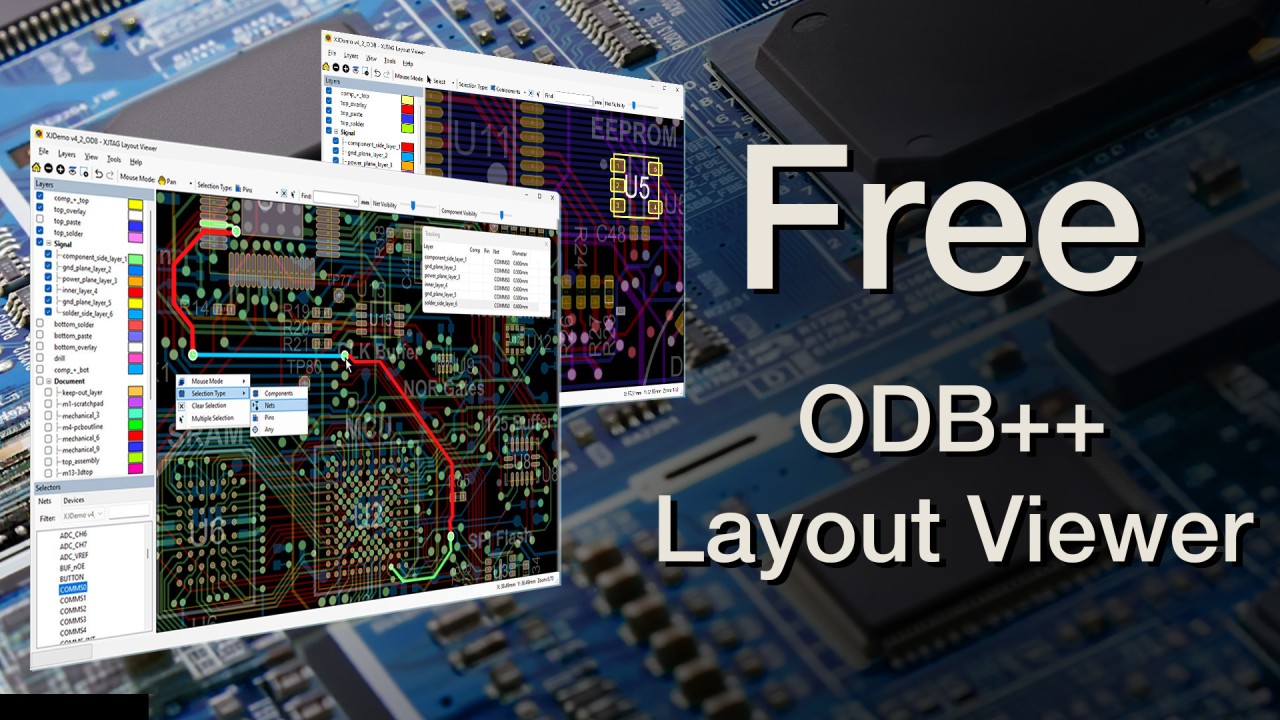 Why Understanding the Board Matters More Than Ever
Today's electronics are incredibly powerful. As boards become denser and more complex, one challenge continues to grow quietly in the background:
simply understanding what is connected to what
During bring-up, debug, and test, engineers are constantly asking questions like:
Where does this signal actually go?
Which devices are connected to this net?
Is this behaviour expected?
What part of the board has already been proven?
The answers already exist inside the design data.
The problem is often visibility.
The Growing Visibility Problem
As electronic systems evolve, so does board complexity:
more layers
more BGAs
more high-speed interfaces
more hidden connectivity
And while schematics remain essential, tracing signals manually across dense layouts can quickly become time-consuming and frustrating.
Particularly when:
debugging hardware issues
investigating manufacturing faults
validating connectivity
or simply trying to understand an unfamiliar design
Seeing the Board Changes the Process
One thing we’ve seen repeatedly over the years is this:
The faster engineers can visualise the board, the faster they can:
understand problems
isolate faults
verify assumptions
and move development forward
Because often, the bottleneck isn’t solving the issue itself.
It’s understanding the hardware clearly enough to know where to focus.
Introducing the Free XJTAG Layout Viewer
To help make this easier, we created the XJTAG Layout Viewer, a free standalone tool for exploring PCB layouts using ODB++ design data.
It allows engineers to:
Search and highlight nets, pins, and devices
Visualise signal connectivity clearly
Navigate dense layouts quickly
Trace connections across the PCB
Understand board structure more intuitively
The goal is simple:
Reduce the time spent trying to understand the board
Particularly Useful For
The Layout Viewer is especially valuable when working with:
BGA-based systems
complex multilayer boards
manufacturing debug
board bring-up
fault investigation
unfamiliar hardware designs
Whether you’re validating a new prototype, investigating a failure, or simply trying to understand how a system is connected, being able to visualise the board directly can dramatically improve workflow efficiency.
More Than Just Viewing Layouts
One of the interesting things we’ve observed is that once engineers can clearly see the hardware, many other processes become easier:
debugging becomes more focused
communication improves between teams
manufacturing issues are easier to isolate
confidence in the hardware increases
In many cases, simply improving visibility removes a surprising amount of friction from development.
Closing Thought
In complex electronic systems, uncertainty often comes from not being able to clearly see what’s happening on the board.
The faster that visibility is established, the faster engineers can move from:
confusion
to understanding
to confidence
And sometimes, that starts with something very simple:
being able to see the connections clearly.
<p">If you’d like to explore your own PCB layouts and board connections more clearly:
<p">Download your free XJTAG Layout Viewer
Why Understanding the Board Matters More Than Ever
Today's electronics are incredibly powerful. As boards become denser and more complex, one challenge continues to grow quietly in the background:
simply understanding what is connected to what
During bring-up, debug, and test, engineers are constantly asking questions like:
Where does this signal actually go?
Which devices are connected to this net?
Is this behaviour expected?
What part of the board has already been proven?
The answers already exist inside the design data.
The problem is often visibility.
The Growing Visibility Problem
As electronic systems evolve, so does board complexity:
more layers
more BGAs
more high-speed interfaces
more hidden connectivity
And while schematics remain essential, tracing signals manually across dense layouts can quickly become time-consuming and frustrating.
Particularly when:
debugging hardware issues
investigating manufacturing faults
validating connectivity
or simply trying to understand an unfamiliar design
Seeing the Board Changes the Process
One thing we’ve seen repeatedly over the years is this:
The faster engineers can visualise the board, the faster they can:
understand problems
isolate faults
verify assumptions
and move development forward
Because often, the bottleneck isn’t solving the issue itself.
It’s understanding the hardware clearly enough to know where to focus.
Introducing the Free XJTAG Layout Viewer
To help make this easier, we created the XJTAG Layout Viewer, a free standalone tool for exploring PCB layouts using ODB++ design data.
It allows engineers to:
Search and highlight nets, pins, and devices
Visualise signal connectivity clearly
Navigate dense layouts quickly
Trace connections across the PCB
Understand board structure more intuitively
The goal is simple:
Reduce the time spent trying to understand the board
Particularly Useful For
The Layout Viewer is especially valuable when working with:
BGA-based systems
complex multilayer boards
manufacturing debug
board bring-up
fault investigation
unfamiliar hardware designs
Whether you’re validating a new prototype, investigating a failure, or simply trying to understand how a system is connected, being able to visualise the board directly can dramatically improve workflow efficiency.
More Than Just Viewing Layouts
One of the interesting things we’ve observed is that once engineers can clearly see the hardware, many other processes become easier:
debugging becomes more focused
communication improves between teams
manufacturing issues are easier to isolate
confidence in the hardware increases
In many cases, simply improving visibility removes a surprising amount of friction from development.
Closing Thought
In complex electronic systems, uncertainty often comes from not being able to clearly see what’s happening on the board.
The faster that visibility is established, the faster engineers can move from:
confusion
to understanding
to confidence
And sometimes, that starts with something very simple:
being able to see the connections clearly.
<p">If you’d like to explore your own PCB layouts and board connections more clearly:
<p">Download your free XJTAG Layout Viewer
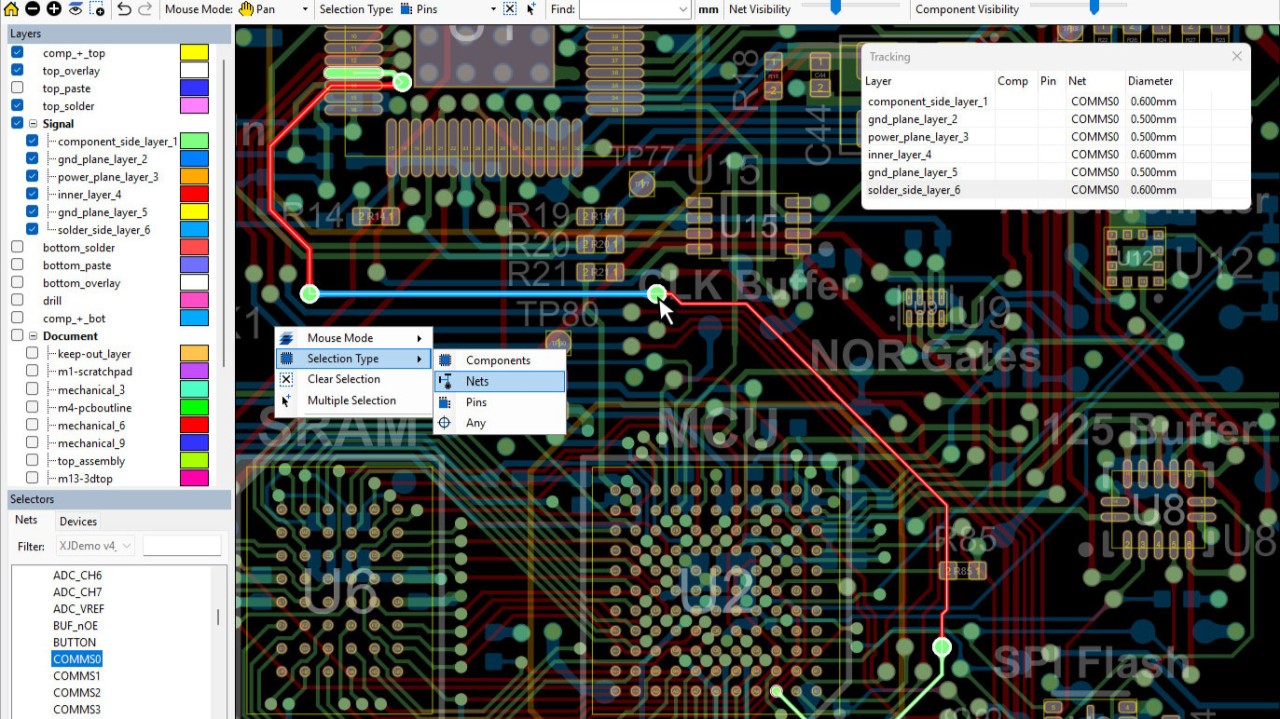 Why Some FPGA Systems Move Faster Than Others
Over the past few weeks, we’ve been exploring how reducing uncertainty early can transform FPGA bring-up and production.
Two recent examples highlight another important factor about how quickly teams can understand what’s actually happening on the board.
The Challenge: Time Lost Before Testing Even Begins
In one case, a test engineering team was evaluating different boundary scan solutions.
One of their key concerns wasn’t just test performance, it was how long it took to get started.
With some systems, creating a working test project could take several days.
With a different approach, they were able to get a project up and running in half a day.
That difference alone had a direct impact on both internal efficiency and customer delivery timelines.
The Hidden Cost of Limited Visibility
In another example, a team working with high-density FPGA-based boards faced a different issue.
Their existing testing approach:
provided limited coverage
struggled to access signals under BGAs
relied heavily on manual intervention
This created two problems:
Longer test times
Higher risk of human error
By changing their approach, they were able to:
increase test coverage significantly
access previously hidden signals
reduce testing time by around 30%
Just as importantly, they were able to remove much of the variability from the process.
What Changed
Across both examples, the improvements weren’t just about speed.
They came from:
faster setup and deployment
greater visibility into board behaviour
the ability to access and verify connections more directly
reducing reliance on manual interpretation
In one case, combining different test methods even allowed up to 25% more of a board to be tested than before.
A Pattern We’re Seeing More Often
These examples reinforce something we’ve been building throughout this series.
The bottleneck in FPGA systems is rarely just the design.
It’s often the time it takes to understand what’s happening.
Where is the signal going?
What is actually connected?
Which part of the system is behaving correctly?
When those questions are hard to answer, progress slows.
Seeing the Board Changes the Process
One of the simplest ways to remove that bottleneck is making the board easier to understand.
Being able to clearly visualise:
connections between devices
signal paths
relationships between components
can significantly reduce the time spent:
tracing schematics
interpreting documentation
trying to locate faults
Introducing the XJTAG Layout Viewer (Free)
To support this, XJTAG provides a free Layout Viewer designed to give engineers immediate visibility into board connections.
With it, you can:
explore how nets are connected across your design
quickly identify where issues may exist
understand complex layouts without manual tracing
This is especially valuable in:
FPGA-based systems
high-density designs
boards with limited physical access
Closing Thought
In FPGA systems, speed doesn’t just come from solving problems faster.
It comes from understanding the system sooner.
And often, that starts with something very simple:
being able to clearly see the board.
Try the Free Layout Viewer
If you’d like to explore your own board connections and start removing uncertainty from your designs:
Go to XJTAG Layout Viewer
Full Case Studies
For more detail on the examples discussed:
Flying Test Systems Case Study
Civitanavi Systems Case Study
Why Some FPGA Systems Move Faster Than Others
Over the past few weeks, we’ve been exploring how reducing uncertainty early can transform FPGA bring-up and production.
Two recent examples highlight another important factor about how quickly teams can understand what’s actually happening on the board.
The Challenge: Time Lost Before Testing Even Begins
In one case, a test engineering team was evaluating different boundary scan solutions.
One of their key concerns wasn’t just test performance, it was how long it took to get started.
With some systems, creating a working test project could take several days.
With a different approach, they were able to get a project up and running in half a day.
That difference alone had a direct impact on both internal efficiency and customer delivery timelines.
The Hidden Cost of Limited Visibility
In another example, a team working with high-density FPGA-based boards faced a different issue.
Their existing testing approach:
provided limited coverage
struggled to access signals under BGAs
relied heavily on manual intervention
This created two problems:
Longer test times
Higher risk of human error
By changing their approach, they were able to:
increase test coverage significantly
access previously hidden signals
reduce testing time by around 30%
Just as importantly, they were able to remove much of the variability from the process.
What Changed
Across both examples, the improvements weren’t just about speed.
They came from:
faster setup and deployment
greater visibility into board behaviour
the ability to access and verify connections more directly
reducing reliance on manual interpretation
In one case, combining different test methods even allowed up to 25% more of a board to be tested than before.
A Pattern We’re Seeing More Often
These examples reinforce something we’ve been building throughout this series.
The bottleneck in FPGA systems is rarely just the design.
It’s often the time it takes to understand what’s happening.
Where is the signal going?
What is actually connected?
Which part of the system is behaving correctly?
When those questions are hard to answer, progress slows.
Seeing the Board Changes the Process
One of the simplest ways to remove that bottleneck is making the board easier to understand.
Being able to clearly visualise:
connections between devices
signal paths
relationships between components
can significantly reduce the time spent:
tracing schematics
interpreting documentation
trying to locate faults
Introducing the XJTAG Layout Viewer (Free)
To support this, XJTAG provides a free Layout Viewer designed to give engineers immediate visibility into board connections.
With it, you can:
explore how nets are connected across your design
quickly identify where issues may exist
understand complex layouts without manual tracing
This is especially valuable in:
FPGA-based systems
high-density designs
boards with limited physical access
Closing Thought
In FPGA systems, speed doesn’t just come from solving problems faster.
It comes from understanding the system sooner.
And often, that starts with something very simple:
being able to clearly see the board.
Try the Free Layout Viewer
If you’d like to explore your own board connections and start removing uncertainty from your designs:
Go to XJTAG Layout Viewer
Full Case Studies
For more detail on the examples discussed:
Flying Test Systems Case Study
Civitanavi Systems Case Study
 Why Seeing the Board Changes Everything in FPGA Bring-Up and Test
Read to the end to access a free tool that lets you visualise your board connections and start uncovering what’s really happening beneath the surface.
Over the past few months, we’ve been exploring a consistent theme:
The faster you can prove what’s happening on the board, the faster everything else becomes.
Two recent examples highlight this clearly, particularly when it comes to fault isolation, test coverage, and understanding complex hardware.
The Common Problem
Both teams were working with complex, high-density electronic systems:
FPGA-based designs
Dense layouts with BGAs and multiple interfaces
Systems where access to signals is limited
And both faced a familiar challenge:
When something went wrong, it was difficult to quickly identify where and why.
When Testing Happens Too Late
In one case, testing was primarily performed after full assembly.
This meant that when a failure occurred:
the system could only indicate pass/fail
root cause was unclear
troubleshooting became time-consuming
In one instance, diagnosing a single issue required around 40 hours of effort across multiple engineers.
The problem wasn’t complexity, it was visibility.
Shifting Test Earlier and Deeper
By introducing board-level testing earlier in the process, both teams were able to fundamentally change how they worked.
Instead of waiting for failures at system level, they could:
test individual PCBs before final assembly
identify faults at component level
replace or rework boards before integration
This avoided:
unnecessary disassembly
repeated debugging cycles
extended engineering effort
And in many cases, faults could be identified in minutes rather than hours.
Expanding What Can Be Tested
Another important shift was increased test coverage.
Even in systems with:
BGAs
dense routing
limited physical access
It became possible to:
access internal device pins
communicate with non-JTAG components
validate a wide range of interfaces
In one example, improved test coverage even revealed previously undetected issues in legacy test fixtures, including a short circuit that had gone unnoticed.
What This Really Means
These examples reinforce something we’ve discussed throughout this series.
The biggest gains don’t come from solving problems faster.
They come from being able to see and prove what is actually happening on the board.
When that visibility is missing:
debugging becomes guesswork
effort increases
bottlenecks appear
When it’s present:
faults are isolated quickly
confidence is established early
development and production flow more smoothly
Seeing the Connections
One of the most powerful ways to improve this visibility is simply being able to see how everything is connected.
Understanding:
which pins connect to which devices
how signals are routed
where potential issues may exist
...can dramatically reduce the time needed to understand a problem.
Closing Thought
In FPGA systems, complexity is unavoidable.
But lack of visibility doesn’t have to be.
The more clearly you can see and prove what is happening on the board, the faster you can move from uncertainty to understanding.
Introducing the Free XJTAG Layout Viewer
To get you started, XJTAG now provides a free Layout Viewer that allows engineers to visualise board connections clearly and interactively.
With the Layout Viewer, you can:
explore connections between devices and signals
quickly locate components and investigate issues
This is particularly valuable when working with:
complex FPGA systems
dense layouts
boards with limited physical access
Explore the XJTAG Free Layout Viewer
To learn more about the XJTAG Layout Viewer and how it can help visualise your board connections:
Go to XJTAG Layout Viewer
Case Studies
If you’d like to explore the full examples:
IMSAR Case Study
Narda-MITEQ Case Study
Why Seeing the Board Changes Everything in FPGA Bring-Up and Test
Read to the end to access a free tool that lets you visualise your board connections and start uncovering what’s really happening beneath the surface.
Over the past few months, we’ve been exploring a consistent theme:
The faster you can prove what’s happening on the board, the faster everything else becomes.
Two recent examples highlight this clearly, particularly when it comes to fault isolation, test coverage, and understanding complex hardware.
The Common Problem
Both teams were working with complex, high-density electronic systems:
FPGA-based designs
Dense layouts with BGAs and multiple interfaces
Systems where access to signals is limited
And both faced a familiar challenge:
When something went wrong, it was difficult to quickly identify where and why.
When Testing Happens Too Late
In one case, testing was primarily performed after full assembly.
This meant that when a failure occurred:
the system could only indicate pass/fail
root cause was unclear
troubleshooting became time-consuming
In one instance, diagnosing a single issue required around 40 hours of effort across multiple engineers.
The problem wasn’t complexity, it was visibility.
Shifting Test Earlier and Deeper
By introducing board-level testing earlier in the process, both teams were able to fundamentally change how they worked.
Instead of waiting for failures at system level, they could:
test individual PCBs before final assembly
identify faults at component level
replace or rework boards before integration
This avoided:
unnecessary disassembly
repeated debugging cycles
extended engineering effort
And in many cases, faults could be identified in minutes rather than hours.
Expanding What Can Be Tested
Another important shift was increased test coverage.
Even in systems with:
BGAs
dense routing
limited physical access
It became possible to:
access internal device pins
communicate with non-JTAG components
validate a wide range of interfaces
In one example, improved test coverage even revealed previously undetected issues in legacy test fixtures, including a short circuit that had gone unnoticed.
What This Really Means
These examples reinforce something we’ve discussed throughout this series.
The biggest gains don’t come from solving problems faster.
They come from being able to see and prove what is actually happening on the board.
When that visibility is missing:
debugging becomes guesswork
effort increases
bottlenecks appear
When it’s present:
faults are isolated quickly
confidence is established early
development and production flow more smoothly
Seeing the Connections
One of the most powerful ways to improve this visibility is simply being able to see how everything is connected.
Understanding:
which pins connect to which devices
how signals are routed
where potential issues may exist
...can dramatically reduce the time needed to understand a problem.
Closing Thought
In FPGA systems, complexity is unavoidable.
But lack of visibility doesn’t have to be.
The more clearly you can see and prove what is happening on the board, the faster you can move from uncertainty to understanding.
Introducing the Free XJTAG Layout Viewer
To get you started, XJTAG now provides a free Layout Viewer that allows engineers to visualise board connections clearly and interactively.
With the Layout Viewer, you can:
explore connections between devices and signals
quickly locate components and investigate issues
This is particularly valuable when working with:
complex FPGA systems
dense layouts
boards with limited physical access
Explore the XJTAG Free Layout Viewer
To learn more about the XJTAG Layout Viewer and how it can help visualise your board connections:
Go to XJTAG Layout Viewer
Case Studies
If you’d like to explore the full examples:
IMSAR Case Study
Narda-MITEQ Case Study
 What Happens When You Remove Guesswork from FPGA Bring-Up and Test
Over the past few months, we’ve been exploring a simple but important idea:
The more you can prove early in FPGA systems, the faster everything else becomes.
Today, we are looking at two different engineering teams working in very different application areas, yet facing very similar challenges.
The Common Challenge
Both teams were developing complex electronic systems:
High-density FPGA-based designs
Multiple interfaces and high-speed components
Increasing system complexity with each new generation
And both faced the same underlying problem:
Testing, programming, and debugging were taking too long.
Not because the teams lacked expertise, but because too much uncertainty remained during bring-up and production.
A Shift in Approach
Instead of treating testing as a late-stage activity, both teams moved it earlier and made it more central to their workflow.
They began:
testing boards as soon as they were assembled
integrating programming into the test process
reusing test procedures across development, production, and service
using structural validation to confirm hardware behaviour early
This wasn’t just about adding tools.
It was about changing when and how confidence in the system was established.
What Changed in Practice
Once this approach was in place, the impact was clear.
1. Faster Programming and Test
One team reduced FPGA programming time from several minutes to around 35 seconds by optimising programming within the test environment
Another achieved programming speeds up to 90% faster than traditional methods
2. Earlier and More Effective Fault Detection
Structural testing enabled faults to be identified:
immediately after assembly
before full system behaviour was introduced
with minimal manual effort
Automatic connection testing was able to detect most defects quickly, significantly reducing the effort required to locate issues.
3. Simpler and Faster Debug
With better visibility into the hardware:
engineers could isolate issues more quickly
unnecessary debugging of firmware and logic was reduced
test coverage increased without increasing complexity
In some cases, functional testing could even be simplified because much of the structural validation had already been completed.
4. Reuse Across the Lifecycle
Perhaps most importantly, the same test approach was used across:
R&D and prototype development
production test
servicing and fault diagnosis
Test procedures were not one-off efforts, they became reusable assets that improved efficiency over time.
What This Tells Us
These examples reinforce a pattern we’ve been discussing throughout this series.
The biggest improvements don’t come from solving problems faster.
They come from reducing uncertainty earlier.
By proving:
connectivity
device access
configuration infrastructure
…teams create a foundation where problems are easier to understand and resolve.
Closing Thought
In FPGA systems, complexity is inevitable.
But uncertainty doesn’t have to be.
When hardware is proven early and consistently, bring-up becomes more predictable, debug becomes more focused and production becomes more efficient.
Full Case Studies
If you’d like to explore these examples in more detail:
Active Silicon Case Study
beyerdynamic Case Study
What Happens When You Remove Guesswork from FPGA Bring-Up and Test
Over the past few months, we’ve been exploring a simple but important idea:
The more you can prove early in FPGA systems, the faster everything else becomes.
Today, we are looking at two different engineering teams working in very different application areas, yet facing very similar challenges.
The Common Challenge
Both teams were developing complex electronic systems:
High-density FPGA-based designs
Multiple interfaces and high-speed components
Increasing system complexity with each new generation
And both faced the same underlying problem:
Testing, programming, and debugging were taking too long.
Not because the teams lacked expertise, but because too much uncertainty remained during bring-up and production.
A Shift in Approach
Instead of treating testing as a late-stage activity, both teams moved it earlier and made it more central to their workflow.
They began:
testing boards as soon as they were assembled
integrating programming into the test process
reusing test procedures across development, production, and service
using structural validation to confirm hardware behaviour early
This wasn’t just about adding tools.
It was about changing when and how confidence in the system was established.
What Changed in Practice
Once this approach was in place, the impact was clear.
1. Faster Programming and Test
One team reduced FPGA programming time from several minutes to around 35 seconds by optimising programming within the test environment
Another achieved programming speeds up to 90% faster than traditional methods
2. Earlier and More Effective Fault Detection
Structural testing enabled faults to be identified:
immediately after assembly
before full system behaviour was introduced
with minimal manual effort
Automatic connection testing was able to detect most defects quickly, significantly reducing the effort required to locate issues.
3. Simpler and Faster Debug
With better visibility into the hardware:
engineers could isolate issues more quickly
unnecessary debugging of firmware and logic was reduced
test coverage increased without increasing complexity
In some cases, functional testing could even be simplified because much of the structural validation had already been completed.
4. Reuse Across the Lifecycle
Perhaps most importantly, the same test approach was used across:
R&D and prototype development
production test
servicing and fault diagnosis
Test procedures were not one-off efforts, they became reusable assets that improved efficiency over time.
What This Tells Us
These examples reinforce a pattern we’ve been discussing throughout this series.
The biggest improvements don’t come from solving problems faster.
They come from reducing uncertainty earlier.
By proving:
connectivity
device access
configuration infrastructure
…teams create a foundation where problems are easier to understand and resolve.
Closing Thought
In FPGA systems, complexity is inevitable.
But uncertainty doesn’t have to be.
When hardware is proven early and consistently, bring-up becomes more predictable, debug becomes more focused and production becomes more efficient.
Full Case Studies
If you’d like to explore these examples in more detail:
Active Silicon Case Study
beyerdynamic Case Study
 What Happens When You Start Testing Earlier
Over the past few months, we’ve been talking about the importance of proving hardware early during bring-up.
Not just debugging when something goes wrong, but establishing confidence in the system before problems have a chance to grow.
Recently, we saw a very clear example of what happens when that approach is applied consistently.
The Starting Point
An engineering team working on complex electronic assemblies wanted to improve their test process.
Their goals were straightforward:
Reduce test development time
Improve fault diagnosis
Maintain high coverage and reliability
Scale across multiple product lines
Nothing unusual there, these are challenges many teams face.
The Traditional Problem
In many environments, testing and debugging happen relatively late in the process.
Boards are assembled
Firmware is developed
Functional testing begins
And only then do issues fully surface. At that stage, diagnosing faults can be slow and expensive.
A Different Approach
Instead, this team shifted testing earlier in the lifecycle.
They introduced structural testing and programming:
during early prototypes
throughout development stages
and across production
This meant that boards could be validated:
as soon as they were assembled
before full system behaviour was introduced
and repeatedly as designs evolved
What Changed
The impact was significant.
Test development became much faster, with reusable libraries reducing creation time to around 40–60% of previous levels.
Fault diagnosis also improved dramatically.
Issues that previously took hours to identify could now be located in minutes and much earlier in the process, often immediately after assembly.
At the same time, integrating programming into the test process reduced overall production costs by 20–30% by removing the need for additional test fixtures.
What’s Really Happening Here
This isn’t just about faster tools or better automation, it’s about a change in approach.
Instead of waiting for problems to appear during functional testing, the team focused on proving the hardware earlier:
confirming connectivity
validating device access
ensuring configuration paths were working
By doing that, they reduced uncertainty. And once that uncertainty was removed, everything else became easier:
debugging became faster
development cycles shortened
production became more predictable
A Broader Pattern
This aligns closely with what we’ve been discussing over the past 12–13 weeks. The biggest gains in bring-up don’t always come from solving problems faster.
They often come from proving the right things earlier.
Closing Thought
In complex FPGA systems, problems are inevitable. But the point at which you discover them and how clearly you can isolate them makes all the difference.
Testing earlier, and across more stages of the lifecycle, doesn’t just improve quality, it fundamentally changes how quickly you can move forward.
Full Case Study
If you’d like to see the full details behind this example, you can read the case study here.
What Happens When You Start Testing Earlier
Over the past few months, we’ve been talking about the importance of proving hardware early during bring-up.
Not just debugging when something goes wrong, but establishing confidence in the system before problems have a chance to grow.
Recently, we saw a very clear example of what happens when that approach is applied consistently.
The Starting Point
An engineering team working on complex electronic assemblies wanted to improve their test process.
Their goals were straightforward:
Reduce test development time
Improve fault diagnosis
Maintain high coverage and reliability
Scale across multiple product lines
Nothing unusual there, these are challenges many teams face.
The Traditional Problem
In many environments, testing and debugging happen relatively late in the process.
Boards are assembled
Firmware is developed
Functional testing begins
And only then do issues fully surface. At that stage, diagnosing faults can be slow and expensive.
A Different Approach
Instead, this team shifted testing earlier in the lifecycle.
They introduced structural testing and programming:
during early prototypes
throughout development stages
and across production
This meant that boards could be validated:
as soon as they were assembled
before full system behaviour was introduced
and repeatedly as designs evolved
What Changed
The impact was significant.
Test development became much faster, with reusable libraries reducing creation time to around 40–60% of previous levels.
Fault diagnosis also improved dramatically.
Issues that previously took hours to identify could now be located in minutes and much earlier in the process, often immediately after assembly.
At the same time, integrating programming into the test process reduced overall production costs by 20–30% by removing the need for additional test fixtures.
What’s Really Happening Here
This isn’t just about faster tools or better automation, it’s about a change in approach.
Instead of waiting for problems to appear during functional testing, the team focused on proving the hardware earlier:
confirming connectivity
validating device access
ensuring configuration paths were working
By doing that, they reduced uncertainty. And once that uncertainty was removed, everything else became easier:
debugging became faster
development cycles shortened
production became more predictable
A Broader Pattern
This aligns closely with what we’ve been discussing over the past 12–13 weeks. The biggest gains in bring-up don’t always come from solving problems faster.
They often come from proving the right things earlier.
Closing Thought
In complex FPGA systems, problems are inevitable. But the point at which you discover them and how clearly you can isolate them makes all the difference.
Testing earlier, and across more stages of the lifecycle, doesn’t just improve quality, it fundamentally changes how quickly you can move forward.
Full Case Study
If you’d like to see the full details behind this example, you can read the case study here.
 What Engineers Actually Do When FPGA Bring-Up Gets Stuck
Over the years, we’ve had many conversations with engineers working on FPGA systems at different stages of development.
Different industries, different devices and different applications.
But interestingly, when bring-up gets stuck, the behaviour is often very similar.
What Typically Happens
The system doesn’t behave as expected.
The FPGA won’t configure
Interfaces don’t respond
Something just doesn’t feel right
So the investigation begins.
A natural first step is to focus on the part of the system that appears to be failing:
looking at a specific interface
examining a particular signal path
trying to debug that area directly
That’s a completely reasonable approach, it’s how most engineers start solving problems.
The Role of Bring-Up
At its core, board bring-up is about proving that everything is working correctly and completely as expected.
And along the way, problems will inevitably appear.
When they do, the task becomes understanding why there is a mismatch between what is expected and what is actually happening.
A Slightly Different Approach
One pattern we’ve seen in experienced teams is a small but important shift in how they approach these situations.
Instead of immediately diving deeper into the failing area, they step back and ask:
“What do we know is working?”
From there, they begin to build a picture of the system based on what has already been proven:
Which devices are accessible?
Which paths are known to be correct?
Which parts of the board are behaving as expected?
This allows them to start ruling things out.
Why This Helps
Focusing only on the failing area can sometimes narrow the investigation too quickly.
By contrast, starting from what is known to work helps define the boundaries of the problem.
It becomes easier to see:
what the issue is likely related to
what it cannot be related to
and where to focus effort next
This doesn’t replace problem solving, it makes it more efficient.
Closing Thought
Bring-up is fundamentally about proving that a system behaves exactly as intended.
And when it doesn’t, systematically identifying where that expectation breaks down.
Often, the fastest way to do that is not to go straight into the problem itself, but to use what is already known to be working to guide the investigation.
FPGA Board-Level Tip of the Week
Design flexibility into JTAG and configuration circuitry from the start.
Why it matters:
Board bring-up and debugging often require configuration or signal adjustments that weren’t originally anticipated
Missing termination or fixed configuration options can limit your ability to diagnose issues
Small design decisions early can significantly affect flexibility later
What to do:
Include pads for all potentially required termination components on JTAG signals (pull-ups, parallel termination and series resistors)
Provide options to configure JTAG chain behaviour where devices may be optional or removed
Design configuration mode pins so they can be set to either state, even if only one mode is expected initially
What to watch out for:
Hard-wiring configuration modes without fallback options
Omitting termination options to save space or cost
Board revisions where flexibility has been reduced unintentionally
Building in these options upfront makes the board far more versatile and avoids situations where a small change is needed, but no longer possible once the hardware is built.
What Engineers Actually Do When FPGA Bring-Up Gets Stuck
Over the years, we’ve had many conversations with engineers working on FPGA systems at different stages of development.
Different industries, different devices and different applications.
But interestingly, when bring-up gets stuck, the behaviour is often very similar.
What Typically Happens
The system doesn’t behave as expected.
The FPGA won’t configure
Interfaces don’t respond
Something just doesn’t feel right
So the investigation begins.
A natural first step is to focus on the part of the system that appears to be failing:
looking at a specific interface
examining a particular signal path
trying to debug that area directly
That’s a completely reasonable approach, it’s how most engineers start solving problems.
The Role of Bring-Up
At its core, board bring-up is about proving that everything is working correctly and completely as expected.
And along the way, problems will inevitably appear.
When they do, the task becomes understanding why there is a mismatch between what is expected and what is actually happening.
A Slightly Different Approach
One pattern we’ve seen in experienced teams is a small but important shift in how they approach these situations.
Instead of immediately diving deeper into the failing area, they step back and ask:
“What do we know is working?”
From there, they begin to build a picture of the system based on what has already been proven:
Which devices are accessible?
Which paths are known to be correct?
Which parts of the board are behaving as expected?
This allows them to start ruling things out.
Why This Helps
Focusing only on the failing area can sometimes narrow the investigation too quickly.
By contrast, starting from what is known to work helps define the boundaries of the problem.
It becomes easier to see:
what the issue is likely related to
what it cannot be related to
and where to focus effort next
This doesn’t replace problem solving, it makes it more efficient.
Closing Thought
Bring-up is fundamentally about proving that a system behaves exactly as intended.
And when it doesn’t, systematically identifying where that expectation breaks down.
Often, the fastest way to do that is not to go straight into the problem itself, but to use what is already known to be working to guide the investigation.
FPGA Board-Level Tip of the Week
Design flexibility into JTAG and configuration circuitry from the start.
Why it matters:
Board bring-up and debugging often require configuration or signal adjustments that weren’t originally anticipated
Missing termination or fixed configuration options can limit your ability to diagnose issues
Small design decisions early can significantly affect flexibility later
What to do:
Include pads for all potentially required termination components on JTAG signals (pull-ups, parallel termination and series resistors)
Provide options to configure JTAG chain behaviour where devices may be optional or removed
Design configuration mode pins so they can be set to either state, even if only one mode is expected initially
What to watch out for:
Hard-wiring configuration modes without fallback options
Omitting termination options to save space or cost
Board revisions where flexibility has been reduced unintentionally
Building in these options upfront makes the board far more versatile and avoids situations where a small change is needed, but no longer possible once the hardware is built.
 The Missing Layer in FPGA Systems
Over the past several weeks we’ve explored the realities of FPGA board bring-up.
Not the marketing version, the real one.
We’ve looked at:
Why simulation success doesn’t guarantee hardware success
The silent failures that occur between devices and the PCB
Why probing isn’t always the first answer
The difference between a dead FPGA and a disconnected one
Why reference designs don’t automatically transfer to custom hardware
How knowledge can disappear when the original engineer leaves
Why system lifecycles often outlast FPGA lifecycles
Across all of these discussions, a common theme keeps appearing.
There is a layer of FPGA systems that often receives less attention than it deserves.
The Layer Between Silicon and System
FPGA ecosystems are built around remarkable silicon and powerful development tools.
Engineers work with:
Sophisticated design environments
Reference platforms
Extensive documentation
These resources help teams design complex digital systems faster than ever before.
But once a design moves beyond the device and into a physical system, another layer becomes critically important.
The board itself.
This layer connects:
The FPGA
Power infrastructure
Configuration paths
Peripheral devices
High-speed interfaces
When something doesn’t behave as expected, it is often this layer that must be understood first.
Why This Layer Matters
Board-level behaviour determines whether a system can be:
Brought up reliably
Diagnosed efficiently
Manufactured consistently
Supported over time
When this layer is well understood, teams can quickly distinguish between:
Design issues
Connectivity problems
Configuration challenges
Hardware faults
When it isn’t, the debugging process often becomes guesswork.
A Shift in Perspective
Many FPGA projects understandably begin with a focus on functionality.
Does the logic work? Does the interface behave correctly? Does the software run?
Those questions are essential.
But experienced teams eventually add another one:
Can we prove the hardware is structurally what we believe it is?
That shift — from assuming behaviour to proving structure — often changes the pace of bring-up and long-term support.
Building Confidence That Lasts
The most resilient FPGA teams tend to build systems where structural validation becomes routine.
They design hardware and processes so that:
Connectivity can be verified
Critical devices remain accessible
Validation procedures can be reused across revisions
Hardware health can be proven years later
These practices don’t slow development.
In many cases, they accelerate it, because uncertainty disappears earlier.
Closing Thought
FPGA systems are often described in terms of logic and software.
But between the silicon and the system lies something equally important:
The physical structure that connects everything together.
Understanding that layer, and designing ways to validate it, is often what separates a working prototype from a system that remains understandable and supportable for years to come.
FPGA Board-Level Tip of the Week
Treat board-level validation as a permanent capability, not a temporary bring-up task.
Validation methods developed during early bring-up can provide lasting value throughout the product lifecycle.
Why it matters
Supports consistent validation across board revisions
Simplifies production and field diagnostics
Reduces dependency on original development teams
What to watch out for
Test infrastructure that disappears after initial bring-up
Debug methods that rely on undocumented procedures
Validation processes tied to a single prototype configuration
When board-level validation becomes part of the engineering infrastructure, systems remain easier to understand long after the first successful bring-up.
The Missing Layer in FPGA Systems
Over the past several weeks we’ve explored the realities of FPGA board bring-up.
Not the marketing version, the real one.
We’ve looked at:
Why simulation success doesn’t guarantee hardware success
The silent failures that occur between devices and the PCB
Why probing isn’t always the first answer
The difference between a dead FPGA and a disconnected one
Why reference designs don’t automatically transfer to custom hardware
How knowledge can disappear when the original engineer leaves
Why system lifecycles often outlast FPGA lifecycles
Across all of these discussions, a common theme keeps appearing.
There is a layer of FPGA systems that often receives less attention than it deserves.
The Layer Between Silicon and System
FPGA ecosystems are built around remarkable silicon and powerful development tools.
Engineers work with:
Sophisticated design environments
Reference platforms
Extensive documentation
These resources help teams design complex digital systems faster than ever before.
But once a design moves beyond the device and into a physical system, another layer becomes critically important.
The board itself.
This layer connects:
The FPGA
Power infrastructure
Configuration paths
Peripheral devices
High-speed interfaces
When something doesn’t behave as expected, it is often this layer that must be understood first.
Why This Layer Matters
Board-level behaviour determines whether a system can be:
Brought up reliably
Diagnosed efficiently
Manufactured consistently
Supported over time
When this layer is well understood, teams can quickly distinguish between:
Design issues
Connectivity problems
Configuration challenges
Hardware faults
When it isn’t, the debugging process often becomes guesswork.
A Shift in Perspective
Many FPGA projects understandably begin with a focus on functionality.
Does the logic work? Does the interface behave correctly? Does the software run?
Those questions are essential.
But experienced teams eventually add another one:
Can we prove the hardware is structurally what we believe it is?
That shift — from assuming behaviour to proving structure — often changes the pace of bring-up and long-term support.
Building Confidence That Lasts
The most resilient FPGA teams tend to build systems where structural validation becomes routine.
They design hardware and processes so that:
Connectivity can be verified
Critical devices remain accessible
Validation procedures can be reused across revisions
Hardware health can be proven years later
These practices don’t slow development.
In many cases, they accelerate it, because uncertainty disappears earlier.
Closing Thought
FPGA systems are often described in terms of logic and software.
But between the silicon and the system lies something equally important:
The physical structure that connects everything together.
Understanding that layer, and designing ways to validate it, is often what separates a working prototype from a system that remains understandable and supportable for years to come.
FPGA Board-Level Tip of the Week
Treat board-level validation as a permanent capability, not a temporary bring-up task.
Validation methods developed during early bring-up can provide lasting value throughout the product lifecycle.
Why it matters
Supports consistent validation across board revisions
Simplifies production and field diagnostics
Reduces dependency on original development teams
What to watch out for
Test infrastructure that disappears after initial bring-up
Debug methods that rely on undocumented procedures
Validation processes tied to a single prototype configuration
When board-level validation becomes part of the engineering infrastructure, systems remain easier to understand long after the first successful bring-up.
 When the FPGA Changes, But the System Must Stay the Same
FPGA technology evolves quickly.
New architectures appear, performance improves, interfaces become faster and tools advance.
For engineers designing new systems, this pace of innovation is exciting.
But for organisations supporting long-lifecycle products, it introduces a quieter challenge.
Because the FPGA may change, while the system around it must remain stable.
The Inevitable Moment
At some point in many FPGA-based systems, a familiar conversation appears:
The original device becomes harder to source
A new revision of the board is required
A newer FPGA family is selected
The design is migrated
None of these events are unusual, they are simply part of the lifecycle of electronic systems.
But when the FPGA changes, an important question follows:
What else changes with it?
What Should Change, and What Should Not
Some elements must naturally evolve:
Logic implementation
Toolchain versions
Performance optimisation
But other elements should remain remarkably stable.
In particular:
The methods used to verify board connectivity
The processes used to validate hardware health
The procedures used to prove the system behaves as intended
These structural validation methods should ideally survive FPGA migrations.
The Risk of Device-Centric Thinking
When validation procedures are tightly coupled to a specific FPGA design, they tend to break whenever the device changes.
Scripts must be rewritten, debug methods recreated and confidence rebuilt.
This creates unnecessary friction during upgrades.
In contrast, when validation focuses on board-level structure and accessibility, the same methods often remain useful across multiple FPGA generations.
Thinking Beyond the First Device
Experienced teams often design their hardware validation strategies with a longer horizon in mind.
Instead of asking only:
“How do we bring up this FPGA?”
They also ask:
“How will we prove the board is healthy when the FPGA eventually changes?”
This shift in perspective helps ensure that validation infrastructure becomes an asset rather than a temporary workaround.
Systems Outlive Devices
In many industries, the system lifecycle far exceeds the lifecycle of the components within it.
Boards are repaired. Designs are refreshed. Devices are replaced.
When validation methods remain stable through these transitions, the system becomes easier to sustain.
When they do not, each device change becomes an organisational reset.
Closing Thought
FPGA devices will continue to evolve and that is a good thing.
But the systems built around them often need to remain understandable, maintainable, and diagnosable for much longer.
The teams that plan for that reality tend to find that device migrations become engineering exercises, not organisational crises
When the FPGA Changes, But the System Must Stay the Same
FPGA technology evolves quickly.
New architectures appear, performance improves, interfaces become faster and tools advance.
For engineers designing new systems, this pace of innovation is exciting.
But for organisations supporting long-lifecycle products, it introduces a quieter challenge.
Because the FPGA may change, while the system around it must remain stable.
The Inevitable Moment
At some point in many FPGA-based systems, a familiar conversation appears:
The original device becomes harder to source
A new revision of the board is required
A newer FPGA family is selected
The design is migrated
None of these events are unusual, they are simply part of the lifecycle of electronic systems.
But when the FPGA changes, an important question follows:
What else changes with it?
What Should Change, and What Should Not
Some elements must naturally evolve:
Logic implementation
Toolchain versions
Performance optimisation
But other elements should remain remarkably stable.
In particular:
The methods used to verify board connectivity
The processes used to validate hardware health
The procedures used to prove the system behaves as intended
These structural validation methods should ideally survive FPGA migrations.
The Risk of Device-Centric Thinking
When validation procedures are tightly coupled to a specific FPGA design, they tend to break whenever the device changes.
Scripts must be rewritten, debug methods recreated and confidence rebuilt.
This creates unnecessary friction during upgrades.
In contrast, when validation focuses on board-level structure and accessibility, the same methods often remain useful across multiple FPGA generations.
Thinking Beyond the First Device
Experienced teams often design their hardware validation strategies with a longer horizon in mind.
Instead of asking only:
“How do we bring up this FPGA?”
They also ask:
“How will we prove the board is healthy when the FPGA eventually changes?”
This shift in perspective helps ensure that validation infrastructure becomes an asset rather than a temporary workaround.
Systems Outlive Devices
In many industries, the system lifecycle far exceeds the lifecycle of the components within it.
Boards are repaired. Designs are refreshed. Devices are replaced.
When validation methods remain stable through these transitions, the system becomes easier to sustain.
When they do not, each device change becomes an organisational reset.
Closing Thought
FPGA devices will continue to evolve and that is a good thing.
But the systems built around them often need to remain understandable, maintainable, and diagnosable for much longer.
The teams that plan for that reality tend to find that device migrations become engineering exercises, not organisational crises
 Where FPGA Vendor Responsibility Ends and System Designer Responsibility Begins
Modern FPGA ecosystems are remarkable.
Device vendors provide:
Highly capable silicon
Sophisticated development tools
Reference platforms
Extensive documentation
Taken together, these resources dramatically reduce the barrier to building complex digital systems.
But every ecosystem has a natural boundary.
The FPGA Vendor’s Perspective
FPGA vendors focus on what they can control directly.
They design and validate:
The FPGA architecture
The configuration infrastructure
The toolchain
Reference platforms that demonstrate best practice
Within that scope, they can deliver predictable behaviour and well-understood performance.
Once a design leaves the reference environment and enters a custom system, the situation changes.
Where Responsibility Naturally Shifts
Custom hardware introduces many variables that FPGA vendors cannot be expected to validate:
Board layout choices
Power distribution networks
Clock architectures
Component selection
System-level integration
Even when the FPGA device and design appear to be correct, any additional change can influence whether a system behaves as expected.
This is not a flaw in the ecosystem.
It’s simply the point where responsibility shifts from device vendor to system designer.
The Board Layer
Between the FPGA device and the surrounding components lies an important layer:
The board itself.
This layer connects:
Multiple devices
Power domains
Configuration paths
When something goes wrong during bring-up, it is often this layer that needs to be understood and proven first.
Why This Layer Matters More Over Time
As FPGA devices become more capable, the boards that host them also become more complex.
More interfaces. More devices. More configuration paths. More opportunities for subtle issues to appear.
That doesn’t make systems fragile — but it does mean that understanding board-level behaviour becomes increasingly important.
Teams that establish reliable ways to validate this layer tend to move through bring-up and support phases much more smoothly.
Closing Thought
A validated vendor FPGA design does not guarantee a custom working system.
Overall behaviour emerges from the interaction between the device, the board, and surrounding components.
Understanding this is key to predictable bring-up and reliable systems.
FPGA Board-Level Tip of the Week
Ensure every device in a JTAG chain has a defined behaviour when not populated.
During development, prototypes often include optional devices or connectors that may not appear in later revisions.
Why it matters
Missing devices can break scan chains unexpectedly
Test infrastructure that worked on prototypes may fail on production boards
Consistent chain behaviour simplifies validation across revisions
What to watch out for
Optional devices inserted directly in the scan path
Pull resistors that change chain behaviour when devices are removed
Board revisions that alter scan-chain order
Designing predictable chain behaviour early avoids surprises later.
Where FPGA Vendor Responsibility Ends and System Designer Responsibility Begins
Modern FPGA ecosystems are remarkable.
Device vendors provide:
Highly capable silicon
Sophisticated development tools
Reference platforms
Extensive documentation
Taken together, these resources dramatically reduce the barrier to building complex digital systems.
But every ecosystem has a natural boundary.
The FPGA Vendor’s Perspective
FPGA vendors focus on what they can control directly.
They design and validate:
The FPGA architecture
The configuration infrastructure
The toolchain
Reference platforms that demonstrate best practice
Within that scope, they can deliver predictable behaviour and well-understood performance.
Once a design leaves the reference environment and enters a custom system, the situation changes.
Where Responsibility Naturally Shifts
Custom hardware introduces many variables that FPGA vendors cannot be expected to validate:
Board layout choices
Power distribution networks
Clock architectures
Component selection
System-level integration
Even when the FPGA device and design appear to be correct, any additional change can influence whether a system behaves as expected.
This is not a flaw in the ecosystem.
It’s simply the point where responsibility shifts from device vendor to system designer.
The Board Layer
Between the FPGA device and the surrounding components lies an important layer:
The board itself.
This layer connects:
Multiple devices
Power domains
Configuration paths
When something goes wrong during bring-up, it is often this layer that needs to be understood and proven first.
Why This Layer Matters More Over Time
As FPGA devices become more capable, the boards that host them also become more complex.
More interfaces. More devices. More configuration paths. More opportunities for subtle issues to appear.
That doesn’t make systems fragile — but it does mean that understanding board-level behaviour becomes increasingly important.
Teams that establish reliable ways to validate this layer tend to move through bring-up and support phases much more smoothly.
Closing Thought
A validated vendor FPGA design does not guarantee a custom working system.
Overall behaviour emerges from the interaction between the device, the board, and surrounding components.
Understanding this is key to predictable bring-up and reliable systems.
FPGA Board-Level Tip of the Week
Ensure every device in a JTAG chain has a defined behaviour when not populated.
During development, prototypes often include optional devices or connectors that may not appear in later revisions.
Why it matters
Missing devices can break scan chains unexpectedly
Test infrastructure that worked on prototypes may fail on production boards
Consistent chain behaviour simplifies validation across revisions
What to watch out for
Optional devices inserted directly in the scan path
Pull resistors that change chain behaviour when devices are removed
Board revisions that alter scan-chain order
Designing predictable chain behaviour early avoids surprises later.
 FPGA Silicon Lifecycles vs System Lifecycles: The Mismatch Nobody Talks About
When engineers discuss FPGA systems, the conversation usually focuses on capability.
More logic. Faster transceivers. New architectures. Better tools.
But there’s a quieter issue that often appears much later in a project’s life.
The lifecycle of the FPGA itself.
The System Will Outlive the Silicon
Many FPGA-based systems are designed to operate for a long time.
Sometimes that means:
5–10 years in industrial applications
15–20 years in aerospace systems
Even longer in defence platforms
In those environments, the FPGA becomes part of a much larger system lifecycle.
But semiconductor lifecycles rarely follow the same timeline.
New devices appear quickly, older ones eventually become harder to source, production priorities shift.
None of this is unusual, it’s simply the pace of the semiconductor industry.
The Quiet Transition Point
Most teams don’t think about this mismatch during early development.
The focus is understandably on:
Getting the architecture right
Bringing the first hardware to life
Achieving stable functionality
But eventually the system reaches a different phase.
Years later, someone may need to:
Repair a board
Replace a component
Manufacture another batch
Analyse a returned unit
And suddenly the question is no longer about design.
It’s about reproducibility.
When Hardware Returns Years Later
Imagine a board returning from the field after several years of operation.
The FPGA part number may still exist, or it may not.
The original engineers may still be available, or they may not.
What remains is the hardware itself.
At that point, teams need reliable ways to answer some basic questions:
Is the board structurally healthy?
Are the key devices still accessible?
Is the behaviour consistent with the original design?
Without repeatable validation methods, every long-lifecycle investigation becomes a fresh bring-up exercise.
Designing for the Long View
Experienced teams working in long-lifecycle environments often plan differently.
They recognise that hardware proof needs to survive beyond the original development phase.
That means designing systems so that:
Structural connectivity can be verified independently of application software
Critical devices remain accessible for diagnosis
Validation methods can be reused years later
These decisions rarely slow development, but they can dramatically simplify long-term support.
Closing Thought
The lifecycle of an FPGA device may be measured in product generations.
The lifecycle of the systems built around it can be measured in decades.
Bridging that gap isn’t just a supply-chain challenge, it’s a validation challenge.
The teams that plan for that reality early tend to find that their systems remain understandable and supportable, long after the first successful bring-up.
FPGA Board-Level Tip of the Week
Design FPGA boards so critical access paths remain usable throughout the product lifecycle.
Access used during development often becomes essential during production support and long-term maintenance.
Why it matters
Enables diagnosis of returned hardware years later
Supports manufacturing validation and repair
Reduces dependency on original development teams
What to watch out for
Access methods that only exist on early prototypes
Configuration paths that disappear in later revisions
Test infrastructure that depends on development-only tooling
Validation capability that survives the product lifecycle becomes a long-term engineering asset.
FPGA Silicon Lifecycles vs System Lifecycles: The Mismatch Nobody Talks About
When engineers discuss FPGA systems, the conversation usually focuses on capability.
More logic. Faster transceivers. New architectures. Better tools.
But there’s a quieter issue that often appears much later in a project’s life.
The lifecycle of the FPGA itself.
The System Will Outlive the Silicon
Many FPGA-based systems are designed to operate for a long time.
Sometimes that means:
5–10 years in industrial applications
15–20 years in aerospace systems
Even longer in defence platforms
In those environments, the FPGA becomes part of a much larger system lifecycle.
But semiconductor lifecycles rarely follow the same timeline.
New devices appear quickly, older ones eventually become harder to source, production priorities shift.
None of this is unusual, it’s simply the pace of the semiconductor industry.
The Quiet Transition Point
Most teams don’t think about this mismatch during early development.
The focus is understandably on:
Getting the architecture right
Bringing the first hardware to life
Achieving stable functionality
But eventually the system reaches a different phase.
Years later, someone may need to:
Repair a board
Replace a component
Manufacture another batch
Analyse a returned unit
And suddenly the question is no longer about design.
It’s about reproducibility.
When Hardware Returns Years Later
Imagine a board returning from the field after several years of operation.
The FPGA part number may still exist, or it may not.
The original engineers may still be available, or they may not.
What remains is the hardware itself.
At that point, teams need reliable ways to answer some basic questions:
Is the board structurally healthy?
Are the key devices still accessible?
Is the behaviour consistent with the original design?
Without repeatable validation methods, every long-lifecycle investigation becomes a fresh bring-up exercise.
Designing for the Long View
Experienced teams working in long-lifecycle environments often plan differently.
They recognise that hardware proof needs to survive beyond the original development phase.
That means designing systems so that:
Structural connectivity can be verified independently of application software
Critical devices remain accessible for diagnosis
Validation methods can be reused years later
These decisions rarely slow development, but they can dramatically simplify long-term support.
Closing Thought
The lifecycle of an FPGA device may be measured in product generations.
The lifecycle of the systems built around it can be measured in decades.
Bridging that gap isn’t just a supply-chain challenge, it’s a validation challenge.
The teams that plan for that reality early tend to find that their systems remain understandable and supportable, long after the first successful bring-up.
FPGA Board-Level Tip of the Week
Design FPGA boards so critical access paths remain usable throughout the product lifecycle.
Access used during development often becomes essential during production support and long-term maintenance.
Why it matters
Enables diagnosis of returned hardware years later
Supports manufacturing validation and repair
Reduces dependency on original development teams
What to watch out for
Access methods that only exist on early prototypes
Configuration paths that disappear in later revisions
Test infrastructure that depends on development-only tooling
Validation capability that survives the product lifecycle becomes a long-term engineering asset.
 What Happens to FPGA Knowledge When the Original Engineer Leaves?
Every FPGA project has a phase where one person knows almost everything.
They understand:
The power architecture
The configuration nuances
The clock dependencies
The “one jumper that must never be moved”
The sequence that makes the board behave
And during early bring-up, that concentration of knowledge is often unavoidable.
But over time, something predictable happens.
People move on.
The Fragility of Tribal Knowledge
In many teams, FPGA bring-up knowledge lives in:
Personal notebooks
Temporary debug scripts
Informal test setups
Email threads
Memory
It works, until it doesn’t.
When a board returns from the field, or a new revision arrives, and the original bring-up engineer is no longer available, the team faces a quiet challenge:
Do we know how to prove this board is healthy — or do we only remember how we once did it?
That distinction matters.
When Re-Building Becomes Re-Learning
Without structured, repeatable validation procedures, later teams often find themselves reconstructing history.
They ask:
How was this board originally validated?
What were the known failure modes?
How did we distinguish configuration issues from hardware faults?
Which signals were verified first?
Even when documentation exists, it rarely captures the full logic of the original decisions.
The result is delay, not because the hardware is complex, but because the proof process isn’t portable.
Designing for Knowledge Transfer
Experienced teams reduce this risk by separating two things:
The FPGA design.
The method used to prove the board is structurally sound.
The first evolves with features and revisions.
The second should become more stable over time.
When access paths, programming flows, and structural checks are formalised and reusable, they outlive individual engineers.
When they aren’t, every personnel change resets confidence.
The Hidden Benefit of Early Test Thinking
This is where earlier decisions pay off.
If test procedures were developed in parallel with FPGA design, even at a basic level, they can evolve into:
Repeatable validation scripts
Manufacturing acceptance checks
Field diagnostic procedures
Regression tests across board revisions
Instead of living in memory, proof becomes part of the system.
And that changes the dynamic entirely.
The Organisational Difference
In organisations where FPGA bring-up is treated as a repeatable discipline:
New engineers ramp faster.
Board revisions cause less anxiety.
Field returns are analysed more systematically.
Knowledge compounds instead of evaporating.
In organisations where it isn’t, every unexpected board behaviour feels like the first time.
Closing Thought
FPGA knowledge doesn’t disappear overnight.
It fades gradually, one engineer, one board revision, one undocumented workaround at a time.
The teams that remain resilient are usually the ones who turn early bring-up insight into repeatable structure.
Working hardware proves the design.
Repeatable validation proves the organisation.
FPGA Board-Level Tip of the Week
Document and preserve structural validation steps, not just design intent.
It’s common to document FPGA functionality thoroughly while leaving board-level validation steps informal. Over time, that imbalance becomes costly.
Why it matters
Reduces dependency on specific individuals
Speeds onboarding of new engineers
Enables consistent validation across revisions
What to watch out for
One-off debug scripts that are never formalised
Manual steps that only one person knows
Validation processes that depend on “remembering how we did it last time”
Board-level proof should survive personnel changes.
What Happens to FPGA Knowledge When the Original Engineer Leaves?
Every FPGA project has a phase where one person knows almost everything.
They understand:
The power architecture
The configuration nuances
The clock dependencies
The “one jumper that must never be moved”
The sequence that makes the board behave
And during early bring-up, that concentration of knowledge is often unavoidable.
But over time, something predictable happens.
People move on.
The Fragility of Tribal Knowledge
In many teams, FPGA bring-up knowledge lives in:
Personal notebooks
Temporary debug scripts
Informal test setups
Email threads
Memory
It works, until it doesn’t.
When a board returns from the field, or a new revision arrives, and the original bring-up engineer is no longer available, the team faces a quiet challenge:
Do we know how to prove this board is healthy — or do we only remember how we once did it?
That distinction matters.
When Re-Building Becomes Re-Learning
Without structured, repeatable validation procedures, later teams often find themselves reconstructing history.
They ask:
How was this board originally validated?
What were the known failure modes?
How did we distinguish configuration issues from hardware faults?
Which signals were verified first?
Even when documentation exists, it rarely captures the full logic of the original decisions.
The result is delay, not because the hardware is complex, but because the proof process isn’t portable.
Designing for Knowledge Transfer
Experienced teams reduce this risk by separating two things:
The FPGA design.
The method used to prove the board is structurally sound.
The first evolves with features and revisions.
The second should become more stable over time.
When access paths, programming flows, and structural checks are formalised and reusable, they outlive individual engineers.
When they aren’t, every personnel change resets confidence.
The Hidden Benefit of Early Test Thinking
This is where earlier decisions pay off.
If test procedures were developed in parallel with FPGA design, even at a basic level, they can evolve into:
Repeatable validation scripts
Manufacturing acceptance checks
Field diagnostic procedures
Regression tests across board revisions
Instead of living in memory, proof becomes part of the system.
And that changes the dynamic entirely.
The Organisational Difference
In organisations where FPGA bring-up is treated as a repeatable discipline:
New engineers ramp faster.
Board revisions cause less anxiety.
Field returns are analysed more systematically.
Knowledge compounds instead of evaporating.
In organisations where it isn’t, every unexpected board behaviour feels like the first time.
Closing Thought
FPGA knowledge doesn’t disappear overnight.
It fades gradually, one engineer, one board revision, one undocumented workaround at a time.
The teams that remain resilient are usually the ones who turn early bring-up insight into repeatable structure.
Working hardware proves the design.
Repeatable validation proves the organisation.
FPGA Board-Level Tip of the Week
Document and preserve structural validation steps, not just design intent.
It’s common to document FPGA functionality thoroughly while leaving board-level validation steps informal. Over time, that imbalance becomes costly.
Why it matters
Reduces dependency on specific individuals
Speeds onboarding of new engineers
Enables consistent validation across revisions
What to watch out for
One-off debug scripts that are never formalised
Manual steps that only one person knows
Validation processes that depend on “remembering how we did it last time”
Board-level proof should survive personnel changes.
 Why FPGA Board Bring-Up Is Not a One-Time Event
FPGA bring-up is often treated as a milestone.
The board powers up. The FPGA configures. Key interfaces respond. The system works.
Checkpoint achieved.
But in reality, bring-up isn’t a single event. It’s the beginning of a lifecycle.
The Myth of “Once It Works”
There’s a quiet assumption that once a board has successfully configured and demonstrated its core functionality, the hard part is over.
In practice, several things inevitably follow:
Design revisions
Component substitutions
Production ramp
Field returns
Environmental variation
Long-term support
Each of these events reintroduces uncertainty.
When Boards Come Back
Boards don’t just fail during development.
They come back:
From production
From environmental testing
From customer deployments
From field service teams
And when they do, the question isn’t:
“Can this FPGA configure?”
It’s:
“Is this board electrically what we think it is?”
Without structured, repeatable validation methods, teams are forced back into reactive debug mode.
The Cost of Not Thinking Ahead
When test and validation are treated as development-only activities, each new board issue feels like starting over.
Engineers revisit assumptions. Rebuild ad-hoc debug setups. Recreate bring-up steps from memory.
That works, but it’s slow.
And in production or field scenarios, slow becomes expensive.
The Shift Experienced Teams Make
Teams that operate in regulated, high-reliability, or long-lifecycle environments tend to think differently.
They don’t treat bring-up as a hurdle to clear.
They treat it as the foundation for:
Manufacturing validation
Revision control
Regression testing
Field diagnostics
In other words, they build repeatable proof, not just working prototypes.
Designing for the Second Bring-Up
The first bring-up proves the design can work.
The second bring-up proves the process can work.
The third proves the organisation can sustain it.
If access paths, programming flows, and structural checks are designed with reuse in mind, each subsequent board event becomes faster and more predictable.
If not, every board issue feels like an exception.
Closing Thought
FPGA bring-up is not a moment in time.
It’s the beginning of a repeatable capability.
The teams that move fastest, and sleep better, are usually the ones who design their boards and processes so that proof can be reproduced, not rediscovered.
FPGA Board-Level Tip of the Week
Design your JTAG and configuration access so they remain usable beyond initial development.
It’s common for test access to be optimised for early bring-up and then forgotten. But those same access paths become invaluable during production, revision, and field support.
Why it matters
Enables consistent validation across board revisions
Supports manufacturing and RMA analysis
Reduces dependency on institutional memory
What to watch out for
Optional devices breaking the scan chain when not fitted
Daughter boards not included in the test chain
Access methods that rely on development-only jumpers
Access designed for reuse turns bring-up into infrastructure.
Why FPGA Board Bring-Up Is Not a One-Time Event
FPGA bring-up is often treated as a milestone.
The board powers up. The FPGA configures. Key interfaces respond. The system works.
Checkpoint achieved.
But in reality, bring-up isn’t a single event. It’s the beginning of a lifecycle.
The Myth of “Once It Works”
There’s a quiet assumption that once a board has successfully configured and demonstrated its core functionality, the hard part is over.
In practice, several things inevitably follow:
Design revisions
Component substitutions
Production ramp
Field returns
Environmental variation
Long-term support
Each of these events reintroduces uncertainty.
When Boards Come Back
Boards don’t just fail during development.
They come back:
From production
From environmental testing
From customer deployments
From field service teams
And when they do, the question isn’t:
“Can this FPGA configure?”
It’s:
“Is this board electrically what we think it is?”
Without structured, repeatable validation methods, teams are forced back into reactive debug mode.
The Cost of Not Thinking Ahead
When test and validation are treated as development-only activities, each new board issue feels like starting over.
Engineers revisit assumptions. Rebuild ad-hoc debug setups. Recreate bring-up steps from memory.
That works, but it’s slow.
And in production or field scenarios, slow becomes expensive.
The Shift Experienced Teams Make
Teams that operate in regulated, high-reliability, or long-lifecycle environments tend to think differently.
They don’t treat bring-up as a hurdle to clear.
They treat it as the foundation for:
Manufacturing validation
Revision control
Regression testing
Field diagnostics
In other words, they build repeatable proof, not just working prototypes.
Designing for the Second Bring-Up
The first bring-up proves the design can work.
The second bring-up proves the process can work.
The third proves the organisation can sustain it.
If access paths, programming flows, and structural checks are designed with reuse in mind, each subsequent board event becomes faster and more predictable.
If not, every board issue feels like an exception.
Closing Thought
FPGA bring-up is not a moment in time.
It’s the beginning of a repeatable capability.
The teams that move fastest, and sleep better, are usually the ones who design their boards and processes so that proof can be reproduced, not rediscovered.
FPGA Board-Level Tip of the Week
Design your JTAG and configuration access so they remain usable beyond initial development.
It’s common for test access to be optimised for early bring-up and then forgotten. But those same access paths become invaluable during production, revision, and field support.
Why it matters
Enables consistent validation across board revisions
Supports manufacturing and RMA analysis
Reduces dependency on institutional memory
What to watch out for
Optional devices breaking the scan chain when not fitted
Daughter boards not included in the test chain
Access methods that rely on development-only jumpers
Access designed for reuse turns bring-up into infrastructure.
 Why FPGA Reference Designs Don’t Fail – But Real Boards Do
FPGA reference designs are reassuring.
They power up. They configure cleanly. Interfaces behave as documented. Examples run exactly as expected.
That predictability is not accidental. Reference designs are carefully engineered, validated, and iterated by teams whose only job is to make them work reliably.
And that’s precisely why they can create a false sense of security.
The Hidden Assumption in Bring-Up
When transitioning from a development board or reference platform to a custom PCB, an assumption often travels with the design:
“If it worked there, it should work here.”
Logically, that makes sense.
But physically, the situation has changed.
Different layout. Different power architecture. Different impedance control. Different assembly environment. Different tolerances.
The FPGA may be the same part number — but the system around it is not.
What Reference Designs Quietly Protect You From
Reference platforms shield engineers from a range of subtle issues:
Marginal power sequencing
Layout-induced noise
Skew between control signals
Assembly variability
Manufacturing defects
When those protections disappear in a custom design, problems that never appeared on the reference board suddenly surface.
Not necessarily because the firmware or FPGA design is wrong — but because the environment is different.
When “It Worked on the Dev Board” Becomes a Trap
One of the most common early bring-up phrases is:
“But it worked on the dev board.”
That statement is emotionally understandable — but technically incomplete.
The development board proved:
The silicon can perform the function
The FPGA configuration is viable
The architecture makes sense
It did not prove:
Your board routing is correct
Your assembly is flawless
Your board-level connectivity matches intent
Those are separate proofs.
Structural Confidence vs Functional Confidence
Reference designs provide functional confidence.
Custom boards require structural confidence.
Until structural confidence is established — meaning power, connectivity, configuration paths, and access are verified — functional debugging is built on assumptions.
This is why experienced teams separate the phases:
Prove the structure.
Then prove the behaviour.
Not the other way around.
Closing Thought
Reference designs are invaluable. They accelerate development, reduce architectural uncertainty, and shorten time-to-first-light.
But they do not eliminate the need to prove that your own board is electrically what you believe it to be.
The fastest bring-up teams don’t assume transferability. They establish proof at each new stage.
FPGA Board-Level Tip of the Week
Design custom boards so critical FPGA access paths can be verified independently of application firmware.
When moving from a reference design to a custom board, ensure that essential access and configuration paths can be tested without relying on the full system being operational.
Why it matters
Prevents firmware issues from masking hardware faults
Allows early isolation of structural problems
Reduces the risk of misattributing connectivity issues to logic
What to watch out for
Mode pins or reset conditions that disable access unintentionally
Clock dependencies that prevent simple structural checks
Watchdogs that can’t be disabled without functioning firmware
Incorrect routing or termination of JTAG signals
Designs that assume the FPGA must be fully configured before any validation can occur. Structural validation should not depend on full system functionality.
Why FPGA Reference Designs Don’t Fail – But Real Boards Do
FPGA reference designs are reassuring.
They power up. They configure cleanly. Interfaces behave as documented. Examples run exactly as expected.
That predictability is not accidental. Reference designs are carefully engineered, validated, and iterated by teams whose only job is to make them work reliably.
And that’s precisely why they can create a false sense of security.
The Hidden Assumption in Bring-Up
When transitioning from a development board or reference platform to a custom PCB, an assumption often travels with the design:
“If it worked there, it should work here.”
Logically, that makes sense.
But physically, the situation has changed.
Different layout. Different power architecture. Different impedance control. Different assembly environment. Different tolerances.
The FPGA may be the same part number — but the system around it is not.
What Reference Designs Quietly Protect You From
Reference platforms shield engineers from a range of subtle issues:
Marginal power sequencing
Layout-induced noise
Skew between control signals
Assembly variability
Manufacturing defects
When those protections disappear in a custom design, problems that never appeared on the reference board suddenly surface.
Not necessarily because the firmware or FPGA design is wrong — but because the environment is different.
When “It Worked on the Dev Board” Becomes a Trap
One of the most common early bring-up phrases is:
“But it worked on the dev board.”
That statement is emotionally understandable — but technically incomplete.
The development board proved:
The silicon can perform the function
The FPGA configuration is viable
The architecture makes sense
It did not prove:
Your board routing is correct
Your assembly is flawless
Your board-level connectivity matches intent
Those are separate proofs.
Structural Confidence vs Functional Confidence
Reference designs provide functional confidence.
Custom boards require structural confidence.
Until structural confidence is established — meaning power, connectivity, configuration paths, and access are verified — functional debugging is built on assumptions.
This is why experienced teams separate the phases:
Prove the structure.
Then prove the behaviour.
Not the other way around.
Closing Thought
Reference designs are invaluable. They accelerate development, reduce architectural uncertainty, and shorten time-to-first-light.
But they do not eliminate the need to prove that your own board is electrically what you believe it to be.
The fastest bring-up teams don’t assume transferability. They establish proof at each new stage.
FPGA Board-Level Tip of the Week
Design custom boards so critical FPGA access paths can be verified independently of application firmware.
When moving from a reference design to a custom board, ensure that essential access and configuration paths can be tested without relying on the full system being operational.
Why it matters
Prevents firmware issues from masking hardware faults
Allows early isolation of structural problems
Reduces the risk of misattributing connectivity issues to logic
What to watch out for
Mode pins or reset conditions that disable access unintentionally
Clock dependencies that prevent simple structural checks
Watchdogs that can’t be disabled without functioning firmware
Incorrect routing or termination of JTAG signals
Designs that assume the FPGA must be fully configured before any validation can occur. Structural validation should not depend on full system functionality.