Schematic Viewer
Overview
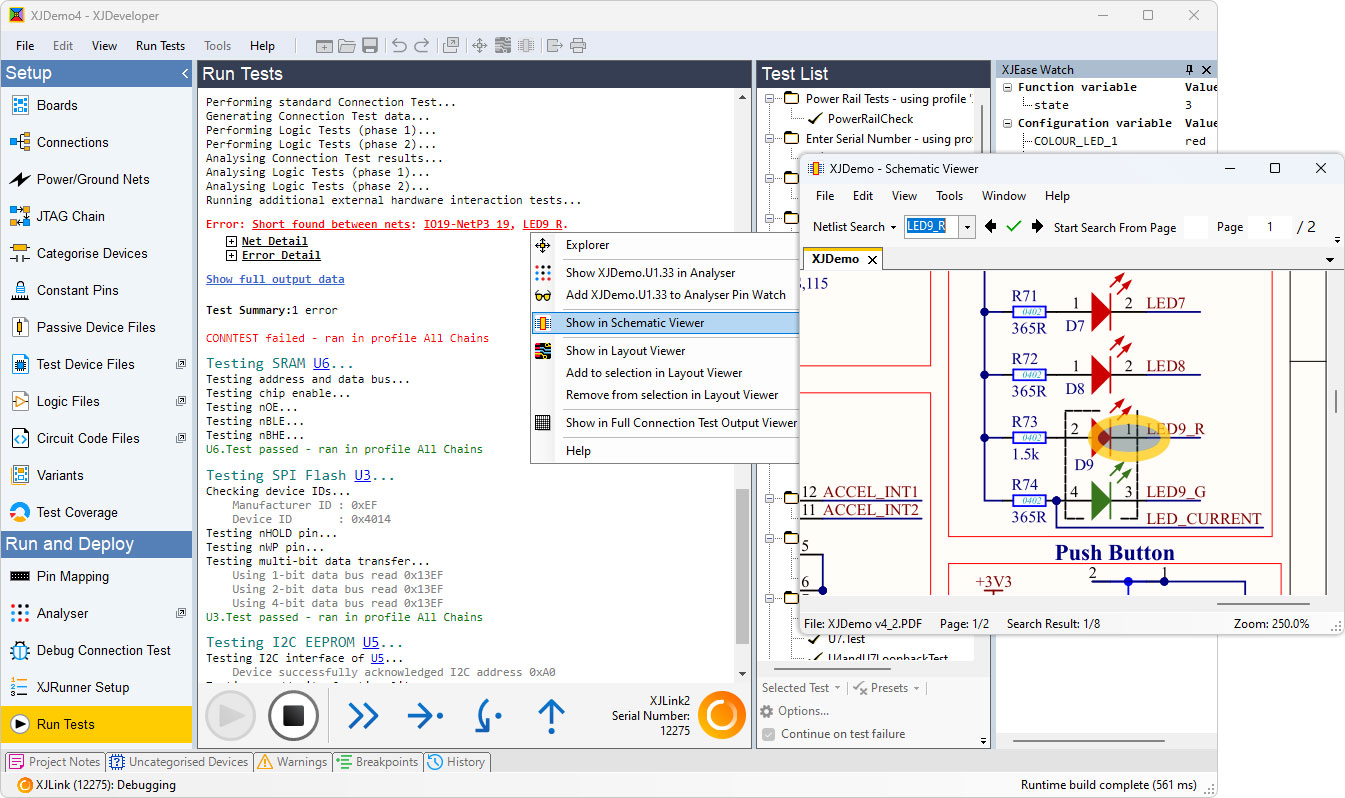
The Schematic Viewer allows you to quickly see the logical arrangement of circuit elements from within XJTAG. It is integrated into XJDeveloper, XJInvestigator, XJRunner and XJBoardExplorer, and can be launched from any place in these applications where devices, nets or pins are displayed. If you’re using applications of XJTAG’s Test Suite, it can also be opened from links embedded in the XJRunner test output. This saves having to continually change applications to view the schematic.
You can use the viewer to quickly understand how a device is being used in a circuit, to help identify faults and debug tests. Simple links take you straight to the schematic viewer from wherever you are working in your XJTAG project and highlight the relevant section of the schematic, while the intelligent netlist search allows you to navigate directly to other elements of the circuit.
Key Benefits
- Speed up test creation and debugging of prototype and manufactured boards
- Improved search functionality*
Features
- Integrated in XJDeveloper, XJInvestigator and XJRunner
- Shows best match first when searching for pins/nets/devices
- Intelligent, learning search
- Searches metadata as well as surface text in PDF documents*
*Requires searchable PDF documents
Included free with XJDeveloper, XJInvestigator and XJRunner
The Schematic Viewer is integrated as standard in XJDeveloper, XJInvestigator and XJRunner to help engineers quickly understand the function of the circuit.
Safe and secure
For manufacturers to use the viewer in XJRunner or XJInvestigator, you have to explicitly export the schematic information from XJDeveloper. Conversely, if your schematics need to be kept confidential, they can be kept out of the XJPack file exported to XJRunner.
Find the right device, net or pin in seconds
Whether you are developing tests or debugging boards, searching for a device, net or pin on a schematic is a common task. The Schematic Viewer simplifies this process using its smart textual analysis as well as PDF bookmarks to take you to the most relevant section of the schematic.
The viewer is very helpful when setting up your XJTAG test system because you can use simple context menus to view the section of the schematic related to any device. These menus are available throughout the system and can be used at every stage of the setup, even when reviewing the test coverage that XJTAG reports in its Design For Test analysis.
When you receive your first prototype hardware and start running tests, the Schematic Viewer saves you time and effort by allowing you to navigate directly to any nets identified as faulty. This can help you understand whether any problems are caused by real hardware faults or are simply configuration issues – such as unfitted components.
If you need to check whether a device has been correctly fitted to your board you can use the XJTAG Layout Viewer to pinpoint its physical location.
Generic data import
The viewer can be used with the output from any schematic capture tool that can produce standard PDF documents.
For support, or for a quote on any part of the XJTAG system, please contact us.

Configure your products